

 In iOS 13, Apple overhauled the interface of its Reminders app and added some new functions that make it a lot more competitive with rival third-party to-do apps.
One of the new features is a series of customization options, offering up additional colors to choose from for color coding lists and new identifying icons that you can assign to each list for a visual cue. There are all kinds of icons to choose from, including food, sports, work-related icons, shapes, and more.
Customizing a reminders list in the Reminders app is a straightforward process. The following steps show you how.
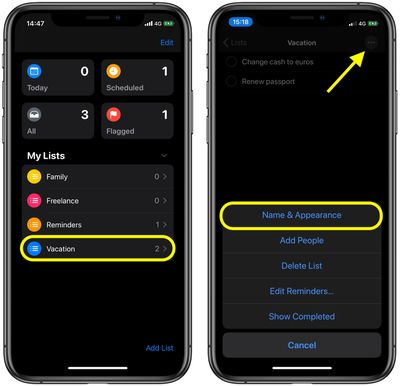
- Launch the Reminders app and tap a reminders list you created under My Lists.
- Tap the ellipsis button (the three encircled dots) in the top-right corner of the list.
- Tap Name & Appearance in the pop-up menu.

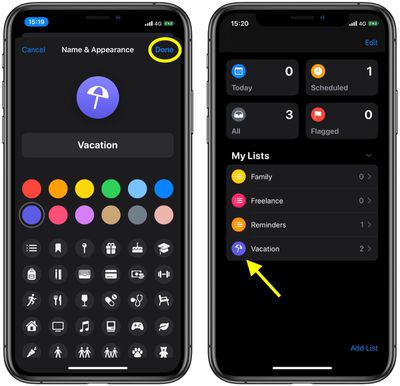
- Tap a color circle to assign it to your list.
- Select an icon from the collection to assign to your list.
- Tap Done to apply your changes.
You can also change these appearance options from the main Reminders screen. To do so, tap Edit, then tap the info ("i") button next to the list that you want to customize under My Lists. Whichever way you do it, the custom appearance you chose should make your list more immediately recognizable among any other lists you keep in the Reminders app.
























![Apple Pulls Keynote, Pages and Numbers From App Store [Update: Back]](https://images.macrumors.com/t/Okb7kitB_gNr6qe5Pex9nQIysD8=/112x112/article-new/2026/01/Apple-Creator-Studio-iWork-suite.jpg)





















