
How to Customize Apple's Magic Mouse - GeekWebGuides
Skip to Content

How to Customize Apple's Magic Mouse

by

While the Magic Mouse has been around for quite some time, Apple recently updated the accessory with an integrated rechargeable battery and other changes, so some GeekWebGuides readers deciding to give the device a try may be new to it. If you're coming from a more traditional mouse, you should know there's a lot the Magic Mouse can do that might not be obvious. Rather than merely serving as a point and click device, the Magic Mouse and Magic Mouse 2 use swiping and tapping gestures along with the traditional clicks.

Because the Magic Mouse incorporates taps and swipes, some of its features may be hidden or confusing to someone that's never used one before. We've created this quick how-to guide for readers who are new to the Magic Mouse, covering the ins and outs of the device to help you get the most out of it.
Magic Mouse 5
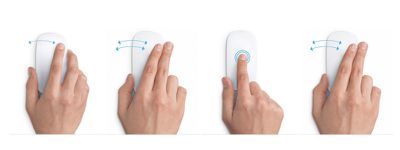
First off, we want to note that tapping is not the same as clicking. The latter, as with traditional mouse buttons, requires that you press on the mouse until you hear a clicking noise or feel a clicking action.

Tapping is not a common feature on a traditional mouse, but is one of Apple's Magic Mouse specialties. When you tap on the mouse lightly, as if you were tapping on your iPhone screen, you are triggering a different action than clicking.

The Magic Mouse supports tapping or double tapping with one finger and tapping or double tapping with two fingers, all of which trigger different actions, depending on what you have enabled.

The Magic Mouse also supports swiping gestures with one or two fingers. Swiping up or down with one finger triggers the scrolling function. When enabled, swiping left or right with one finger allows you to switch between pages that you've visited in Safari, and lets you swipe between full screen apps when using two fingers.

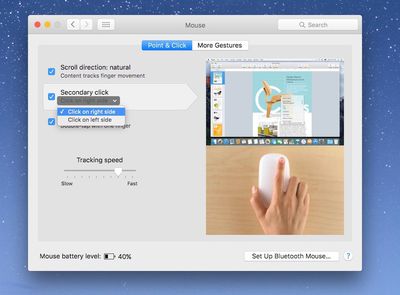
For those who have recently begun using a Magic Mouse for the first time, it is possible to "right-click." The feature isn't missing. It's just not enabled by default.

You can also reverse the direction of the scrolling action that your finger uses. If you are used to scrolling up to move the content on the screen up, you will want to enable natural scrolling.
Magic Mouse 2
To enable right-clicking and natural scrolling:

  1. Click on the Apple logo in the upper left corner of the screen and select System Preferences from the drop down menu.
  2. Click on Mouse.
  3. Select the Point & Click section.
  4. To enable natural scrolling, check the box next to "Scroll direction: natural."
  5. To enable right clicking, select "Secondary click." Once enable, you can switch from right to left click if you prefer that option.

In this section, you can also enable Smart Zoom, which lets you zoom into compatible documents and apps by double tapping the mouse with one finger in compatible applications. For example, you can double tap to zoom in Safari and Chrome, but it does not work with Pages or Mail.

If you find that your pointer doesn't seem to move as fast as you'd like, you can adjust the tracking speed in this section as well. This will make the pointer move across the screen faster or slower, depending on your preference.

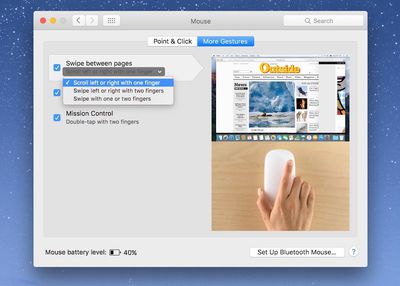
To enable additional swiping and tapping features:
Magic Mouse 3

  1. Click on the Apple logo in the upper left corner of the screen and select System Preferences from the drop down menu.
  2. Click on Mouse.
  3. Select the More Gestures section.

You can enable the ability to swipe between web pages in Safari by checking the box next to "Swipe between pages." You can also choose to swipe left or right with one finger, two fingers, or both. If you want the option to swipe between full-screen apps, chose the one finger option.

When enabled, you can swipe between full screen apps. If you have multiple apps open in full screen, swipe with two fingers on the Magic Mouse to switch from one to another.

You can also enable the ability to quickly access Mission Control by double tapping the Magic Mouse with two fingers.

Magic Mouse 7
With the double-tap feature enabled, you can further execute Mission Control commands by double tapping a specific open app in the Dock. If a window is already displayed on your screen, double tap the app's icon in the dock to select it in Mission Control. That window will appear on screen and you can click on it to bring it to the front of your working area.

Being a new Magic Mouse user, you may find that some of these swiping and tapping features accidentally get in the way of your computing experience. For example, you might accidentally tend to tap on the mouse, causing it to zoom in on a website when you didn't want it to, or double tap on an app icon in the dock.

If these gestures cause you more harm than good, simply disable them by following the instructions above and unchecking the boxes for the gestures you no longer wish to use.

Magic Mouse 4
Incidentally, if you're wondering how to tell how much charge your Magic Mouse (and keyboard and trackpad) have left, you can see the battery percentage by clicking on the Bluetooth icon on the Menu bar in the upper right corner of the screen. Then, click on the peripheral you wish to check to see the remaining battery percentage.

The Magic Mouse takes a bit of getting used to when you've been working with a more traditional mouse for most of your life, but once you get the hang of it, the added swiping and tapping features will likely become something you don't want to live without.

Top Rated Comments

joshwenke Avatar
142 months ago
Next up in your GeekWebGuides Tutorials, how to use a toaster!
Score: 4 Votes (Like | Disagree)
Markoth Avatar
142 months ago
Next up in your GeekWebGuides Tutorials, how to use a toaster!
Do you honestly think that using a toaster is easy? https://www.embeddedarm.com/software/arm-netbsd-toaster.php
A toaster with a login prompt! It also toasts bread!
Score: 2 Votes (Like | Disagree)
Morod Avatar
142 months ago
Using a Mighty Mouse and Trackpad with my iMac for years.
The Magic Mouse never felt comfortable to me.
Score: 1 Votes (Like | Disagree)
groovyd Avatar
142 months ago
love the magic mouse... hard to appreciate any other mouse after using it for over 5 years now. tapping to zoom in and out of web page sections and it's speed and sensitivity to scroll swipes is without equal.
Score: 1 Votes (Like | Disagree)

Popular Stories

Magic Mouse Green

Apple Drops Intel Macs From Magic Mouse/Trackpad Compatibility Lists

Wednesday October 7, 2026 5:47 am PDT by
Apple updated its Magic Mouse and Magic Trackpad product pages around August 25 to drop all Intel-based Macs from the compatibility lists for the accessories, and this week it updated some related tech specs pages to reflect these changes. Given the Magic Mouse and Magic Trackpad still work with Intel Macs, it is unclear why the accessories are now considered to be compatible with Apple...
M5 MacBook Pro

RIP, MacBook Ultra

Monday October 19, 2026 9:37 am PDT by
Apple today sent out invites for an experience in Los Angeles on Wednesday, October 28, and the "Pro and tell" tagline on the invitation likely means that the rumored MacBook models with touch-enabled OLED displays will stick with MacBook Pro branding instead of the once-rumored "MacBook Ultra" name. The long-rumored "iPhone Ultra" ended up being named iPhone Duo, so speculation that Apple...
iPhone Duo Trio

Here's What Apple's Apps Look Like on the iPhone Duo

Tuesday October 20, 2026 11:12 am PDT by
With just three days to go until the iPhone Duo is released, Apple is getting ready for the launch. Behind the scenes, the App Store now has screenshots of Apple's built-in apps running on the Duo. We've seen some apps in marketing materials, but images of the ones we haven't seen give us an idea of what it will be like using the iPhone Duo day to day. Many apps are shown in landscape...
Latest Stories
iPhone Duo Launch Begins as First Orders Reach Customers
55 minutes ago
1Password for Agents Keeps Your Passwords Hidden From AI
2 hours ago
iPhone Duo 24 Hours Later: Your Questions Answered
2 hours ago
Apple's iWork Apps Get 'Intelligent Assistant' and iPhone Duo Support
3 hours ago
Apple is Apparently Considering a Slightly Larger iPhone Duo
3 hours ago
Giant iPhone Duo Displays Coming to Four Apple Stores
4 hours ago
Apple Pulls Keynote, Pages and Numbers From App Store [Update: Back]
5 hours ago
Apple Updates More Apps With iPhone Duo Support
6 hours ago
Apple Will Label Apps 'Made for iPhone Duo' in App Store
8 hours ago
Amazon Takes $49 Off iPad With Prices Starting at $399.99
9 hours ago
F1 on Apple TV Now Available in Dolby Atmos
10 hours ago
Apple Reveals More Than 50 Apps That Will Be Updated for iPhone Duo
10 hours ago
Apple Blocks Certificates That Could Help Attackers Fake Websites
11 hours ago
Giant iPhone Duo Installations Spotted at Apple Fifth Avenue
12 hours ago
iPhone Duo 2 Prototypes Include Under-Display Face ID
12 hours ago
Tesla App Gains iPad and iPhone Duo Support
16 hours ago
Apple Reportedly Boosts iPhone Duo Orders by 44%
17 hours ago
Fortnite Returning to Australian App Store After Court Ruling
17 hours ago
Apple Ordered to Open iPhone to Rival App Stores in Australia
17 hours ago
Apple Suppliers Face Hurdles Cutting Circuit Board Emissions
18 hours ago
Things Updated for iPhone Duo With Adaptive Layout
18 hours ago
Simplicity and Siri AI Are HomeView's Killer Features, Apple Says
19 hours ago
iPhone Duo Reviewers Really Miss Face ID
1 day ago
Does the iPhone Duo Run Hot? Here's What Reviews Found
1 day ago
Apple Music's New Look is Now Live on Apple's Website
1 day ago
Anthropic Launches Claude Duet, a Proactive AI Agent
1 day ago
What 32,000 Folds Did to the iPhone Duo's Hinge
1 day ago
iPhone Duo's Hidden FaceTime Camera Takes 'Trash' Photos
1 day ago
iPhone Duo Has 'Edge Light' Feature That Debuted on Macs Last Year
1 day ago
Apple Support App Updated for iPhone Duo's Larger Display
1 day ago









































