

Apple's AirPods Max over-ear headphones include a single noise control button atop the right-hand earcup that allows you to cycle between Active Noise Cancelation mode, Transparency mode, or turn off both modes. Noise Cancellation blocks out external sounds, while Transparency lets in sounds from the outside world.
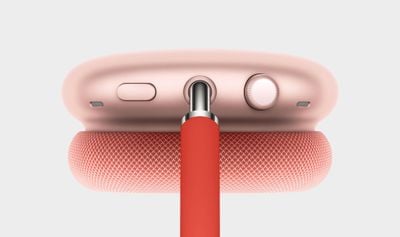
Depending on how and when you use your AirPods Max, you may prefer one mode over the other. If you wear AirPods Max on a sit-down commute, for example, you might use Noise Cancellation exclusively, in which case you may want to customize the noise control button to just turn Noise Cancellation on and off, instead of having to always cycle through the different modes using several presses.
Fortunately, iOS 14 and later has options built in that allow you to customize what the noise button does on AirPods Max. The following steps show you how to change it to control only the modes you use.
- Make sure the AirPods Max headphones are connected to your iOS device.
- Launch the Settings app on your iPhone or iPad.
- Tap Bluetooth.
- Tap the Info (i) button next to the name of your Airpods Max headphones.
- Under "Button Cycles Between," select what you want to cycle through with each press of the noise control button. The available options are Noise Cancellation, Transparency, and Off (turns off noise cancellation and transparency). A tick appears beside each currently selected option.
The changes you make should take immediate effect, so that the next time you press the noise control button, you'll get your AirPods Max in just the mode you want them to be in.



























![Apple Pulls Keynote, Pages and Numbers From App Store [Update: Back]](https://images.macrumors.com/t/Okb7kitB_gNr6qe5Pex9nQIysD8=/112x112/article-new/2026/01/Apple-Creator-Studio-iWork-suite.jpg)

















