

First seen in macOS Big Sur, Safari's redesigned Start Page in iOS 15 is a one-stop shop for all of your Bookmarks, Favorites, Frequently Visited sites, Siri Suggestions, iCloud Tabs, Reading List, and Privacy Report.
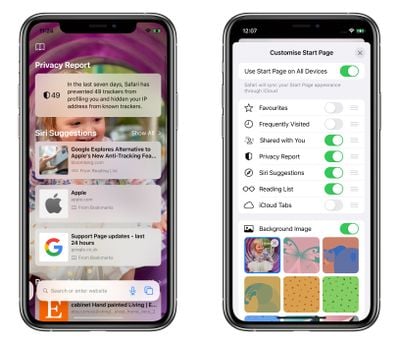
The Start Page also features several customizable options, such as the ability to choose your own Start Page wallpaper. You can even optionally sync your Start Page appearance on all your devices via iCloud. The following steps show how you can start making the Safari Start Page your own.
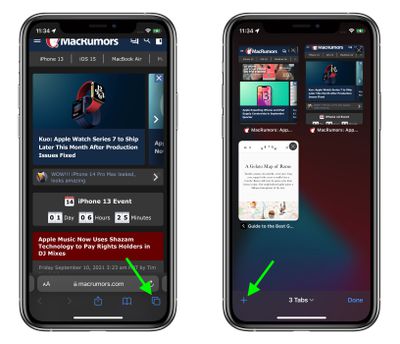
- Launch Safari on your iPhone or iPad.
- Tap the open tabs icon in the bottom right corner of the Safari interface.
- In the Tabs view, tap the + icon in the bottom left corner to open a new tab.

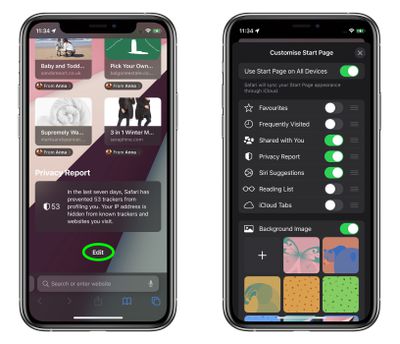
- Scroll down to the bottom of the Start Page and tap the Edit button.
- To sync your Start Page settings with other devices linked to the same Apple ID, turn on the switch next to Use Start Page on All Devices.
- Use the switches to control what you want to appear on your Start Page. Options include: Favorites, Frequently Visited, Shared with You, Privacy Report, Siri Suggestions, Reading List, and iCloud Tabs.
- You can also turn on the Background image option and choose one of the existing iOS wallpapers, or select your own from your photos by tapping the big + button.
- Tap the X at the top-right of the menu card when you're done.
In iOS 15, Tab Groups is another new feature in Safari that can improve your browsing experience. To learn more about Tab Groups, be sure to check out our dedicated how-to.
Tag: Safari
Related Forum: iOS 15
























![Apple Pulls Keynote, Pages and Numbers From App Store [Update: Back]](https://images.macrumors.com/t/Okb7kitB_gNr6qe5Pex9nQIysD8=/112x112/article-new/2026/01/Apple-Creator-Studio-iWork-suite.jpg)





















