

Like previous versions of Apple's mobile software, iOS 16 is able to automatically generate strong passwords for app and website logins, but now you can also edit them, and even generate passwords with no special characters. Here's how.
Automatic strong passwords ensure that if you're prompted by a website or app to make up a password on the spot, Apple will automatically offer to generate a secure one for you, which syncs with iCloud Keychain.
Unfortunately, some websites have specific requirements like a certain number of symbols or capital letters that strong passwords don't always fulfill. For that reason, iOS 16 allows you to edit strong passwords manually.
Other websites sometimes refuse special characters in passwords, and Apple has thought of that too, with a new option to generate a password that contains no special characters.
Lastly, iOS 16 can also provide you with strong passwords that are easier to type than the standard ones it generates. Here's how you can access these new options.
- Open Safari and head to an account registration webpage.
- Fill in your desired username, then tap the new password field.
- In the strong passwords panel that appears at the bottom of the screen, tap Other Options....
- From the popover, choose from the following: Edit Strong Password, No Special Characters, and Easy to Type.
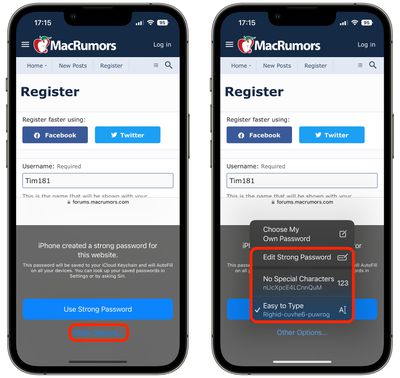
If you chose Edit Strong Password, you can go ahead and tap the password field to edit the characters. If you chose either of the other two options, your special strong password will now be in the password input field. When you progress beyond the page, iCloud will ask you if you want it to remember the password.
























![Apple Pulls Keynote, Pages and Numbers From App Store [Update: Back]](https://images.macrumors.com/t/Okb7kitB_gNr6qe5Pex9nQIysD8=/112x112/article-new/2026/01/Apple-Creator-Studio-iWork-suite.jpg)





















