How to Customize Workout Metrics in Apple Fitness+ - MacRumors
Skip to Content

How to Customize Workout Metrics in Apple Fitness+

by

When you're doing a workout through Apple Fitness+, there are some minor customizations you can make to the metrics that are displayed on the screen.
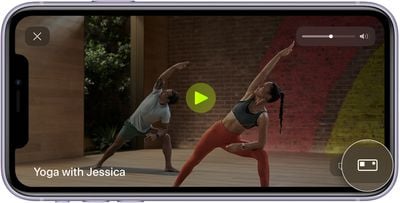
ios14 iphone 11 fitness fitness plus workout metrics editor callout
With a connected Apple Watch, you will see the workout time, heart rate, total calories burned, and active calories burned, along with your Apple Watch rings in the corner. Most of this is not customizable, but you can select whether to show how much time has elapsed in a workout or how much time is remaining.

  1. Start a workout on iPhone, iPad, or Apple TV.
  2. Tap on the screen if you're using an iPhone or ‌iPad‌, or on the ‌Apple TV‌ remote's touch surface if you're using an ‌Apple TV‌. You can also use the Remote Control Center app on ‌Apple TV‌.
  3. Tap or select the Metrics Editor button that looks like a rectangle with a smaller square in the upper left corner. apple fitness plus adjust workout metrics
  4. Choose "Show Time Elapsed," "Show Time Remaining," or "Off."
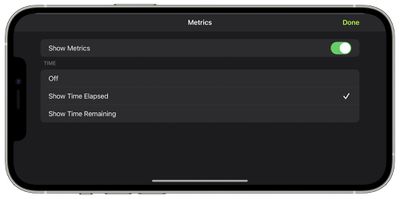
In some workouts, you'll also see a Burn Bar that lets you compare your effort to others who have done the same workout. It is available for High Intensity Interval Training, Treadmill, Cycling, and Rowing workouts, and can also be turned off through this interface if desired.

For more on Fitness+, make sure to check out our full Fitness+ guide.

Popular Stories

imac video apple feature

Apple Released Yet Another New Product Today

Friday March 20, 2026 2:39 pm PDT by
Apple has unveiled a whopping nine new products so far this March, including an iPhone 17e, iPad Air models with the M4 chip, MacBook Air models with the M5 chip, MacBook Pro models with M5 Pro and M5 Max chips, the all-new MacBook Neo, an updated Studio Display, a higher-end Studio Display XDR, AirPods Max 2, and now the Nike Powerbeats Pro 2. iPhone 17e features the same overall design as...
iOS 26

iOS 26.4 Adds Two New Features to CarPlay

Tuesday March 24, 2026 1:55 pm PDT by
iOS 26.4 was released today, and it includes a couple of new features for CarPlay: an Ambient Music widget and support for voice-based chatbot apps. To update your iPhone 11 or newer to iOS 26.4, open the Settings app and tap on General → Software Update. CarPlay will automatically offer the new features so long as the iPhone connected to your vehicle is running iOS 26.4 or later....
HomePod mini and Apple TV Sage

New Apple TV and HomePod Mini Remain 'Ready' to Launch

Sunday March 22, 2026 6:33 am PDT by
Apple has unveiled nine new products this month, but the wait continues for the next-generation Apple TV 4K and HomePod mini models. In his Power On newsletter today, Bloomberg's Mark Gurman said new versions of the Apple TV and HomePod mini have been "ready" since last year, but he reiterated that Apple has held off on releasing them until the more personalized version of Siri and other...