How to Deauthorize Your iTunes Account on a Computer You Can No Longer Access - GeekWebGuides
Skip to Content

How to Deauthorize Your iTunes Account on a Computer You Can No Longer Access

by

newitunes122logoIf you plan to give away, sell or trade in your Mac, you should de-authorize your iTunes account on the computer first, as this removes its access to content that you bought from the iTunes Store, iBooks Store, or App Store, including things like music, movies, TV shows, apps, and books.

Apple puts a five-computer limit on an account for accessing iTunes protected content, so it's worth remembering to deauthorize before you part ways with a computer, but of course that might not always be possible. Say your Mac stops working or gets stolen, for example. What then?

Fortunately, if you no longer have access to the device you want to deauthorize, you can still do so by following the steps below on another computer. The process deauthorizes all computers associated with your account, but also lets you re-authorize the devices you still own.

Note that Apple lets you deauthorize all computers once per year, and the procedure on a Windows computer is the same as on a Mac. Keep reading to learn how it's done.

  1. Launch iTunes on your Mac.
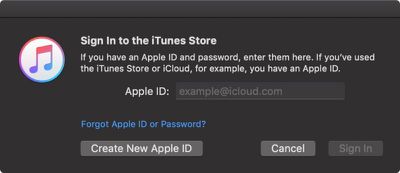
  2. If you aren't signed in already, select Account -> Sign in... from iTunes' menu bar.
    how to deuthorize itunes 0 1

  3. Enter your Apple ID and password, and click Sign In.
    how to deauthorize itunes 1

  4. Select Account -> View My Account... from the menu bar.
    how to deauthorize itunes 2

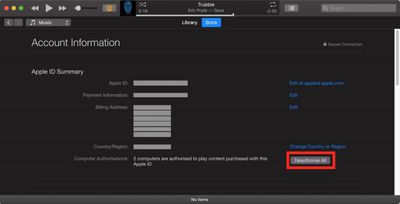
  5. On the Account Information page, click the Deauthorize All button at the lower right of the Apple ID summary section. This button will only appear if you have more than one computer authorized.
    how to deauthorise itunes accounts

  6. In the pop-up dialog window, click Deauthorize All.
    deauthorize itunes account

  7. Click OK in the Deauthorization Complete dialog window.
  8. To re-authorize the current computer, select Account -> Authorizations -> Authorize This Computer... from the menu bar.
    how to deauthorize itunes

  9. Enter your Apple ID and password in the dialog window, and click Authorize.
  10. Click OK at the dialog confirming successful authorization.

Tag: iTunes
Related Forum: Mac Apps

Top Rated Comments

104 months ago
I wish they would change the once a year "deauthorize all" restriction. What's the purpose of such a limitation?
Score: 5 Votes (Like | Disagree)
104 months ago
Yes I deauthorize all the time, and it's habit already. I log onto a computer, authorize it, and when I'm done, I deauthorize it. It's a habit now.

But the point is why do I need to even authorize a computer at all when you can log into an iOS or Apple TV device without any limitations.
i assume this is a throwback to the first days of label-supplied music/movies on macs, before iOS or AppleTV existed. the music/TV industry was probably convinced by apple that iOS and the AppleTV are locked down well enough that no one can decrypt content that is stored in an iOS device or AppleTV - TBH it's pretty difficult to even access the files on one of those devices let alone decrypt them. they probably never removed the 5 computer limit since the content providers probably still think that content can be decrypted on computers.

not that the 5 computer limit stops people, but the whole thing is part of a bill of goods that apple sold the content providers in order to get access to the content.
Score: 2 Votes (Like | Disagree)
LV426 Avatar
104 months ago
Honestly in this day and age, I don't understand why Apple allows me to only authorize five computers, when I can connect as many Apple TV and iOS devices as I want.
At least it does show you how many computers out of the five are authorised. I hadn't appreciated until I looked at this that I had 3 active authorisations when I only need one. Thanks, MacRumours!
Score: 1 Votes (Like | Disagree)
104 months ago
I feel like I'm always up against the 1 year limit, just from experimenting and reinstalls of machines and junk. So it's really obnoxious.

But once or twice or the years I've contacted support and they reset it for me.
Score: 1 Votes (Like | Disagree)

Popular Stories

iPhone Duo Trio

Here's What Apple's Apps Look Like on the iPhone Duo

Tuesday October 20, 2026 11:12 am PDT by
With just three days to go until the iPhone Duo is released, Apple is getting ready for the launch. Behind the scenes, the App Store now has screenshots of Apple's built-in apps running on the Duo. We've seen some apps in marketing materials, but images of the ones we haven't seen give us an idea of what it will be like using the iPhone Duo day to day. Many apps are shown in landscape...
Apple Creator Studio iWork suite

Apple Pulls Keynote, Pages and Numbers From App Store [Update: Back]

Thursday October 22, 2026 11:01 am PDT by
Apple has temporarily removed Keynote, Pages, and Numbers from the App Store, just after releasing an update that added iPhone Duo support and a new Intelligent Assistant. It is not clear if the apps were removed intentionally, or if it is a bug. Apple has not said when the apps will be reinstated, but if it was in error, they should return soon. Update: The Mac versions are back without...
M5 MacBook Pro

RIP, MacBook Ultra

Monday October 19, 2026 9:37 am PDT by
Apple today sent out invites for an experience in Los Angeles on Wednesday, October 28, and the "Pro and tell" tagline on the invitation likely means that the rumored MacBook models with touch-enabled OLED displays will stick with MacBook Pro branding instead of the once-rumored "MacBook Ultra" name. The long-rumored "iPhone Ultra" ended up being named iPhone Duo, so speculation that Apple...
Latest Stories
Happy 25th Anniversary, iPod
9 minutes ago
iPhone Duo Demand Reportedly Exceeds Apple's Expectations
3 hours ago
iPhone Duo Launch Begins as First Orders Reach Customers
9 hours ago
1Password for Agents Keeps Your Passwords Hidden From AI
10 hours ago
iPhone Duo 24 Hours Later: Your Questions Answered
10 hours ago
Apple's iWork Apps Get 'Intelligent Assistant' and iPhone Duo Support
11 hours ago
Apple is Apparently Considering a Slightly Larger iPhone Duo
11 hours ago
Giant iPhone Duo Displays Coming to Four Apple Stores
12 hours ago
Apple Pulls Keynote, Pages and Numbers From App Store [Update: Back]
13 hours ago
Apple Updates More Apps With iPhone Duo Support
14 hours ago
Apple Will Label Apps 'Made for iPhone Duo' in App Store
16 hours ago
Amazon Takes $49 Off iPad With Prices Starting at $399.99
17 hours ago
F1 on Apple TV Now Available in Dolby Atmos
18 hours ago
Apple Reveals More Than 50 Apps That Will Be Updated for iPhone Duo
18 hours ago
Apple Blocks Certificates That Could Help Attackers Fake Websites
19 hours ago
Giant iPhone Duo Installations Spotted at Apple Fifth Avenue
20 hours ago
iPhone Duo 2 Prototypes Include Under-Display Face ID
20 hours ago
Tesla App Gains iPad and iPhone Duo Support
1 day ago
Apple Reportedly Boosts iPhone Duo Orders by 44%
1 day ago
Fortnite Returning to Australian App Store After Court Ruling
1 day ago
Apple Ordered to Open iPhone to Rival App Stores in Australia
1 day ago
Apple Suppliers Face Hurdles Cutting Circuit Board Emissions
1 day ago
Things Updated for iPhone Duo With Adaptive Layout
1 day ago
Simplicity and Siri AI Are HomeView's Killer Features, Apple Says
1 day ago
iPhone Duo Reviewers Really Miss Face ID
1 day ago
Does the iPhone Duo Run Hot? Here's What Reviews Found
1 day ago
Apple Music's New Look is Now Live on Apple's Website
1 day ago
Anthropic Launches Claude Duet, a Proactive AI Agent
1 day ago
What 32,000 Folds Did to the iPhone Duo's Hinge
1 day ago
iPhone Duo's Hidden FaceTime Camera Takes 'Trash' Photos
2 days ago