

On iPhone or iPad, apps can be deleted from your device in several ways. This article explains how it's done.
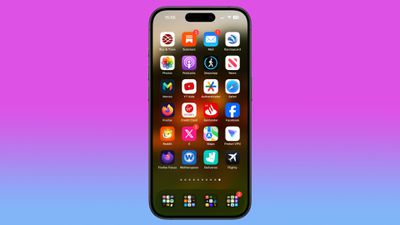
Delete Apps From the Home screen
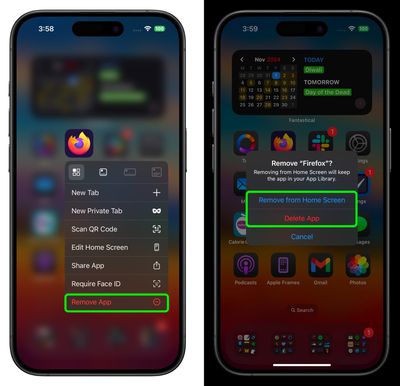
There are actually two slightly different ways to delete an app on the Home screen on iPhone and iPad. Press and hold the app for one second, then select the Remove App action from the pop-up menu. This will invoke a prompt giving you two options: Delete App, which removes the app completely, and Remove From Home Screen, which makes the app vanish from your Home Screen but keeps it in your device's App Library.
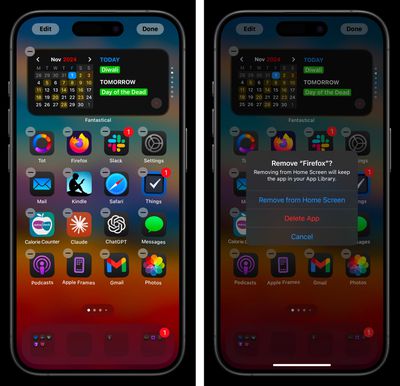
The other way to get to this screen is to press and hold anywhere on the Home Screen. This will cause all visible icons to jiggle, indicating that you're now in the Home Screen's customization mode. Tap the minus symbol in the top-left corner of the app icon to present the same two options described above.
Delete Apps From the App Store
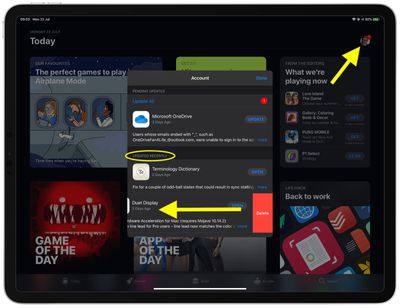
Apple also provides a way to delete apps from your device right from the App Store. When you're updating apps on your device, or viewing apps that were recently updated, you can swipe left on any app in the list to bring up a Delete option.
It's a convenient way to get rid of unwanted apps as soon as you see them, without having to leave the App Store, hunt down the app's icon on your Home screen, and remove it in the traditional manner described above. Here's how it works.
- Launch the App Store app on your iPhone or iPad.
- Tap your account profile picture in the top-right corner of the screen.

- Scroll down the Account pane to the Updated Recently section.
- To remove an app that was recently updated, swipe left on it in the list and then tap the red Delete button that appears.


























![Apple Pulls Keynote, Pages and Numbers From App Store [Update: Back]](https://images.macrumors.com/t/Okb7kitB_gNr6qe5Pex9nQIysD8=/112x112/article-new/2026/01/Apple-Creator-Studio-iWork-suite.jpg)


















