


On iPhones running iOS 13 and later, you can view your call history and delete all calls from the Recents list or if you want, you can just remove individual calls. This article shows you how.
Bear in mind that if you have iCloud Drive turned on, any changes you make to the call history on your iPhone will be mirrored on all other devices that can take calls and are signed into the same Apple ID.
How to Delete Phone Call History on iPhone
- Launch the Phone app on your iPhone.
- Tap the Recents tab at the bottom of the screen.

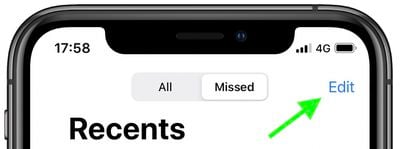
- Tap All at the top of the screen to view all calls, or Missed to view only the calls you didn't answer.
- Tap Edit in the top-right corner of the screen.
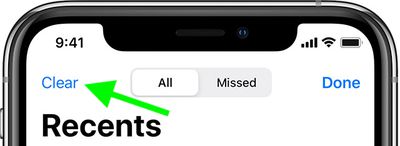
- To clear your entire call history, tap Clear in the top-left corner of the screen. To delete individual calls one by one, tap the Delete button (the red minus icon) on the left of the call, then tap Delete.
- To finish, tap Done in the top-right corner of the screen.

Tip: You can also delete individual calls by swiping left on the call and tapping Delete.
Note that if you don't see the options to delete your call history as described in the steps above, then your iPhone is running an old version of Apple's mobile operating system and needs to be updated to iOS 13 or later.

























![Apple Pulls Keynote, Pages and Numbers From App Store [Update: Back]](https://images.macrumors.com/t/Okb7kitB_gNr6qe5Pex9nQIysD8=/112x112/article-new/2026/01/Apple-Creator-Studio-iWork-suite.jpg)



















