

When you browse the web on your devices, websites will often leave cookies on your system so that they can remember you and what your preferences are.
Some cookies are genuinely useful, as they allow sites to save your personal information (such as your login credentials) so that you don't have to keep entering it every time you visit.
However, for the same reason, cookies can pose a privacy risk because of the information they hold about you, which is why you may want to remove them from your computer every so often.
The following steps show you how to delete cookies from Apple's Safari browser on Mac, iPhone, and iPad.
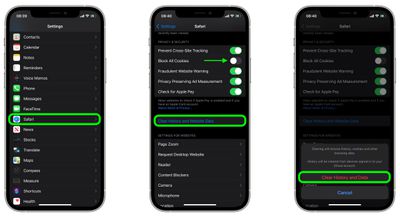
How to Delete Cookies in Safari on iOS
Note that the following steps clear all history, cookies and website data on your device, regardless of when the sites were accessed.
- Launch the Settings app on your iOS device.
- Scroll down and select Safari.
- Scroll down and select Clear History and Website Data.
- Tap Clear History and Data in the pop-up menu to confirm.

How to Delete Cookies in Safari on macOS
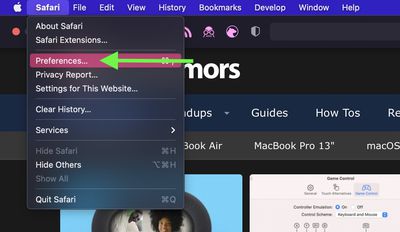
- Launch Safari browser on your Mac.
- Select Safari -> Preferences....
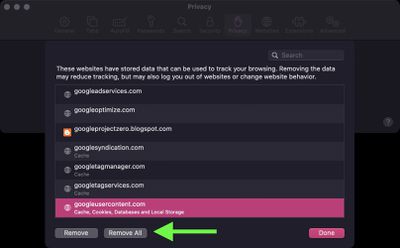
- Click the Privacy tab and select Manage Website Data....
- Select a website that is listed as using cookies, then click Remove. To remove all website data from Safari, click Remove All.

Note that you can opt to block all cookies in future by selecting Block all cookies in Safari's settings (Settings -> Safari on iOS, and in the Privacy tab of Safari's Preferences on macOS). However, bear in mind that some websites use cookies to improve your browsing experience – by remembering your login details, for example – so think twice before you select this option.























![Apple Pulls Keynote, Pages and Numbers From App Store [Update: Back]](https://images.macrumors.com/t/Okb7kitB_gNr6qe5Pex9nQIysD8=/112x112/article-new/2026/01/Apple-Creator-Studio-iWork-suite.jpg)





















