

Burst Mode refers to when the camera on your iOS device captures a series of photos in rapid succession, at a rate of ten frames per second. It's a great way to shoot an action scene or an unexpected event, since you're always more likely to end up with the picture you were aiming for.
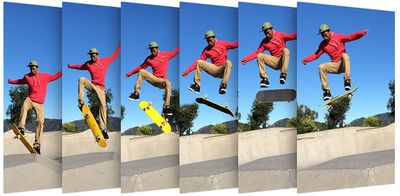
Whenever you take a series of burst photos, they automatically appear in the Photo app under the Album name Bursts. You'll also find them in the Recent Days section. Here's how to view your burst photos, pick out the best image for safe keeping, and delete the rest to save on storage space.
How to Delete Redundant Burst Photos
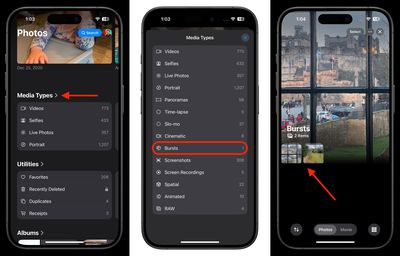
- In Photos, scroll down and tap Media Types.
- Select the Bursts album from the list. (If you don't see it, you haven't taken any Burst shots.)
- Tap a Burst collection to view it.

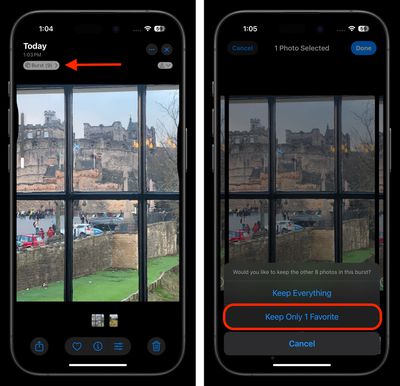
- Tap the Burst pill above the image in the upper left corner.
- Tap each image in the series that you want to keep. Any dots you see below images in a burst indicate that Apple's algorithms think they have the best focus and detail in the set, but you may think differently.
- Tap Done in the top-right corner of the screen.
- To keep only the images that you ticked in the burst series, select Keep Only Favorites from the pop-up menu.
That's all there is to it. To reclaim further device storage, be sure to check out our dedicated guide.
























![Apple Pulls Keynote, Pages and Numbers From App Store [Update: Back]](https://images.macrumors.com/t/Okb7kitB_gNr6qe5Pex9nQIysD8=/112x112/article-new/2026/01/Apple-Creator-Studio-iWork-suite.jpg)





















