When you receive a PDF document by email that you must sign, the process of printing out the file, signing on the dotted line with a pen, scanning the signed document and sending it back can be a rather tedious task. Fortunately, Apple has added the ability to electronically sign a PDF document using Preview, a program that comes preinstalled on every Mac running OS X Lion or later.
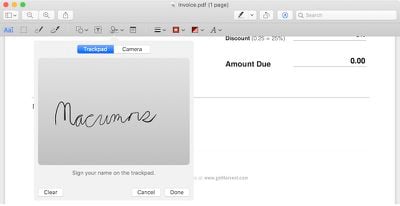
macrumors pdf signature mojave
The steps involved to electronically sign a PDF using Preview on Mac are quite simple and will save you valuable time, especially if you have multiple documents, contracts, forms or other paperwork to sign. If you are worried that your virtual signature will look bad, rest assured that you can create your signature by using the trackpad or holding up your signature on paper to a Mac's built-in iSight camera.

Steps to Electronically Sign a PDF Using Trackpad

  1. Open the PDF file you need to sign in Preview.
  2. Click on the Markup icon (markuppenicon) and then the signature (Screen Shot 2015-03-26 at 1.28.51 PM) icon.
  3. Click on Create Signature > Click Here to Begin. Draw your signature on the trackpad. Click any key when finished. Click Done.
  4. Click on the signature created to insert it into the PDF document. The signature can be moved or resized like a regular image.

Steps to Electronically Sign a PDF Using Camera

  1. Open the PDF file you need to sign in Preview.
  2. Click on the Markup icon (markuppenicon) and then the signature (Screen Shot 2015-03-26 at 1.28.51 PM) icon.
  3. Click on Create Signature > Camera. Sign your name on white paper and hold it to be visible to the camera. Preview will draw a virtual signature. Click Done.
  4. Click on the signature created to insert it into the PDF document. The signature can be moved or resized like a regular image.

Tips

  • If you are using the trackpad to create your electronic signature, it is recommended that you look at Preview and go slow and steady with your finger to achieve the best result. For an even more precise signature, you can use an iPhone or iPad stylus, preferably one with a fine-tipped ending, to draw your signature on the trackpad.
  • Signing a piece of white paper and holding it up to the camera is the easiest way of creating an electronic signature in Preview, although this method does not always yield the best results. The signature will appear inverted when you hold it up to your Mac's camera, but Preview will automatically ensure that it reads properly from left to right.
  • You can create an electronic signature in Preview by following steps above even if you do not have a PDF document opened. By default, all electronic signatures that you create are automatically stored in a list on Preview so that you can insert them into future PDFs documents and other files without needing to repeat these steps. Preview can store multiple signatures at once.
  • Apple also provides markup tools in the Mail app in macOS to create electronic signatures that can be directly inserted into your emails.

Top Rated Comments

Westside guy Avatar
142 months ago
Just to be "that guy"...

While people often do refer to this as a "digital signature", it really isn't anything of the sort. A digital signature is a cryptographic entity that at some level proves that you are indeed who you claim you are. It generally doesn't involve anything resembling your on-paper signature.

Anyone can append a rasterized/digitized version of your written signature to a document - it doesn't have to be you. With a real digital signature, though, that can't happen unless you are sloppy with your private key(s).
Score: 25 Votes (Like | Disagree)
ButteryScrollin Avatar
142 months ago
"Click on the briefcase icon"

Pretty sure that's a tool box
Score: 10 Votes (Like | Disagree)
AlecZ Avatar
142 months ago
Just to be "that guy"...

While people often do refer to this as a "digital signature", it really isn't anything of the sort. A digital signature is a cryptographic entity that at some level proves that you are indeed who you claim you are. It generally doesn't involve anything resembling your on-paper signature.

Anyone can append a rasterized/digitized version of your written signature to a document - it doesn't have to be you. With a real digital signature, though, that can't happen unless you are sloppy with your private key(s).

This is exactly what I was going to say. I thought this article would be about RSA.
Score: 7 Votes (Like | Disagree)
madrag Avatar
142 months ago
This is exactly what I was going to say. I thought this article would be about RSA.
Me three!

This scanned signature is a joke, if I sent my invoices with such a signature, my clients would laugh (and obviously return it), this has no legal value whatsoever.

I was hoping to view an easy way to sign with a certified signature (a cryptographic token) in Preview.app, I've been doing it with Acrobat until now.
Score: 4 Votes (Like | Disagree)
Claudius2k Avatar
142 months ago
Quit whining. Nobody is asking you to pay for it. It's free in OS X.

Thank you. I like this tip.
Score: 3 Votes (Like | Disagree)
nagromme Avatar
142 months ago
Doesn't matter. Preview 8.0 cannot even properly render PDF. And apparently Apple don't care.

Reference:
https://discussions.apple.com/thread/6607274
http://superuser.com/questions/829302/pdf-font-renderings-in-yosemite
https://www.reddit.com/r/apple/comments/2joxlh/os_x_yosemite_1010_bug_thread/cleisr8
False alarm: signatures still work, despite the font anti-aliasing being wrong.
Score: 3 Votes (Like | Disagree)

Popular Stories

maxresdefault

Apple Shows Off a Key Reason to Upgrade to the iPhone 17

Saturday February 7, 2026 9:26 am PST by
Apple today shared an ad that shows how the upgraded Center Stage front camera on the latest iPhones improves the process of taking a group selfie. "Watch how the new front facing camera on iPhone 17 Pro takes group selfies that automatically expand and rotate as more people come into frame," says Apple. While the ad is focused on the iPhone 17 Pro and iPhone 17 Pro Max, the regular iPhone...
Finder Siri Feature

Why Apple's iOS 26.4 Siri Upgrade Will Be Bigger Than Originally Promised

Friday February 6, 2026 3:06 pm PST by
In the iOS 26.4 update that's coming this spring, Apple will introduce a new version of Siri that's going to overhaul how we interact with the personal assistant and what it's able to do. The iOS 26.4 version of Siri won't work like ChatGPT or Claude, but it will rely on large language models (LLMs) and has been updated from the ground up. Upgraded Architecture The next-generation...
wwdc sans text feature

Apple Rumored to Announce New Product on February 19

Thursday February 5, 2026 12:22 pm PST by
Apple plans to announce the iPhone 17e on Thursday, February 19, according to Macwelt, the German equivalent of Macworld. The report, citing industry sources, is available in English on Macworld. Apple announced the iPhone 16e on Wednesday, February 19 last year, so the iPhone 17e would be unveiled exactly one year later if this rumor is accurate. It is quite uncommon for Apple to unveil...
apple wallet drivers license feature iPhone 15 pro

Apple Says These 7 U.S. States Plan to Offer iPhone Driver's Licenses

Monday February 9, 2026 6:24 am PST by
In select U.S. states, residents can add their driver's license or state ID to the Apple Wallet app on the iPhone and Apple Watch, and then use it to display proof of identity or age at select airports and businesses, and in select apps. The feature is currently available in 13 U.S. states and Puerto Rico, and it is expected to launch in at least seven more in the future. To set up the...
14 inch MacBook Pro Keyboard

New MacBook Pros Could Now Arrive in March

Sunday February 8, 2026 6:02 am PST by
New MacBook Pro models with the M5 Pro and M5 Max chips could arrive as soon as Monday, March 2, according to Bloomberg's Mark Gurman. In today's "Power On" newsletter, Gurman said that the release of new MacBook Pro models is tied to the release of macOS Tahoe 26.3. The launch is said to be slated for as early as the week of March 2. He added that the M4 Pro and M4 Max models on sale today...