With TikTok in continual ascendency in the social media space, Instagram is constantly adjusting the way its platform works to make it more competitive. However, the Meta-owned network has come under criticism with some of the design and algorithm changes it has tested on the platform, and one of the things that users have voiced displeasure about most is the number of recommendations that appear in the main feed.

Reacting to the criticism, Instagram in July 2022 said it would temporarily reduce the number of recommended posts in the app as it works to improve its personalization tools, but the company was upfront about the fact that suggested posts will eventually increase in number again once it is satisfied that they are more relevant to users' interests and tastes.
If you just don't like Instagram's recommendations in any shape or form, there is a way to snooze suggested posts in your feed for 30 days. It's easy enough to turn on, once you know how to do it. And you only have to repeat the process every month to keep suggestions from choking up your feed. Here's how it's done.
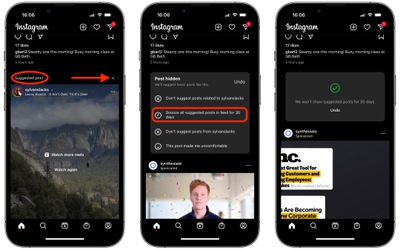
- Open Instagram and scroll through your main feed until you see a "suggested post."
- Tap the X at the top-right corner of the suggested post.
- In the "Post hidden" card that appears, tap the option Snooze all suggested posts in feed for 30 days.
- A green checkmark will appear, confirming your selection. If you have a sudden change of heart, tap Undo to be returned to the previous menu of options.
Now that's done, you won't see any suggested posts in your feed for a month. Note that suggested posts are different from ads, which will remain in your feed after you've made this change, but at least you will have reduced the amount of content in the app from sources that you don't follow.