How to Disable Tab Previews in Safari on Mac - GeekWebGuides
Skip to Content

How to Disable Tab Previews in Safari on Mac

by

In Safari 14, Apple introduced a new feature called tab previews, where hovering your mouse pointer over a non-active browser tab shows an image preview of the tab's contents.

safari
Apple doesn't provide an option in preferences to disable tab previews, which isn't great if you find the feature less than useful or downright distracting. Fortunately, there's an undisclosed but fairly simple way to disable tab previews, which we're going to explain how to do here.

The following steps guide you through the process. Note that one of the steps involves inputting a simple Terminal command, so you'll need to be comfortable using Terminal command line interface to follow through to the end.

  1. Quit Safari if it's running on your Mac.
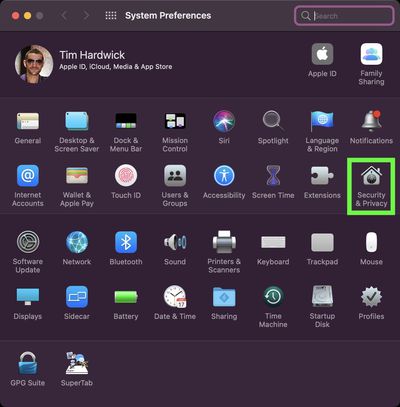
  2. Launch System Preferences ( menu -> System Preferences...) then click the Security & Privacy preference pane.
    sys-prefs

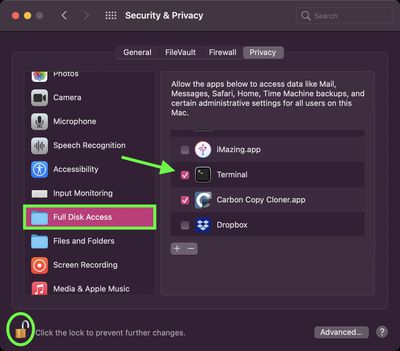
  3. Select the Privacy tab, then click the padlock icon and enter your password or use Touch ID to make changes.
  4. Select Full Disk Access in the sidebar.
  5. Scroll to Terminal in the app list and check the box next to it to enable the app to have full disk access. (Note that you can disable this access later by unchecking the box after you've followed all the steps.)
    sys prefs

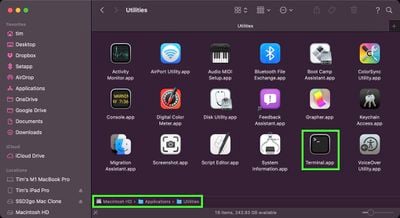
  6. Next, launch the Terminal app (found in /Applications/Utilities/Terminal).
    finder

  7. Enter the following command and then hit Enter:
    defaults write com.apple.Safari DebugDisableTabHoverPreview 1
    terminal

Launch Safari, and you should find that page previews no longer appear when you hover your mouse pointer over a non-active tab.

How to Re-Enable Safari Tab Previews

terminal
To revert the change at any time, simply repeat the steps, except in step 7 be sure to replace the "1" at the end of the Terminal command with "0". After hitting Enter and relaunching Safari, your tab previews will be re-instated.


Tag: Safari

Top Rated Comments

Sebosz Avatar
73 months ago
This literally could have been a switch in safari settings. Wtf Apple?
Score: 10 Votes (Like | Disagree)
TheYayAreaLiving 🎗️ Avatar
73 months ago
Wow this is very helpful!! thank you.
Score: 7 Votes (Like | Disagree)
Jodeo Avatar
73 months ago
RELATED QUESTION...
How do we disable web searches from Spotlight Search?


Over the years many of us have grown accustomed to Spotlight being a local search. Adding even a 1-line, top of the stack option for Web search is an annoyance. Is there some way to disable that too?

Thanks.
\
Score: 6 Votes (Like | Disagree)
myrtlebee Avatar
73 months ago
What I've been wanting to disable forever in Safari is the pinch to see all of the tabs as mini windows. I can't stand it - I constantly accidentally trigger it. Sine I'm a heavy tab user, when it does get triggered it makes my Mac's fans spin to sound like a jet plane and freezes things almost every time.
Score: 4 Votes (Like | Disagree)
hellosil Avatar
73 months ago
This should be a Safari setting just like there is an option for disabling the annoying ‘favicon instead of text in tab’.

To be able to disable ‘enhancements’ that shouldn’t even have made it as default. :confused:
Score: 3 Votes (Like | Disagree)
CheesePuff Avatar
73 months ago

RELATED QUESTION...
How do we disable web searches from Spotlight Search?


Over the years many of us have grown accustomed to Spotlight being a local search. Adding even a 1-line, top of the stack option for Web search is an annoyance. Is there some way to disable that too?

Thanks.
\
Disable Siri Suggestions under Spotlight settings:

https://support.apple.com/guide/mac-help/turn-off-siri-suggestions-for-spotlight-mchl62db64f5/mac
Score: 3 Votes (Like | Disagree)

Popular Stories

Switch to Safari

Apple Explains Why Chrome Users Should 'Switch to Safari'

Tuesday October 13, 2026 5:29 am PDT by
Apple has launched a new "Switch to Safari" marketing campaign that encourages Chrome users to switch to Safari as their web browser of choice on the Mac. "Safari is a more powerful and private browser than Chrome," says Apple. Apple has a new "Switch to Safari" page on its website that outlines more than 10 reasons that Chrome users should switch to Safari, including faster performance...
iPhone Duo Trio

Here's What Apple's Apps Look Like on the iPhone Duo

Tuesday October 20, 2026 11:12 am PDT by
With just three days to go until the iPhone Duo is released, Apple is getting ready for the launch. Behind the scenes, the App Store now has screenshots of Apple's built-in apps running on the Duo. We've seen some apps in marketing materials, but images of the ones we haven't seen give us an idea of what it will be like using the iPhone Duo day to day. Many apps are shown in landscape...
Apple Creator Studio iWork suite

Apple Pulls Keynote, Pages and Numbers From App Store [Update: Back]

Thursday October 22, 2026 11:01 am PDT by
Apple has temporarily removed Keynote, Pages, and Numbers from the App Store, just after releasing an update that added iPhone Duo support and a new Intelligent Assistant. It is not clear if the apps were removed intentionally, or if it is a bug. Apple has not said when the apps will be reinstated, but if it was in error, they should return soon. Update: The Mac versions are back without...
Latest Stories
iPhone Duo Launch Begins as First Orders Reach Customers
6 hours ago
1Password for Agents Keeps Your Passwords Hidden From AI
6 hours ago
iPhone Duo 24 Hours Later: Your Questions Answered
7 hours ago
Apple's iWork Apps Get 'Intelligent Assistant' and iPhone Duo Support
8 hours ago
Apple is Apparently Considering a Slightly Larger iPhone Duo
8 hours ago
Giant iPhone Duo Displays Coming to Four Apple Stores
9 hours ago
Apple Pulls Keynote, Pages and Numbers From App Store [Update: Back]
10 hours ago
Apple Updates More Apps With iPhone Duo Support
10 hours ago
Apple Will Label Apps 'Made for iPhone Duo' in App Store
13 hours ago
Amazon Takes $49 Off iPad With Prices Starting at $399.99
14 hours ago
F1 on Apple TV Now Available in Dolby Atmos
14 hours ago
Apple Reveals More Than 50 Apps That Will Be Updated for iPhone Duo
15 hours ago
Apple Blocks Certificates That Could Help Attackers Fake Websites
16 hours ago
Giant iPhone Duo Installations Spotted at Apple Fifth Avenue
17 hours ago
iPhone Duo 2 Prototypes Include Under-Display Face ID
17 hours ago
Tesla App Gains iPad and iPhone Duo Support
21 hours ago
Apple Reportedly Boosts iPhone Duo Orders by 44%
21 hours ago
Fortnite Returning to Australian App Store After Court Ruling
22 hours ago
Apple Ordered to Open iPhone to Rival App Stores in Australia
22 hours ago
Apple Suppliers Face Hurdles Cutting Circuit Board Emissions
23 hours ago
Things Updated for iPhone Duo With Adaptive Layout
23 hours ago
Simplicity and Siri AI Are HomeView's Killer Features, Apple Says
23 hours ago
iPhone Duo Reviewers Really Miss Face ID
1 day ago
Does the iPhone Duo Run Hot? Here's What Reviews Found
1 day ago
Apple Music's New Look is Now Live on Apple's Website
1 day ago
Anthropic Launches Claude Duet, a Proactive AI Agent
1 day ago
What 32,000 Folds Did to the iPhone Duo's Hinge
1 day ago
iPhone Duo's Hidden FaceTime Camera Takes 'Trash' Photos
1 day ago
iPhone Duo Has 'Edge Light' Feature That Debuted on Macs Last Year
1 day ago
Apple Support App Updated for iPhone Duo's Larger Display
1 day ago