How to Discreetly Disable Touch ID and Face ID on an iPhone - MacRumors
Skip to Content

How to Discreetly Disable Touch ID and Face ID on an iPhone

by

There's an Emergency SOS feature built into iOS 11 that has hidden functionality -- it automatically disables Touch ID and makes it so your passcode has to be entered to unlock your iPhone.

Because it essentially shuts down the biometrics on your device, you can't be compelled by a police officer or malicious person to unlock your iPhone with a fingerprint, nor can your fingerprint be used to get into your device should you be unconscious after an emergency. On iPhone X, this also applies to Face ID.

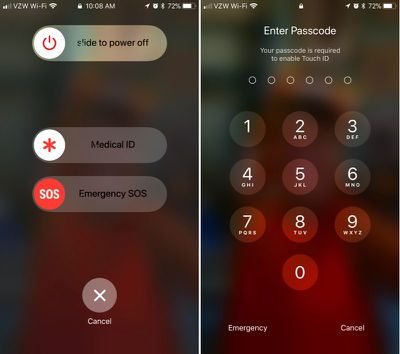
Emergency SOS is enabled by default, and there's only one step to activate it: Press on the sleep/wake (Side) button of your iPhone five times in rapid succession. On the iPhone X, iPhone 8, and iPhone 8 Plus, instead of pressing the Side button five times rapidly, you hold down the Side button and one of the volume buttons at the same time. It's essentially a quick squeeze on either side of the device.
disabletouchidios11
These gestures initiates a screen that gives you the option to power the iPhone off, make a call to emergency services, or access your Medical ID.

Though not expressly stated, once your iPhone is in this emergency state, Touch ID is disabled. You will, however, have to press the cancel button to get back to the Home screen, so it's not an entirely secretive process.

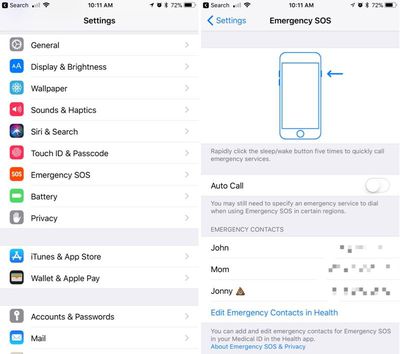
If you're using Emergency SOS to disable the lock screen and don't want to set the feature up to automatically call 911 when the sleep/wake button is pressed, make sure to disable Auto Call in the Settings app. Here's how:

  1. Open the Settings app.
  2. Scroll down to Emergency SOS.emergencysossettings
  3. Disable Auto Call.

With Auto Call disabled, pressing sleep/wake will bring up the aforementioned screen with the option to slide to make the emergency call. With Auto Call enabled, emergency services are called automatically when the sleep/wake button is pressed five times, following a five second countdown timer.

It's best to leave Auto Call on if you want to be able to get in touch with emergency services immediately should you be in danger.

While this feature was likely built to keep your iPhone secure in a situation where you might be incapacitated, it can also prevent authority figures from forcing you to unlock your device.

This is notable because there have been legal rulings where a defendant has been compelled to provide a fingerprint, but not a passcode. Most people will never need to disable Touch ID, but it's worth knowing the option is there should there be a situation where it is necessary.

Related Forum: iOS 11

Top Rated Comments

119 months ago
Useful feature. Hopefully I'll never have to use it, but good to know it's there.
Score: 6 Votes (Like | Disagree)
119 months ago
And to turn it back on, hold it over your head tilted at a 47 degree angle, hop 3 times, and say "Hey Siri, who is John Galt?", then boom, you're back in business.
Score: 4 Votes (Like | Disagree)
119 months ago
And to turn it back on, hold it over your head tilted at a 47 degree angle, hop 3 times, and say "Hey Siri, who is John Galt?", then boom, you're back in business.
You just need to enter your pass code to unlock and biometrics is automatically back on. No need to sarcastically scroll through settings to enable it.
Score: 3 Votes (Like | Disagree)
119 months ago
nor can your fingerprint be used to get into your device should you be unconscious after an emergency.
If you are unconscious, how do you hit the button five times.

People... enough of this crazy paranoid stuff. Unless you are a murderer, kiddie molester or big time drug dealer the police don’t really care about your phone. If a cop gets in your phone illegally, it is thrown out in court.

And for Gods sake, if you are being robbed, give them the damn phone. Disable it later or track it with the police. They can’t do anything without your icloud passcode.
Score: 2 Votes (Like | Disagree)
JRoDDz Avatar
119 months ago
Yes, a nice feature hope to never have to use. Maybe a small detail, but I noticed that the message shown is "Touch ID does not recognize your fingerprint", which also provides a little more protection since it doesn't indicate that you disabled Touch ID or even own the phone necessarily.
Plausible deniability.
Score: 2 Votes (Like | Disagree)
119 months ago
Useful feature. Hopefully I'll never have to use it, but good to know it's there.
Yes, a nice feature hope to never have to use. Maybe a small detail, but I noticed that the message shown is "Touch ID does not recognize your fingerprint", which also provides a little more protection since it doesn't indicate that you disabled Touch ID or even own the phone necessarily.
Score: 2 Votes (Like | Disagree)

Popular Stories

Face ID iPhone 18 Pro

Apple Releases iOS 27.0.1 With Face ID Bug Fix

Monday September 28, 2026 10:09 am PDT by
Apple today released iOS 27.0.1, the first update for the iOS 27 update that came out two weeks ago. iOS 27.0.1 can be downloaded over the air by going to Settings > General > Software Update. Apple has also released iPadOS 27.0.1 and visionOS 27.0.1 updates, as well as iOS and iPadOS 26.7.1 updates for devices not updated to iOS and iPadOS 27. According to Apple's release notes, iOS...
iPhone Duo Open large

iPhone Duo Reviewers Really Miss Face ID

Wednesday October 21, 2026 4:27 pm PDT by
Touch ID on the iPhone Duo might end up being frustrating for some users, based on media reviews that came out today. Multiple reviewers found Touch ID to be slow to unlock, which can be jarring coming from Face ID. According to Marques Brownlee, Apple added an intentional delay to "every single" Touch ID unlock. After you touch a finger to the side button to unlock, it pauses on the Lock...
iPhone Duo Open large scaled feature

iPhone Duo 2 Prototypes Include Under-Display Face ID

Thursday October 22, 2026 3:46 am PDT by
Apple's second-generation iPhone Duo could gain Face ID, with prototypes already incorporating the technology beneath the outer display, according to Bloomberg's Mark Gurman. In the latest episode of his "Power On" podcast, Gurman described Apple's work on adding facial authentication technology to its foldable iPhone. The company is said to be testing the hardware for a successor expected...
Latest Stories
iPhone Duo Launch Begins as First Orders Reach Customers
3 hours ago
1Password for Agents Keeps Your Passwords Hidden From AI
4 hours ago
iPhone Duo 24 Hours Later: Your Questions Answered
4 hours ago
Apple's iWork Apps Get 'Intelligent Assistant' and iPhone Duo Support
5 hours ago
Apple is Apparently Considering a Slightly Larger iPhone Duo
5 hours ago
Giant iPhone Duo Displays Coming to Four Apple Stores
6 hours ago
Apple Pulls Keynote, Pages and Numbers From App Store [Update: Back]
7 hours ago
Apple Updates More Apps With iPhone Duo Support
8 hours ago
Apple Will Label Apps 'Made for iPhone Duo' in App Store
11 hours ago
Amazon Takes $49 Off iPad With Prices Starting at $399.99
11 hours ago
F1 on Apple TV Now Available in Dolby Atmos
12 hours ago
Apple Reveals More Than 50 Apps That Will Be Updated for iPhone Duo
12 hours ago
Apple Blocks Certificates That Could Help Attackers Fake Websites
14 hours ago
Giant iPhone Duo Installations Spotted at Apple Fifth Avenue
14 hours ago
iPhone Duo 2 Prototypes Include Under-Display Face ID
14 hours ago
Tesla App Gains iPad and iPhone Duo Support
18 hours ago
Apple Reportedly Boosts iPhone Duo Orders by 44%
19 hours ago
Fortnite Returning to Australian App Store After Court Ruling
19 hours ago
Apple Ordered to Open iPhone to Rival App Stores in Australia
20 hours ago
Apple Suppliers Face Hurdles Cutting Circuit Board Emissions
20 hours ago
Things Updated for iPhone Duo With Adaptive Layout
20 hours ago
Simplicity and Siri AI Are HomeView's Killer Features, Apple Says
21 hours ago
iPhone Duo Reviewers Really Miss Face ID
1 day ago
Does the iPhone Duo Run Hot? Here's What Reviews Found
1 day ago
Apple Music's New Look is Now Live on Apple's Website
1 day ago
Anthropic Launches Claude Duet, a Proactive AI Agent
1 day ago
What 32,000 Folds Did to the iPhone Duo's Hinge
1 day ago
iPhone Duo's Hidden FaceTime Camera Takes 'Trash' Photos
1 day ago
iPhone Duo Has 'Edge Light' Feature That Debuted on Macs Last Year
1 day ago
Apple Support App Updated for iPhone Duo's Larger Display
1 day ago