In macOS, transparency – or more properly, translucency – is a visual effect many apps use to create a sense of depth by hinting at content residing in the background.
how to disable transparency in macos 00
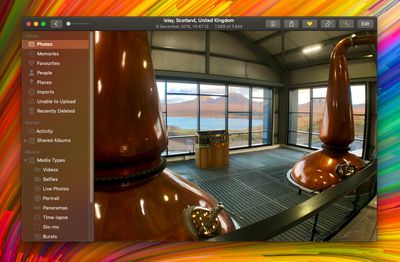
An example of transparency is when content behind a window shows through in interface elements like menus and sidebars. It's evident in the screenshot above, for example, in which the colors of the desktop wallpaper bleed through the sidebar in the Photos app.

A similar effect is sometimes used within app interface elements that are windowed, allowing window content to show through other elements like toolbars. An instance of this can be seen below, where the folders are visible through Finder's toolbar as if through frosted glass.

how to disable transparency in macos 000

Transparency enabled (left); transparency disabled

The effect can look cool, but it can also be distracting if you're trying to focus on content, especially if you're editing photos. Fortunately, macOS lets you turn off transparency, but the way to do it isn't immediately obvious. The following steps show you how.

How to Disable Transparency in macOS Mojave

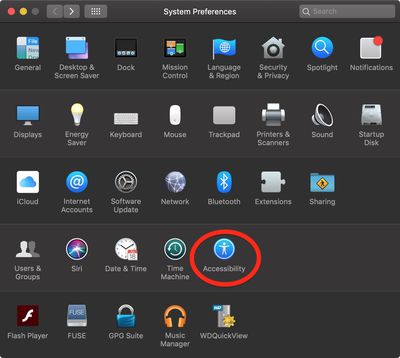
  1. Launch System Preferences from your Mac's Dock, from the Applications folder, or from the Apple menu bar ( -> System Preferences...).
    how to disable transparency in macos 01

  2. Select the Accessibility preference pane.
  3. In the sidebar, under Vision, click Display.
    how to disable transparency in macos 02

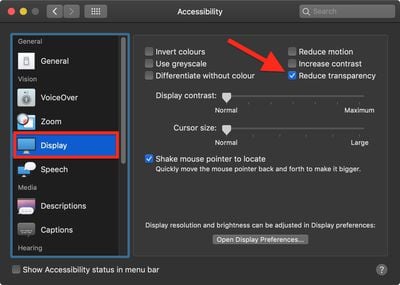
  4. Check the box next to Reduce transparency.
Related Forum: macOS Mojave

Top Rated Comments

martyjmclean Avatar
94 months ago
Setting your Accent Colour to Greyscale also turns off wallpaper window tinting. Another tip to increase legibility.
[doublepost=1544791052][/doublepost]
Does this save resources at all? I used to do this on my iphones back in the day thinking I saved CPU cycles and ram.
None of this makes any difference on modern computers.
Score: 5 Votes (Like | Disagree)
martyjmclean Avatar
93 months ago
There's no accent color called "Greyscale". It's called "Graphite".
You still knew which colour I was talking about.
I hope you realize that's an issue with whatever third-party browser and/or theme you're using.
I hope you realise they were being sarcastic.

Stop being obtusely fastidious.
Score: 2 Votes (Like | Disagree)
BigMcGuire Avatar
93 months ago
I still do this on my iPhone XR (started with the iPhone 5 and iOS 7). It’s less about resources at this stage, and more that I’ve come to prefer low transparency and reduced motion.
Same here! I thought I was the only one that did this. I am so happy to have found Reduced Motion for my MacBook thanks to this article, all these years I had no clue it existed (same for transparency for Mac OS). I've used both since my 6+ iPhone and prefer it.
Score: 2 Votes (Like | Disagree)
edrozenberg Avatar
93 months ago
Setting your Accent Colour to Greyscale also turns off wallpaper window tinting. Another tip to increase legibility.
[doublepost=1544791052][/doublepost]
Recent betas remove the window tinting when using any accent color with reduce transparency enabled (I'm on 10.14.3 Beta (18D21c)). This is great. Tinting still remains in the dock, notification center, and alerts - no big deal, window tinting was the one that was really annoying.
Score: 2 Votes (Like | Disagree)
2499723 Avatar
93 months ago
Does this save resources at all? I used to do this on my iphones back in the day thinking I saved CPU cycles and ram.
I still do this on my iPhone XR (started with the iPhone 5 and iOS 7). It’s less about resources at this stage, and more that I’ve come to prefer low transparency and reduced motion.
Score: 2 Votes (Like | Disagree)
jbarley Avatar
93 months ago
Really wish I could get rid of this dropdown menu transparency, it's almost a deal breaker for me.


Attachment Image
Score: 1 Votes (Like | Disagree)

Popular Stories

maxresdefault

Apple Shows Off a Key Reason to Upgrade to the iPhone 17

Saturday February 7, 2026 9:26 am PST by
Apple today shared an ad that shows how the upgraded Center Stage front camera on the latest iPhones improves the process of taking a group selfie. "Watch how the new front facing camera on iPhone 17 Pro takes group selfies that automatically expand and rotate as more people come into frame," says Apple. While the ad is focused on the iPhone 17 Pro and iPhone 17 Pro Max, the regular iPhone...
Finder Siri Feature

Why Apple's iOS 26.4 Siri Upgrade Will Be Bigger Than Originally Promised

Friday February 6, 2026 3:06 pm PST by
In the iOS 26.4 update that's coming this spring, Apple will introduce a new version of Siri that's going to overhaul how we interact with the personal assistant and what it's able to do. The iOS 26.4 version of Siri won't work like ChatGPT or Claude, but it will rely on large language models (LLMs) and has been updated from the ground up. Upgraded Architecture The next-generation...
wwdc sans text feature

Apple Rumored to Announce New Product on February 19

Thursday February 5, 2026 12:22 pm PST by
Apple plans to announce the iPhone 17e on Thursday, February 19, according to Macwelt, the German equivalent of Macworld. The report, citing industry sources, is available in English on Macworld. Apple announced the iPhone 16e on Wednesday, February 19 last year, so the iPhone 17e would be unveiled exactly one year later if this rumor is accurate. It is quite uncommon for Apple to unveil...
apple wallet drivers license feature iPhone 15 pro

Apple Says These 7 U.S. States Plan to Offer iPhone Driver's Licenses

Monday February 9, 2026 6:24 am PST by
In select U.S. states, residents can add their driver's license or state ID to the Apple Wallet app on the iPhone and Apple Watch, and then use it to display proof of identity or age at select airports and businesses, and in select apps. The feature is currently available in 13 U.S. states and Puerto Rico, and it is expected to launch in at least seven more in the future. To set up the...
14 inch MacBook Pro Keyboard

New MacBook Pros Could Now Arrive in March

Sunday February 8, 2026 6:02 am PST by
New MacBook Pro models with the M5 Pro and M5 Max chips could arrive as soon as Monday, March 2, according to Bloomberg's Mark Gurman. In today's "Power On" newsletter, Gurman said that the release of new MacBook Pro models is tied to the release of macOS Tahoe 26.3. The launch is said to be slated for as early as the week of March 2. He added that the M4 Pro and M4 Max models on sale today...