

In iOS 16, Apple has made it possible to display Activity rings on the iPhone Lock Screen, allowing you to glance at your progress toward your movement goals throughout the day without having to unlock your iPhone or look at your Apple Watch.
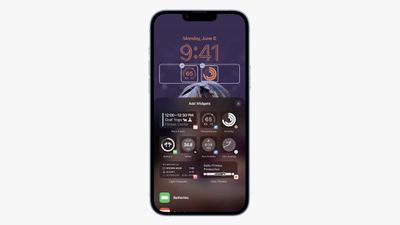
The ability to show your Activity rings comes courtesy of Apple's introduction of Lock Screen widgets. There are two widgets in the Fitness category: One shows your activity rings, while another larger widget shows your move, exercise, and stand stats for the day, and how close you are to reaching your goals.
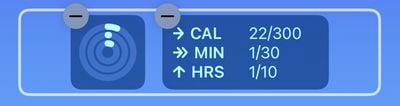
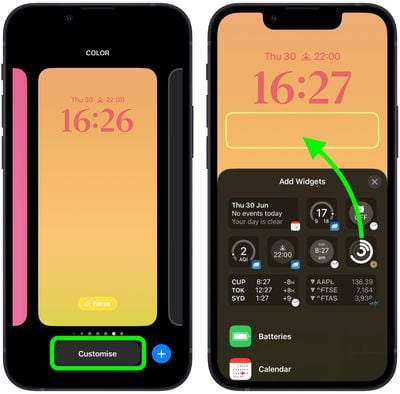
The following steps show you how to add these widgets to the Lock Screen on an iPhone running iOS 16.
- Raise your iPhone to wake it and unlock with Face ID or Touch ID, and then long press on the Lock Screen to enter the Lock Screen gallery.
- Swipe to the wallpaper you want your activity to appear on, and then tap Customize.
- Tap the frame below the time to bring up the widgets selector.

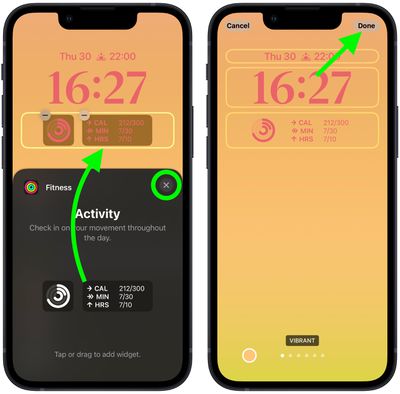
- Add the Activity rings widget by tapping it in the suggested widgets. Alternatively, scroll down the list of widgets and tap Fitness, and then tap the widget that you want to use, or drag it to the frame (you can add both widget types if you want).
- When you're finished arranging your widgets, close the widget selector by tapping the X in the top-right corner of the panel, then tap Done in the top-right corner of the screen.
- Lastly, tap the current Lock Screen in the wallpaper gallery to activate it.
Even if you don't have an Apple Watch, you can still track your movement (calories burned) in iOS 16 via the Fitness app. That's right – you can set a daily move goal even if you don't have an Apple Watch, using the iPhone to track your progress toward reaching the goal.
























![Apple Pulls Keynote, Pages and Numbers From App Store [Update: Back]](https://images.macrumors.com/t/Okb7kitB_gNr6qe5Pex9nQIysD8=/112x112/article-new/2026/01/Apple-Creator-Studio-iWork-suite.jpg)





















