
How to Downgrade From iOS 27 Beta to iOS 26 - MacRumors
Skip to Content

How to Downgrade From iOS 27 Beta to iOS 26

by

If you installed iOS 27 Beta or iPadOS 27 Beta through Apple's Developer Program, you may decide you want to downgrade because of usability or stability issues. Keep reading to learn how it's done.
How to Downgrade From iOS 27 Beta to iOS 26 Feature
Apple's beta versions of its major software updates can be buggy, especially the early releases. While that isn't necessarily the case for the latest iOS 27 beta, you may still find apps not working properly, poor battery life, device crashes, and features that don't do what they're supposed to. Fortunately, you can restore your iPhone or iPad to the previous version of iOS.

If you made an archived backup before you installed the iOS 27 beta, you can remove the ‌beta and restore the backup. If you don't have an archived backup that was created before installing the beta, you can still downgrade, but you'll need to set up your device as new or restore from an older compatible backup. Only an archived backup made before installing the beta can be restored after downgrading.

Also, bear in mind that if you've installed watchOS 27 beta on your Apple Watch, you won't be able to use it with your ‌iPhone‌ once you've gone back to iOS 26. And downgrading an Apple Watch to a previous version of watchOS can't be done manually – if you want to remove ‌watchOS 27 beta, you'll have to send your watch in to Apple.

How to Downgrade From iOS 27 Beta or iPadOS 27 Beta

  1. Launch Finder on your Mac. On Windows, open the Apple Devices app (or iTunes if you're using an older setup).
  2. Connect your iPhone or iPad to your computer using a Lightning or USB-C cable.
  3. Put your device into recovery mode. The method of doing this depends on your device, so check the list below these steps to find your model. Apple also provides more information on Recovery mode in this support article.
    restore

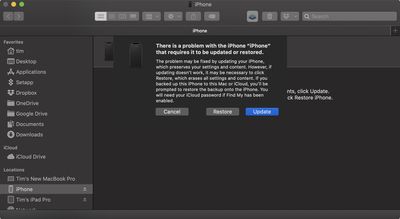
  4. A dialog will pop up asking if you want to restore your device. Click Restore when prompted. Your computer will erase the device and install the latest publicly available version of iOS or iPadOS that's still being signed by Apple.
  5. Wait while the restore process completes.
How to Enter Recovery Mode on Your iOS Device

  • iPad models with Face ID or a Touch ID power button: Press and quickly release the Volume Up button. Press and quickly release the Volume Down button. Press and hold the Top button until your device begins to restart. Continue holding the Top button until your device goes into recovery mode.

  • iPhone XS or later: Press and quickly release the Volume Up button. Press and quickly release the Volume Down button. Then, press and hold the Side button until you see the recovery mode screen.

Once you've followed the above steps, you can restore a backup of your device from iOS 26 or iPadOS 26 using your Mac or iCloud.

Related Roundups: iOS 26, iPadOS 26, iOS 27, iPadOS 27
Related Forums: iOS 26, iOS 27

Top Rated Comments

14 weeks ago
iOS 18 is better than both of them
Very sad iPhone 17 didn’t came with iOS 18 🥺
I don’t have much faith that iOS 27 will be as good as iOS 18 when it’s out of beta. Better than iOS 26 but still not as easy going and smooth as 18.
Score: 7 Votes (Like | Disagree)
14 weeks ago
On my iPhone 17 Pro, iOS 27 public beta has been far superior to 26.5.2. Battery life is great, phone doesn't get hot anymore. A couple small bugs but nothing show stopping. Using it on my main device and no regrets whatsoever.
Score: 4 Votes (Like | Disagree)
mrat93 Avatar
14 weeks ago
The iOS 27 beta gave my iPhone 15 Pro a new lease on life. It feels more stable than iOS 26 ever did.

If I remember correctly, 26.3 was the best update for me. Very little lag, didn’t overheat, etc.

Then with iOS 26.4 onward, it was slow, and was hot nearly all the time when it was charging or in use.

Now with the iOS 27 beta, my phone feels nearly brand new — even while in the process of indexing. I’m considering keeping this phone for a fourth year now.
Score: 2 Votes (Like | Disagree)
mrmoobs Avatar
14 weeks ago
Be careful downgrading, you can lose iCloud data like I did lost passwords all of them and photos plus notes data missing
Score: 1 Votes (Like | Disagree)
I7guy Avatar
14 weeks ago

iOS 18 is better than both of them
Very sad iPhone 17 didn’t came with iOS 18 🥺
I don’t have much faith that iOS 27 will be as good as iOS 18 when it’s out of beta. Better than iOS 26 but still not as easy going and smooth as 18.
iOS 18 while there is little inherently wrong with it is just boring compared to iOS 26, which again has little inherently wrong with. YMMV.
Score: 1 Votes (Like | Disagree)
vertsix Avatar
14 weeks ago
Improved headline:

"You ****ed Up Updating to iOS 27 beta? Here's How to Downgrade to iOS 26"

Come on, MacRumors. Do better! /s
Score: 1 Votes (Like | Disagree)

Popular Stories

iOS 27 0 1

iOS 27.0.1 is Coming Soon

Wednesday September 23, 2026 1:06 pm PDT by
After releasing iOS 27 last week, Apple is already testing a follow-up iOS 27.0.1 update for iPhones, according to MacRumors logs. iOS 27.0.1 will likely be a minor update with bug fixes and/or security patches. Shortly after Apple launches new iPhone models, some software bugs are usually discovered as the devices get into the hands of millions of customers around the world. This year, so...
Face ID iPhone 18 Pro

Apple Confirms iPhone 18 Pro Bug Fix Update is Coming Next Week

Thursday September 24, 2026 6:10 am PDT by
Apple has confirmed to 9to5Mac's Benjamin Mayo that it plans to release a software update early next week with a fix for a Face ID issue affecting some iPhone 18 Pro users. Yesterday, we reported that Apple is testing iOS 27.0.1, which is likely to be the update with the...
iPhone Handoff Feature

AT&T Responds to iOS 27's New iPhone Handoff Feature

Wednesday September 23, 2026 7:06 am PDT by
Apple added a new iPhone Handoff feature to iOS 27 that allows you to switch between two iPhones while using the same phone number on each device. T-Mobile and Deutsche Telekom are the first carriers to offer iPhone Handoff, and Apple said Verizon and EE will add support later this year, but AT&T is noncommittal about the feature. A spokesperson for AT&T told CNET that the carrier sees...
Latest Stories
iPhone Duo Demand Reportedly Exceeds Apple's Expectations
1 hour ago
iPhone Duo Launch Begins as First Orders Reach Customers
7 hours ago
1Password for Agents Keeps Your Passwords Hidden From AI
8 hours ago
iPhone Duo 24 Hours Later: Your Questions Answered
9 hours ago
Apple's iWork Apps Get 'Intelligent Assistant' and iPhone Duo Support
10 hours ago
Apple is Apparently Considering a Slightly Larger iPhone Duo
10 hours ago
Giant iPhone Duo Displays Coming to Four Apple Stores
11 hours ago
Apple Pulls Keynote, Pages and Numbers From App Store [Update: Back]
12 hours ago
Apple Updates More Apps With iPhone Duo Support
12 hours ago
Apple Will Label Apps 'Made for iPhone Duo' in App Store
15 hours ago
Amazon Takes $49 Off iPad With Prices Starting at $399.99
16 hours ago
F1 on Apple TV Now Available in Dolby Atmos
16 hours ago
Apple Reveals More Than 50 Apps That Will Be Updated for iPhone Duo
17 hours ago
Apple Blocks Certificates That Could Help Attackers Fake Websites
18 hours ago
Giant iPhone Duo Installations Spotted at Apple Fifth Avenue
19 hours ago
iPhone Duo 2 Prototypes Include Under-Display Face ID
19 hours ago
Tesla App Gains iPad and iPhone Duo Support
23 hours ago
Apple Reportedly Boosts iPhone Duo Orders by 44%
23 hours ago
Fortnite Returning to Australian App Store After Court Ruling
1 day ago
Apple Ordered to Open iPhone to Rival App Stores in Australia
1 day ago
Apple Suppliers Face Hurdles Cutting Circuit Board Emissions
1 day ago
Things Updated for iPhone Duo With Adaptive Layout
1 day ago
Simplicity and Siri AI Are HomeView's Killer Features, Apple Says
1 day ago
iPhone Duo Reviewers Really Miss Face ID
1 day ago
Does the iPhone Duo Run Hot? Here's What Reviews Found
1 day ago
Apple Music's New Look is Now Live on Apple's Website
1 day ago
Anthropic Launches Claude Duet, a Proactive AI Agent
1 day ago
What 32,000 Folds Did to the iPhone Duo's Hinge
1 day ago
iPhone Duo's Hidden FaceTime Camera Takes 'Trash' Photos
1 day ago
iPhone Duo Has 'Edge Light' Feature That Debuted on Macs Last Year
2 days ago








































