iconApple recently bought licenses for several new fonts in macOS Catalina. But given they're an optional download, you might not even be aware that you can access them for free.

Reported by Typography.Guru, the new system fonts were licensed from type foundries including Commercial Type, Klim Type Foundry and Mark Simonson Studio. To view and install the optional fonts, follow these steps.

Installing Fonts in Catalina

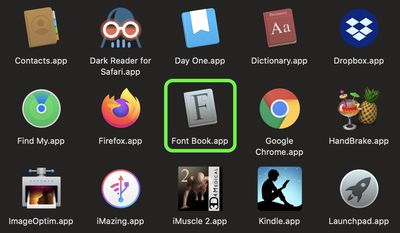
  1. Launch the Font Book app on your Mac.
    how to install new catalina fonts 4

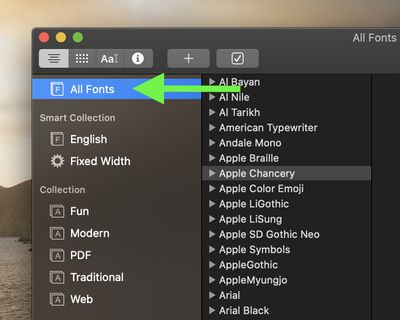
  2. Select All Fonts in the sidebar.
    how to install new catalina fonts 3

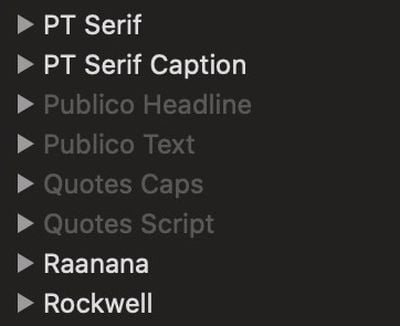
  3. Browse the font list and select any greyed out fonts you like the look of. The grey indicates they're either deactivated or haven't been downloaded yet.
    how to install new catalina fonts 2

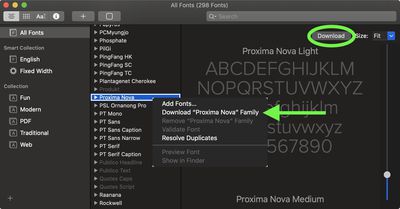
  4. Right-click (or Ctrl-click) the selected font and choose Download [Font name] from the contextual menu. Alternately, click the Download button in the font preview window.
    font book

The new font options include Canela (16 styles), Domaine (6 styles), Founders Grotesk (17 styles), Graphik (18 styles), Produkt (8 styles), Proxima Nova (12 styles), Publico, Sauber Script, and Quotes Caps.

Top Rated Comments

jayducharme Avatar
74 months ago
Nice tip, thanks! I never realized that Apple occasionally updated their fonts.
Score: 14 Votes (Like | Disagree)
Xenobius Avatar
74 months ago
Nice. These few fonts are worth more than the Windows 10 license.
Score: 8 Votes (Like | Disagree)
Unregistered 4U Avatar
74 months ago

I use the iCloud versions of Pages, Keynote, and Numbers a lot - can I use the fonts in the desktop version and have them show up fine in the web version? What about the iOS version?
I created a Keynote presentation with each of the new fonts and their variants (16 different text boxes). Then, I opened that presentation on my iPad. The first time I opened it, it said fonts were missing. But as it was displaying that message, the fonts were downloading in the background, replacing the default font with the new ones. When I opened the presentation the second time, no error, so now they're installed on my iPad :)
Score: 7 Votes (Like | Disagree)
SurferPup Avatar
74 months ago
Thank you MacRumours.
Score: 7 Votes (Like | Disagree)
flottenheimer Avatar
74 months ago
Nice collection. Glad we're not in Camp-Arial. : )
Score: 7 Votes (Like | Disagree)
macdos Avatar
74 months ago
Then the document will say that there are missing fonts. That's why you include fonts when submitting to a print office, and that is why you use PDF for sharing information.

Once you share editable documents, you absolutely have to use the same software base, the same fonts and so on.


And what happens if I were to share such documents?
They are universally accessable in apps in Catalina, as long as there is support for them. For instance, emoji fonts may not work in Adobe Indesign.

However, when you upgrade from Catalina to Macos Death Valley 10.16, you will have to reinstall all these fonts, and also all additional voices, dictionaries and so on. Bummer.


Question: Will these fonts display in Catalina only, or do they become system fonts and can be accessed for instance in Pages?
Score: 6 Votes (Like | Disagree)

Popular Stories

wwdc sans text feature

Apple Rumored to Announce New Product on February 19

Thursday February 5, 2026 12:22 pm PST by
Apple plans to announce the iPhone 17e on Thursday, February 19, according to Macwelt, the German equivalent of Macworld. The report, citing industry sources, is available in English on Macworld. Apple announced the iPhone 16e on Wednesday, February 19 last year, so the iPhone 17e would be unveiled exactly one year later if this rumor is accurate. It is quite uncommon for Apple to unveil...
Apple Logo Zoomed

Tim Cook Teases Plans for Apple's Upcoming 50th Anniversary

Thursday February 5, 2026 12:54 pm PST by
Apple turns 50 this year, and its CEO Tim Cook has promised to celebrate the milestone. The big day falls on April 1, 2026. "I've been unusually reflective lately about Apple because we have been working on what do we do to mark this moment," Cook told employees today, according to Bloomberg's Mark Gurman. "When you really stop and pause and think about the last 50 years, it makes your heart ...
Finder Siri Feature

Why Apple's iOS 26.4 Siri Upgrade Will Be Bigger Than Originally Promised

Friday February 6, 2026 3:06 pm PST by
In the iOS 26.4 update that's coming this spring, Apple will introduce a new version of Siri that's going to overhaul how we interact with the personal assistant and what it's able to do. The iOS 26.4 version of Siri won't work like ChatGPT or Claude, but it will rely on large language models (LLMs) and has been updated from the ground up. Upgraded Architecture The next-generation...
maxresdefault

Apple Shows Off a Key Reason to Upgrade to the iPhone 17

Saturday February 7, 2026 9:26 am PST by
Apple today shared an ad that shows how the upgraded Center Stage front camera on the latest iPhones improves the process of taking a group selfie. "Watch how the new front facing camera on iPhone 17 Pro takes group selfies that automatically expand and rotate as more people come into frame," says Apple. While the ad is focused on the iPhone 17 Pro and iPhone 17 Pro Max, the regular iPhone...
iOS 26

iOS 26.3 and iOS 26.4 Will Add These New Features to Your iPhone

Tuesday February 3, 2026 7:47 am PST by
While the iOS 26.3 Release Candidate is now available ahead of a public release, the first iOS 26.4 beta is likely still at least a week away. Following beta testing, iOS 26.4 will likely be released to the general public in March or April. Below, we have recapped known or rumored iOS 26.3 and iOS 26.4 features so far. iOS 26.3 iPhone to Android Transfer Tool iOS 26.3 makes it easier...