macOS: How to Edit Strong Password Suggestions - MacRumors
Skip to Content

macOS: How to Edit Strong Password Suggestions

by

Like previous versions of Apple's Mac software, macOS Ventura is able to automatically generate strong passwords for app and website logins, but now you can also edit them, and even generate passwords with no special characters. Here's how.

macos ventura roundup header
Automatic strong passwords ensure that if you're prompted by a website or app to make up a password on the spot, Apple will automatically offer to generate a secure one for you, which syncs with iCloud Keychain.

Unfortunately, some websites have specific requirements like a certain number of symbols or capital letters that strong passwords don't always fulfill. For that reason, macOS now allows you to edit strong passwords manually.

Other websites sometimes refuse special characters in passwords, and Apple has thought of that too, with a new option to generate a password that contains no special characters.

Lastly, ‌macOS‌ can also provide you with strong passwords that are easier to type than the standard ones it generates. Here's how you can access these new options.

  1. Open Safari and head to an account registration webpage.
  2. Fill in your desired username, then click inside the new password field.
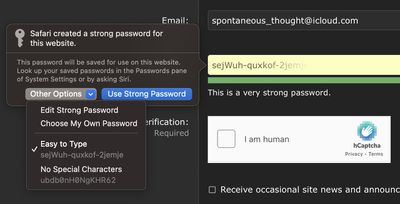
  3. In the strong password contextual menu that appears, click Other Options to access the Edit Strong Password dropdown.
  4. From here, you can change the characters that have been suggested by selecting Edit Strong Password. You can also opt for a quick-access Easy to Type or No Special Characters option.
safari

That's all there is to it. Safari browser's built-in password suggestion feature just got a whole more convenient.


Popular Stories

Apple Event Logo

Apple's Next Era Begins September 1

Thursday May 7, 2026 10:36 am PDT by
Apple recently announced that Tim Cook will be stepping down as CEO later this year, after 15 years of leading the company. Effective September 1, Apple's hardware engineering chief John Ternus will become the company's next CEO, while Cook will become executive chairman of Apple's board of directors. In his new role, Apple said Cook will assist with "certain aspects" of the company,...
Instagram Feature 2

PSA: Instagram Encrypted Messaging Ends on Friday, May 8

Tuesday May 5, 2026 8:24 am PDT by
Instagram will remove end-to-end encryption for direct messages between users from May 8, 2026. When the date comes around, Meta will potentially be able to see the contents of all messages between users on the social media platform. Encrypting messages has been an optional feature in Instagram since 2023, but in March of this year the social media platform quietly updated a help page to say ...
macbook neo launch day

Apple May Drop Base $599 MacBook Neo as Chip, DRAM Costs Climb

Thursday May 7, 2026 4:55 am PDT by
Apple is considering dropping the cheapest MacBook Neo configuration as one possible response to the rising cost of building the popular laptop, according to Taiwan-based tech columnist and former Bloomberg reporter Tim Culpan. The Neo currently starts at $599 for a 256GB model, with a 512GB version at $699. Writing in his latest Culpium newsletter, Culpan says cutting the entry-level...