How to Edit a Video on iPhone and iPad - MacRumors
Skip to Content

How to Edit a Video on iPhone and iPad

by

photos iconIn iOS 13, Apple has enhanced the built-in photo and video editing capabilities available to iPhone and iPad users, and for the first time it has made many of its stock photo adjustment tools available for editing videos.

In addition to the new video editing options, Apple has introduced a new tool selection interface that makes the whole process quicker and easier than ever before. Let's take a look at how it works.

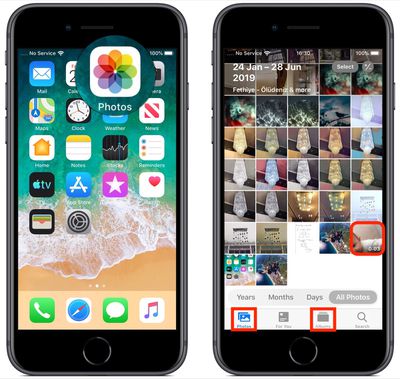
Launch the stock Photos app on your iPhone or ‌iPad‌ and select a video clip from your Photo library using the Photos tab. If it isn't a recent video that you want to edit, use the Days, Months, and Years views to whittle down your collection, or select a clip from one of your albums via the Albums tab.
how to edit video
Once you've selected a video, tap Edit in the top-right corner of the screen. When the black-bordered editing interface appears, you'll notice four icons between the Cancel and Done options at the bottom of the screen.

Trimming a Video

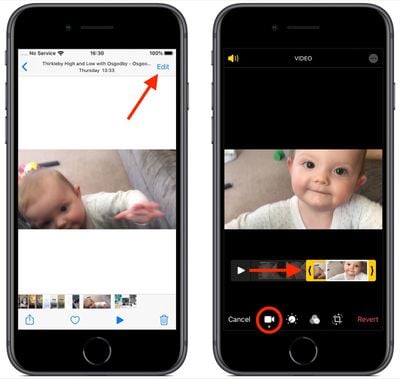
The first film camera-shaped icon is the default selection, and gives you quick access to the timeline. The timeline appears below the video, and you can use it to scrub through a clip or trim it.
how to edit video 1
To trim the clip, drag the yellow chevrons to include the portion you wish to keep – anything outside the yellow frame will be discarded when you tap Done.

Adjustment Tools

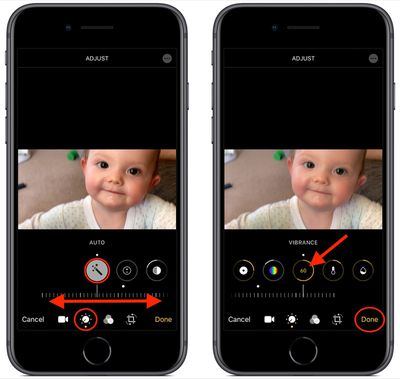
The next option in the row of icons at the bottom of the editing interface looks like a control knob. Tapping this opens the Adjust tools in a horizontal strip below your video. Tap Auto – the first tool in the strip – and you'll notice the horizontal dial light up below the toolset.

Auto uses intelligent algorithms to optimally tune the other tools and enhance your video, but you can manually adjust its intensity level by moving the dial with a swipe of your finger. You can easily return to the auto-tuned level by returning the dial back to the white dot.
how to edit video 2
Swipe along the strip of other tools and you'll find that they all work similarly. The only difference is that when you swipe along the dial to change the adjustment level, the selected tool's icon will display a number that you can use as a reference to refine the effect you're previewing.

The other adjustment tools available in the horizontal strip include Exposure, Highlights, Shadows, Contrast, Brightness, Black Point, Saturation, Vibrance, Warmth, Tint, Sharpness, Definition, Noise Reduction, and Vignette. Simply tap Done when you're happy to apply and save your adjustments.

The Filters Tool

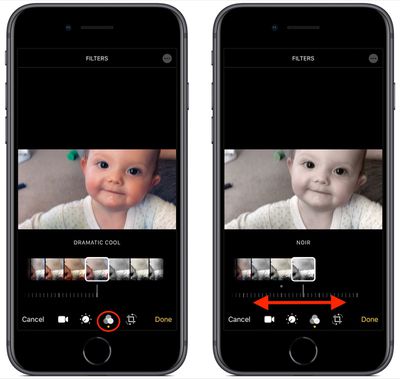
The third option in the row of icons along the bottom of the editing interface looks like a Venn diagram. Tapping this icon opens the Filters tool, which allows you to apply an Instagram-style filter to your captured videos in just a few quick taps.
how to edit video 3
Swipe through the nine available filters to get a preview of how your video looks when each one is applied. Let your finger come to a rest, and a horizontal dial will appear below the selected filter.

Use you finger to move the dial and adjust the intensity level of the filter. Tap Done in the bottom right of the screen to apply the filter effect to your video.

Cropping Tools

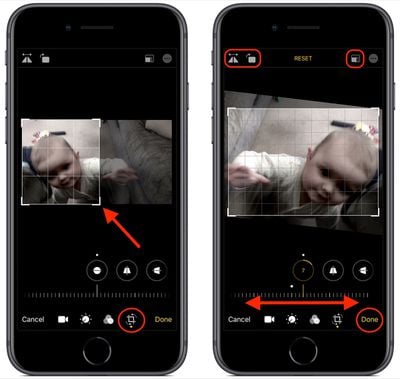
The fourth and final icon at the bottom of the editing interface opens the cropping tools. You can easily crop a video using the grid overlay that appears by dragging at its corners, just like you would for photos.

Notice that you also now have a row of three additional adjustment tools associated with the dial below them. From left to right, these allow you to straighten the video, adjust its vertical alignment, and adjust its horizontal alignment.
how to edit video 4
Tap one of the tools and move the dial with a swipe of your finger to adjust to the desired level, indicated by the number in the selected icon.

Running along the top of the video editing interface you'll notice more tools to flip and rotate the video on the left, and apply preset crop ratios on the right. You can tap the Reset button between these tools to undo your adjustments, or press Done if you're happy with your edits.

Lastly, it's worth remembering that you can access all of these editing tools whenever you capture video using the built-in Camera app – you don't even have to unlock your device to use them on the clip you just shot.


Related Forum: iOS 13

Popular Stories

iphone duo colors

Apple Shares Photos Shot on iPhone Duo

Thursday October 1, 2026 1:37 pm PDT by
Apple on Instagram today shared a curated gallery of six photos shot on the iPhone Duo. The photos were shot by American photographers Jake Michaels and Jason Nocito, as part of a project commissioned by Apple. iPhone Duo is equipped with four cameras:A rear 48-megapixel Fusion Main camera A rear 48-megapixel Ultra Wide camera A front 12-megapixel Center Stage camera in the outer display A...
iphone duo facetime

iPhone Duo's Hidden FaceTime Camera Takes 'Trash' Photos

Wednesday October 21, 2026 11:36 am PDT by
The iPhone Duo's inner screen has an under-display front camera that's largely hidden from view. It's the first time we've seen an under-display camera on an iPhone, and it turns out there's a reason Apple hasn't used the technology before. Apple said the camera offers 1080p video recording, but didn't mention photo quality. Gizmodo said it's a 4-megapixel camera and described the photos as...
google photos wardrobe

Google Photos Wardrobe Feature Comes to iOS

Thursday September 24, 2026 1:33 pm PDT by
Google today said its digital wardrobe option is available in the Google Photos iOS app in the U.S., India, and Brazil. Google first announced the feature back in April, but it was limited to Android users until now. The wardrobe option uses AI to pull images of clothing from the Google Photos library, organizing them into a digital closet. Users can put items together to create outfits ...
Latest Stories
iPhone Duo Demand Reportedly Exceeds Apple's Expectations
55 minutes ago
iPhone Duo Launch Begins as First Orders Reach Customers
7 hours ago
1Password for Agents Keeps Your Passwords Hidden From AI
8 hours ago
iPhone Duo 24 Hours Later: Your Questions Answered
8 hours ago
Apple's iWork Apps Get 'Intelligent Assistant' and iPhone Duo Support
9 hours ago
Apple is Apparently Considering a Slightly Larger iPhone Duo
9 hours ago
Giant iPhone Duo Displays Coming to Four Apple Stores
10 hours ago
Apple Pulls Keynote, Pages and Numbers From App Store [Update: Back]
11 hours ago
Apple Updates More Apps With iPhone Duo Support
12 hours ago
Apple Will Label Apps 'Made for iPhone Duo' in App Store
15 hours ago
Amazon Takes $49 Off iPad With Prices Starting at $399.99
15 hours ago
F1 on Apple TV Now Available in Dolby Atmos
16 hours ago
Apple Reveals More Than 50 Apps That Will Be Updated for iPhone Duo
16 hours ago
Apple Blocks Certificates That Could Help Attackers Fake Websites
18 hours ago
Giant iPhone Duo Installations Spotted at Apple Fifth Avenue
18 hours ago
iPhone Duo 2 Prototypes Include Under-Display Face ID
19 hours ago
Tesla App Gains iPad and iPhone Duo Support
23 hours ago
Apple Reportedly Boosts iPhone Duo Orders by 44%
23 hours ago
Fortnite Returning to Australian App Store After Court Ruling
23 hours ago
Apple Ordered to Open iPhone to Rival App Stores in Australia
1 day ago
Apple Suppliers Face Hurdles Cutting Circuit Board Emissions
1 day ago
Things Updated for iPhone Duo With Adaptive Layout
1 day ago
Simplicity and Siri AI Are HomeView's Killer Features, Apple Says
1 day ago
iPhone Duo Reviewers Really Miss Face ID
1 day ago
Does the iPhone Duo Run Hot? Here's What Reviews Found
1 day ago
Apple Music's New Look is Now Live on Apple's Website
1 day ago
Anthropic Launches Claude Duet, a Proactive AI Agent
1 day ago
What 32,000 Folds Did to the iPhone Duo's Hinge
1 day ago
iPhone Duo's Hidden FaceTime Camera Takes 'Trash' Photos
1 day ago
iPhone Duo Has 'Edge Light' Feature That Debuted on Macs Last Year
1 day ago