How to Use Emergency SOS on iPhone and Apple Watch - MacRumors
Skip to Content

How to Use Emergency SOS on iPhone and Apple Watch

by

Starting with iOS 11, Apple added a new emergency feature to the iPhone, which is designed to allow you to quickly and discreetly place a call to emergency services. In the United States, SOS dials 911, and in other countries, it works with local emergency response teams.

Emergency SOS is activated through a series of button presses on an iPhone running iOS 11 or later, and the buttons you need to press will vary based on your device. On the iPhone 7, iPhone 7 Plus, and older iPhones, rapidly press the Side button on the right of the device five times to activate Emergency SOS.

On the iPhone 8, iPhone 8 Plus, iPhone X, iPhone XS, iPhone XS Max, and iPhone XR, you will need to press and hold on the Side button while also holding one of the two Volume buttons at the same time.

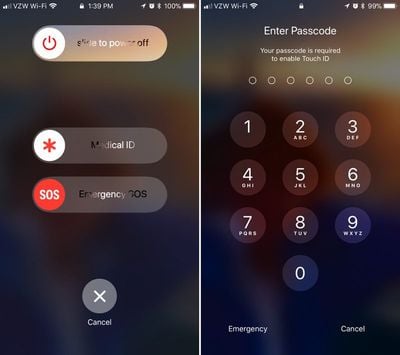
When you use these gestures, it brings up a slider bar that allows you to slide a finger across the screen to quickly place an emergency call. While this slider screen is the default option and is in place to make sure you don't accidentally place a 911 call, there's also an option to enable "Auto Call" for initiating a 911 call as soon as you activate Emergency SOS.
touchiddisabled
When you use Emergency SOS on an iPhone, the feature also disables Touch ID, preventing a would-be thief or other person with malicious intent from accessing your device without entering your passcode. It also automatically alerts any emergency contacts you've set in the Health app, sending them an iMessage with your location.

Enabling Auto Call

SOS is automatically included on every iPhone running iOS 11 and there is no disabling it. Activate it by pressing on the sleep/wake button five times in rapid succession to bring up the swipe interface. If you want the feature to call emergency services automatically without the need for an extra gesture, here's how to toggle it on:

  1. Open the Settings app.
  2. Scroll down to "Emergency SOS."emergencysosiphone
  3. Toggle on "Auto Call."
  4. To turn it off, simply toggle off Auto Call.
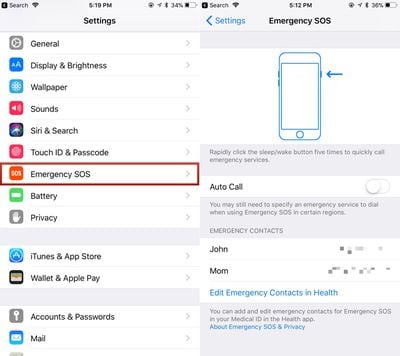
With Auto Call enabled, your phone will dial "911" (or your country's emergency line) after a three second countdown that gives you enough time to cancel the call if it's placed accidentally.

SOS on the Apple Watch

On the Apple Watch, an emergency call can be placed when you press and hold down on the side button for several seconds in a row. When you set up your Apple Watch, Apple prompts you to turn it on, but if you didn't, you can still choose to do so later.

On the Apple Watch, it's a lot easier to accidentally make an emergency call if something presses against the side button, so many people may not want this feature on. Here's how to turn it on:

  1. Open the Apple Watch app on the iPhone.
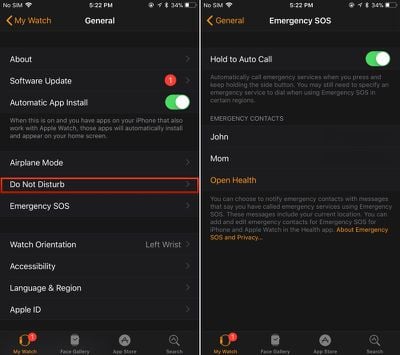
  2. Scroll down to General and tap it.
  3. Look for Emergency SOS. It's the sixth option.
  4. Tap to the Emergency SOS interface. emergencysosapplewatch
  5. Toggle on "Hold to Auto Call."
  6. To turn it off again, toggle off Hold to Auto Call.
Setting Emergency Contacts

As mentioned above, whenever you use the SOS feature, Apple will automatically notify your emergency contacts if you have them set. Emergency contacts can be set up in the Health app:

  1. Open the Health app.
  2. Choose Medical ID.
  3. Select "Edit" in the top right corner.
  4. Scroll down to the Emergency Contacts section.
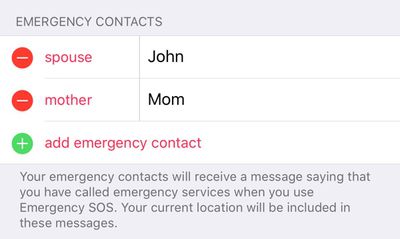
  5. Tap the "+" button to add an emergency contact.emergencycontacts

You can add multiple emergency contacts, each of which will receive a text message with your location if you ever use the Emergency SOS feature.


Related Forum: iOS 11

Top Rated Comments

sulpfiction Avatar
119 months ago
Countdown to people being stopped by the police sticking their hands in their pockets to secure their iPhones, and getting shot for it.
Way to take a good feature and twist it all up. That will never happen. Why the heck would u need to “secure” ur iPhone when a cop pulls u over?? Your comment makes absolutely zero sense.
Score: 7 Votes (Like | Disagree)
Rajani Isa Avatar
119 months ago
Way to take a good feature and twist it all up. That will never happen. Why the heck would u need to “secure” ur iPhone when a cop pulls u over?? Your comment makes absolutely zero sense.
By secure, they mean disable Touch/FaceID. In part due to the fact that some mid-level courts have held that while passwords are protected by 5th Amendment protections, fingerprints (and most likely, faces) are not.

So you'd do this to prevent the cops from forcing you to unlock your phone for whatever reason with your fingerprint or Face.
[doublepost=1505982982][/doublepost]
I don't think that will happen much either, but look up 'civil forfeiture' and read up on it. It's a real, actual problem in a lot of US states.
I think it's more the forced unlock rather than civil forfeiture.
Score: 3 Votes (Like | Disagree)
mattyj2001 Avatar
119 months ago
Way to take a good feature and twist it all up. That will never happen. Why the heck would u need to “secure” ur iPhone when a cop pulls u over?? Your comment makes absolutely zero sense.
I don't think that will happen much either, but look up 'civil forfeiture' and read up on it. It's a real, actual problem in a lot of US states.
Score: 3 Votes (Like | Disagree)
119 months ago
Countdown to people being stopped by the police sticking their hands in their pockets to secure their iPhones, and getting shot for it.
Don't be silly. Most of those people will already have their phone firmly in their hand. Pockets... ha! You can watch most people on the road and know their phones are far from being in their pockets.
Score: 3 Votes (Like | Disagree)
KazKam Avatar
119 months ago
If you are feeling awkward during a serious emergency for pressing a damn button 5 times, you shouldn’t.
It's not about "feeling" awkward, it's about "being" awkward. Maybe awkward is the wrong word... overly-fidley? In many emergency situations, time and timing is of the essence, three vs five button clicks might be the difference between activating the feature and not.
Score: 2 Votes (Like | Disagree)
phillytim Avatar
119 months ago
Regardless, I love that Apple finally gives us this great feature.
Score: 2 Votes (Like | Disagree)

Popular Stories

iPhone Duo Trio

Here's What Apple's Apps Look Like on the iPhone Duo

Tuesday October 20, 2026 11:12 am PDT by
With just three days to go until the iPhone Duo is released, Apple is getting ready for the launch. Behind the scenes, the App Store now has screenshots of Apple's built-in apps running on the Duo. We've seen some apps in marketing materials, but images of the ones we haven't seen give us an idea of what it will be like using the iPhone Duo day to day. Many apps are shown in landscape...
Apple Creator Studio iWork suite

Apple Pulls Keynote, Pages and Numbers From App Store [Update: Back]

Thursday October 22, 2026 11:01 am PDT by
Apple has temporarily removed Keynote, Pages, and Numbers from the App Store, just after releasing an update that added iPhone Duo support and a new Intelligent Assistant. It is not clear if the apps were removed intentionally, or if it is a bug. Apple has not said when the apps will be reinstated, but if it was in error, they should return soon. Update: The Mac versions are back without...
M5 MacBook Pro

RIP, MacBook Ultra

Monday October 19, 2026 9:37 am PDT by
Apple today sent out invites for an experience in Los Angeles on Wednesday, October 28, and the "Pro and tell" tagline on the invitation likely means that the rumored MacBook models with touch-enabled OLED displays will stick with MacBook Pro branding instead of the once-rumored "MacBook Ultra" name. The long-rumored "iPhone Ultra" ended up being named iPhone Duo, so speculation that Apple...
Latest Stories
iPhone Duo Launch Begins as First Orders Reach Customers
5 hours ago
1Password for Agents Keeps Your Passwords Hidden From AI
6 hours ago
iPhone Duo 24 Hours Later: Your Questions Answered
7 hours ago
Apple's iWork Apps Get 'Intelligent Assistant' and iPhone Duo Support
7 hours ago
Apple is Apparently Considering a Slightly Larger iPhone Duo
7 hours ago
Giant iPhone Duo Displays Coming to Four Apple Stores
9 hours ago
Apple Pulls Keynote, Pages and Numbers From App Store [Update: Back]
9 hours ago
Apple Updates More Apps With iPhone Duo Support
10 hours ago
Apple Will Label Apps 'Made for iPhone Duo' in App Store
13 hours ago
Amazon Takes $49 Off iPad With Prices Starting at $399.99
13 hours ago
F1 on Apple TV Now Available in Dolby Atmos
14 hours ago
Apple Reveals More Than 50 Apps That Will Be Updated for iPhone Duo
14 hours ago
Apple Blocks Certificates That Could Help Attackers Fake Websites
16 hours ago
Giant iPhone Duo Installations Spotted at Apple Fifth Avenue
16 hours ago
iPhone Duo 2 Prototypes Include Under-Display Face ID
17 hours ago
Tesla App Gains iPad and iPhone Duo Support
21 hours ago
Apple Reportedly Boosts iPhone Duo Orders by 44%
21 hours ago
Fortnite Returning to Australian App Store After Court Ruling
22 hours ago
Apple Ordered to Open iPhone to Rival App Stores in Australia
22 hours ago
Apple Suppliers Face Hurdles Cutting Circuit Board Emissions
22 hours ago
Things Updated for iPhone Duo With Adaptive Layout
23 hours ago
Simplicity and Siri AI Are HomeView's Killer Features, Apple Says
23 hours ago
iPhone Duo Reviewers Really Miss Face ID
1 day ago
Does the iPhone Duo Run Hot? Here's What Reviews Found
1 day ago
Apple Music's New Look is Now Live on Apple's Website
1 day ago
Anthropic Launches Claude Duet, a Proactive AI Agent
1 day ago
What 32,000 Folds Did to the iPhone Duo's Hinge
1 day ago
iPhone Duo's Hidden FaceTime Camera Takes 'Trash' Photos
1 day ago
iPhone Duo Has 'Edge Light' Feature That Debuted on Macs Last Year
1 day ago
Apple Support App Updated for iPhone Duo's Larger Display
1 day ago