Apple's Advanced Data Protection for iCloud feature uses end-to-end encryption to provide the highest level of cloud data security that Apple offers. Here's everything you need to know about enabling it on your devices.
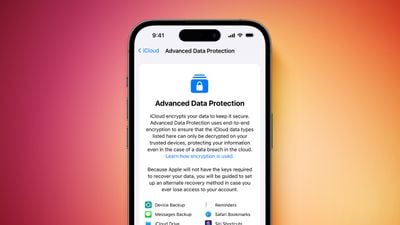
Apple advanced security Advanced Data Protection screen Feature Orange
The encrypted security feature gives you the choice to further protect your important iCloud data, including iCloud Backup, Photos, Notes, and more.

Apple's use of end-to-end encryption means the vast majority of your most sensitive iCloud data can only be decrypted on your trusted Apple devices where you're signed in with your Apple ID account, ensuring that the data remains secure even in the case of a data breach in the cloud. In other words, no-one – not even Apple – can access your data except you.

iCloud already protects 14 sensitive data categories using end-to-end encryption by default, including passwords in iCloud Keychain and Health data. For users who enable Advanced Data Protection, the total number of data categories protected using end-to-end encryption rises to 23, including iCloud Backup, Notes, and Photos.

Advanced Data Protection provides end-to-end encryption for the following additional iCloud categories:

  • Device Backups and Messages Backups
  • iCloud Drive
  • Notes
  • Photos
  • Reminders
  • Voice Memos
  • Safari Bookmarks
  • Siri Shortcuts
  • Wallet Passes

The only major iCloud data categories that are not covered are iCloud Mail, Contacts, and Calendar because of the need to interoperate with the global email, contacts, and calendar systems.

Crucially, Advanced Data Protection for iCloud is an opt-in feature, so you must enable it yourself using the steps below. Note that if you lose access to your account, you can only recover your data using your device passcode or password, a recovery contact, or a recovery key. (You will be guided to set up at least one recovery contact or recovery key before Advanced Data Protection is enabled.)

It's also worth bearing in mind that when Advanced Data Protection is enabled, access to your data via iCloud.com is disabled by default, although you will have the option to turn on data access on iCloud.com, which allows the web browser to have temporary access to data-specific encryption keys.

Before you enable Advanced Data Protection, you'll first have to update all your devices to the latest software versions, otherwise you'll have to remove these devices from your account as they won't support end-to-end encryption. Advanced Data Protection is available globally on the iPhone, iPad, and Mac, running iOS 16.3 or later, iPadOS 16.3 or later, and macOS 13.2 or later, respectively.

How to Enable Account Recovery on iPhone, iPad, and Mac

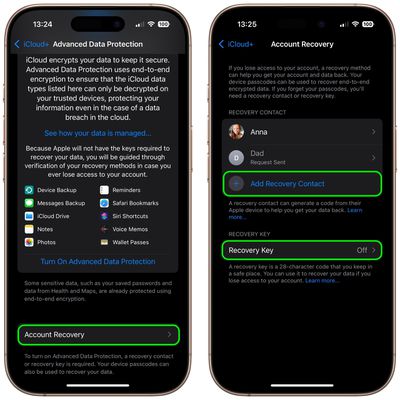
Before turning on Advanced Data Protection, you'll need to set up Account Recovery. This ensures you can recover your data if you forget your password.

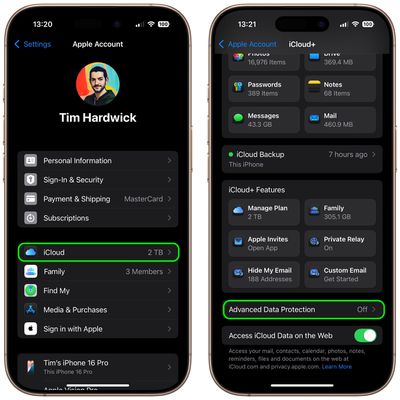
  1. Open Settings on your iPhone or iPad (or System Settings on Mac), and then select your Apple Account banner at the top of the menu.
  2. Select iCloud.
  3. Select Advanced Data Protection.
    settings

  4. Select Account Recovery.
  5. Add a Recovery Contact, and set a Recovery Key if desired.
    settings

A recovery contact should be a trusted person such as a family member or friend who also owns an Apple device. They will receive recovery codes if you ever forget your password. If you opt to set a 28-character recovery key, you'll need to print it out and keep it somewhere safe, or store it in a password manager.

How to Enable Advanced Data Protection on iPhone, iPad, and Mac

Once Account Recovery is set up, you can enable Advanced Data Protection for iCloud Backups.

  1. Open Settings on iPhone or iPad (System Settings on Mac) and then select your Apple Account banner at the top of the menu.
  2. Select iCloud.
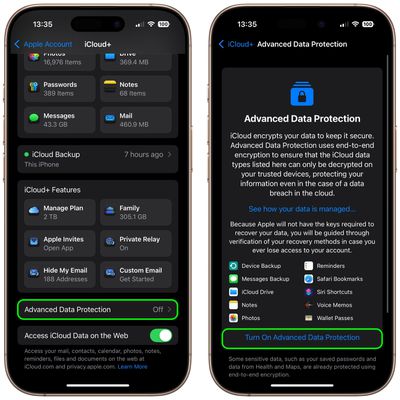
  3. Select Advanced Data Protection.
  4. Toggle on the switch for Advanced Data Protection to turn it on.
settings

That's it. Your iCloud backups are now protected with end-to-end encryption.

You can turn off Advanced Data Protection at any time. Upon doing so, your device will securely upload the required encryption keys to Apple servers, and your account will revert to a standard level of protection.


Top Rated Comments

PBG4 Dude Avatar
13 months ago

Not everyone has your level of paranoia. None of the 10 things this encrypts do I care whatsoever if someone sees. I always wonder what people talk about when they chat on encrypted apps? Criminal activity? Sexting? What?
The point is, it isn’t anyone else’s business. Doesn’t matter if I’m talking about my favorite movie or where I’m investing next week, you shouldn’t be able to see it if I didn’t send it to you.

This whole “if you’re doing nothing wrong what are you worried about?” Argument is specious at best.
Score: 20 Votes (Like | Disagree)
turbineseaplane Avatar
13 months ago

Not everyone has your level of paranoia. None of the 10 things this encrypts do I care whatsoever if someone sees. I always wonder what people talk about when they chat on encrypted apps? Criminal activity? Sexting? What? Why does everything need to be encrypted? Some data needs to be encrypted for sure, but for most people, most of this doesn't need to be so having this ON by default, as you suggest, is not a good idea.
For anyone interested, Wikipedia has well covered the "nothing to hide argument"

Link ('https://en.wikipedia.org/wiki/Nothing_to_hide_argument')
Score: 17 Votes (Like | Disagree)
Fraserh02 Avatar
13 months ago

Not everyone has your level of paranoia. None of the 10 things this encrypts do I care whatsoever if someone sees. I always wonder what people talk about when they chat on encrypted apps? Criminal activity? Sexting? What? Why does everything need to be encrypted? Some data needs to be encrypted for sure, but for most people, most of this doesn't need to be so having this ON by default, as you suggest, is not a good idea.
Since you don’t care about encryption I assume you’d be totally fine with sharing your complete medical history (physical and mental health included), your personal and business finances, your full browser history, every private conversation you’ve ever had (family drama, work discussions, all of it), your location, any legal matters you’ve been involved in (divorce, accidents, disputes, etc)?

I don’t get why you wouldn’t think anyone would not want to protect their personal data from hackers, corporations selling their information, government mass surveillance, identity theft, or even just nosy people who have no business knowing their private affairs? Clearly you think encryption is only for criminals and intimate conversation. Not like you know, useful for literally every person who doesn’t want their life to be an open book for strangers. But sure.. let’s just assume privacy is useless because you personally don’t think you need it. Great logic!

This should just be on by default really shouldn’t it.. without us even needing to even consider enabling it!
Score: 11 Votes (Like | Disagree)
Mr_Ed Avatar
13 months ago

For anyone interested, Wikipedia has well covered the "nothing to hide argument"

Link ('https://en.wikipedia.org/wiki/Nothing_to_hide_argument')
“It’s not that I have something to hide, I have nothing I want you to see”

A movie quote I like.
Score: 11 Votes (Like | Disagree)
WarmWinterHat Avatar
13 months ago

Not everyone has your level of paranoia. None of the 10 things this encrypts do I care whatsoever if someone sees. I always wonder what people talk about when they chat on encrypted apps? Criminal activity? Sexting? What?
The point is that no one should have to think about it. If it's enabled by everyone, always, and by default, then it becomes the norm. Your data should your business and yours alone, not available for marketing, curious people, companies or anyone else without a warrant.

I'm not particularly paranoid and don't think anyone is trying to get anything I have, I just don't like carrying data around with me and prefer a quieter and less connected life. My wife, on the other hand, is a prominent local attorney and has ran for office a few times..people have actively tried to get into her accounts, and routinely still do. It can be a battle with the fishing attempts, and she isn't tech savvy. She also doesn't use an iPhone, and doesn't like Apple devices.
Score: 9 Votes (Like | Disagree)
Martin Bland Avatar
13 months ago

Not everyone has your level of paranoia. None of the 10 things this encrypts do I care whatsoever if someone sees. I always wonder what people talk about when they chat on encrypted apps? Criminal activity? Sexting? What? Why does everything need to be encrypted? Some data needs to be encrypted for sure, but for most people, most of this doesn't need to be so having this ON by default, as you suggest, is not a good idea.
If you don’t care, please post it all here. We are curious to see what you don’t have to hide. It will be fun. And you have nothing to hide.
Score: 6 Votes (Like | Disagree)

Popular Stories

Apple Logo Zoomed

Tim Cook Teases Plans for Apple's Upcoming 50th Anniversary

Thursday February 5, 2026 12:54 pm PST by
Apple turns 50 this year, and its CEO Tim Cook has promised to celebrate the milestone. The big day falls on April 1, 2026. "I've been unusually reflective lately about Apple because we have been working on what do we do to mark this moment," Cook told employees today, according to Bloomberg's Mark Gurman. "When you really stop and pause and think about the last 50 years, it makes your heart ...
wwdc sans text feature

Apple Rumored to Announce New Product on February 19

Thursday February 5, 2026 12:22 pm PST by
Apple plans to announce the iPhone 17e on Thursday, February 19, according to Macwelt, the German equivalent of Macworld. The report, citing industry sources, is available in English on Macworld. Apple announced the iPhone 16e on Wednesday, February 19 last year, so the iPhone 17e would be unveiled exactly one year later if this rumor is accurate. It is quite uncommon for Apple to unveil...
Finder Siri Feature

Why Apple's iOS 26.4 Siri Upgrade Will Be Bigger Than Originally Promised

Friday February 6, 2026 3:06 pm PST by
In the iOS 26.4 update that's coming this spring, Apple will introduce a new version of Siri that's going to overhaul how we interact with the personal assistant and what it's able to do. The iOS 26.4 version of Siri won't work like ChatGPT or Claude, but it will rely on large language models (LLMs) and has been updated from the ground up. Upgraded Architecture The next-generation...
iOS 26

iOS 26.3 and iOS 26.4 Will Add These New Features to Your iPhone

Tuesday February 3, 2026 7:47 am PST by
While the iOS 26.3 Release Candidate is now available ahead of a public release, the first iOS 26.4 beta is likely still at least a week away. Following beta testing, iOS 26.4 will likely be released to the general public in March or April. Below, we have recapped known or rumored iOS 26.3 and iOS 26.4 features so far. iOS 26.3 iPhone to Android Transfer Tool iOS 26.3 makes it easier...
iphone 17 pro dark blue 1

iPhone 18 Pro Max Rumored to Deliver Next-Level Battery Life

Friday February 6, 2026 5:14 am PST by
The iPhone 18 Pro Max will feature a bigger battery for continued best-in-class battery life, according to a known Weibo leaker. Citing supply chain information, the Weibo user known as "Digital Chat Station" said that the iPhone 18 Pro Max will have a battery capacity of 5,100 to 5,200 mAh. Combined with the efficiency improvements of the A20 Pro chip, made with TSMC's 2nm process, the...