Enable End-to-End Encryption for Your iCloud Backups - GeekWebGuides
Skip to Content

Enable End-to-End Encryption for Your iCloud Backups

by

Apple's Advanced Data Protection for iCloud feature uses end-to-end encryption to provide the highest level of cloud data security that Apple offers. Here's everything you need to know about enabling it on your devices.
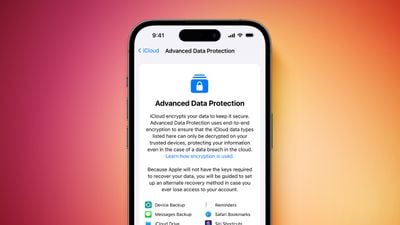
Apple advanced security Advanced Data Protection screen Feature Orange
The encrypted security feature gives you the choice to further protect your important iCloud data, including iCloud Backup, Photos, Notes, and more.

Apple's use of end-to-end encryption means the vast majority of your most sensitive iCloud data can only be decrypted on your trusted Apple devices where you're signed in with your Apple ID account, ensuring that the data remains secure even in the case of a data breach in the cloud. In other words, no-one – not even Apple – can access your data except you.

iCloud already protects 14 sensitive data categories using end-to-end encryption by default, including passwords in iCloud Keychain and Health data. For users who enable Advanced Data Protection, the total number of data categories protected using end-to-end encryption rises to 23, including iCloud Backup, Notes, and Photos.

Advanced Data Protection provides end-to-end encryption for the following additional iCloud categories:

  • Device Backups and Messages Backups
  • iCloud Drive
  • Notes
  • Photos
  • Reminders
  • Voice Memos
  • Safari Bookmarks
  • Siri Shortcuts
  • Wallet Passes

The only major iCloud data categories that are not covered are iCloud Mail, Contacts, and Calendar because of the need to interoperate with the global email, contacts, and calendar systems.

Crucially, Advanced Data Protection for iCloud is an opt-in feature, so you must enable it yourself using the steps below. Note that if you lose access to your account, you can only recover your data using your device passcode or password, a recovery contact, or a recovery key. (You will be guided to set up at least one recovery contact or recovery key before Advanced Data Protection is enabled.)

It's also worth bearing in mind that when Advanced Data Protection is enabled, access to your data via iCloud.com is disabled by default, although you will have the option to turn on data access on iCloud.com, which allows the web browser to have temporary access to data-specific encryption keys.

Before you enable Advanced Data Protection, you'll first have to update all your devices to the latest software versions, otherwise you'll have to remove these devices from your account as they won't support end-to-end encryption. Advanced Data Protection is available globally on the iPhone, iPad, and Mac, running iOS 16.3 or later, iPadOS 16.3 or later, and macOS 13.2 or later, respectively.

How to Enable Account Recovery on iPhone, iPad, and Mac

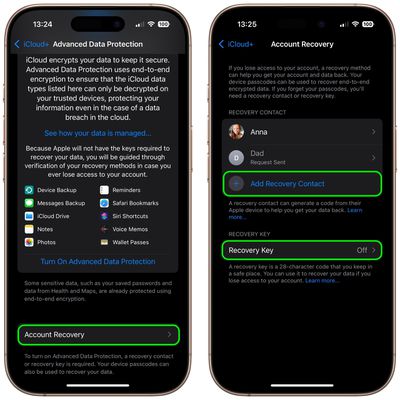
Before turning on Advanced Data Protection, you'll need to set up Account Recovery. This ensures you can recover your data if you forget your password.

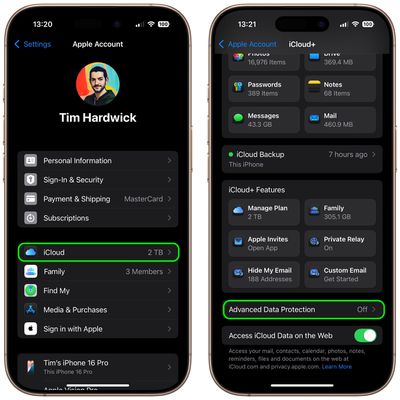
  1. Open Settings on your iPhone or iPad (or System Settings on Mac), and then select your Apple Account banner at the top of the menu.
  2. Select iCloud.
  3. Select Advanced Data Protection.
    settings

  4. Select Account Recovery.
  5. Add a Recovery Contact, and set a Recovery Key if desired.
    settings

A recovery contact should be a trusted person such as a family member or friend who also owns an Apple device. They will receive recovery codes if you ever forget your password. If you opt to set a 28-character recovery key, you'll need to print it out and keep it somewhere safe, or store it in a password manager.

How to Enable Advanced Data Protection on iPhone, iPad, and Mac

Once Account Recovery is set up, you can enable Advanced Data Protection for iCloud Backups.

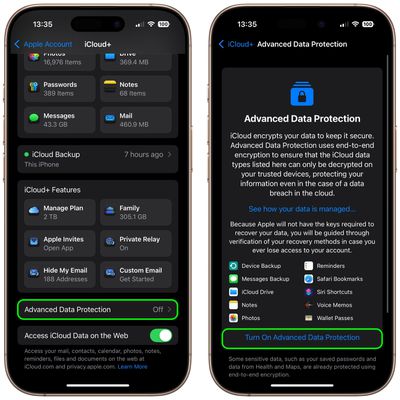
  1. Open Settings on iPhone or iPad (System Settings on Mac) and then select your Apple Account banner at the top of the menu.
  2. Select iCloud.
  3. Select Advanced Data Protection.
  4. Toggle on the switch for Advanced Data Protection to turn it on.
settings

That's it. Your iCloud backups are now protected with end-to-end encryption.

You can turn off Advanced Data Protection at any time. Upon doing so, your device will securely upload the required encryption keys to Apple servers, and your account will revert to a standard level of protection.


Top Rated Comments

PBG4 Dude Avatar
22 months ago

Not everyone has your level of paranoia. None of the 10 things this encrypts do I care whatsoever if someone sees. I always wonder what people talk about when they chat on encrypted apps? Criminal activity? Sexting? What?
The point is, it isn’t anyone else’s business. Doesn’t matter if I’m talking about my favorite movie or where I’m investing next week, you shouldn’t be able to see it if I didn’t send it to you.

This whole “if you’re doing nothing wrong what are you worried about?” Argument is specious at best.
Score: 20 Votes (Like | Disagree)
turbineseaplane Avatar
22 months ago

Not everyone has your level of paranoia. None of the 10 things this encrypts do I care whatsoever if someone sees. I always wonder what people talk about when they chat on encrypted apps? Criminal activity? Sexting? What? Why does everything need to be encrypted? Some data needs to be encrypted for sure, but for most people, most of this doesn't need to be so having this ON by default, as you suggest, is not a good idea.
For anyone interested, Wikipedia has well covered the "nothing to hide argument"

Link ('https://en.wikipedia.org/wiki/Nothing_to_hide_argument')
Score: 17 Votes (Like | Disagree)
Mr_Ed Avatar
22 months ago

For anyone interested, Wikipedia has well covered the "nothing to hide argument"

Link ('https://en.wikipedia.org/wiki/Nothing_to_hide_argument')
“It’s not that I have something to hide, I have nothing I want you to see”

A movie quote I like.
Score: 11 Votes (Like | Disagree)
22 months ago

Not everyone has your level of paranoia. None of the 10 things this encrypts do I care whatsoever if someone sees. I always wonder what people talk about when they chat on encrypted apps? Criminal activity? Sexting? What? Why does everything need to be encrypted? Some data needs to be encrypted for sure, but for most people, most of this doesn't need to be so having this ON by default, as you suggest, is not a good idea.
Since you don’t care about encryption I assume you’d be totally fine with sharing your complete medical history (physical and mental health included), your personal and business finances, your full browser history, every private conversation you’ve ever had (family drama, work discussions, all of it), your location, any legal matters you’ve been involved in (divorce, accidents, disputes, etc)?

I don’t get why you wouldn’t think anyone would not want to protect their personal data from hackers, corporations selling their information, government mass surveillance, identity theft, or even just nosy people who have no business knowing their private affairs? Clearly you think encryption is only for criminals and intimate conversation. Not like you know, useful for literally every person who doesn’t want their life to be an open book for strangers. But sure.. let’s just assume privacy is useless because you personally don’t think you need it. Great logic!

This should just be on by default really shouldn’t it.. without us even needing to even consider enabling it!
Score: 11 Votes (Like | Disagree)
WarmWinterHat Avatar
22 months ago

Not everyone has your level of paranoia. None of the 10 things this encrypts do I care whatsoever if someone sees. I always wonder what people talk about when they chat on encrypted apps? Criminal activity? Sexting? What?
The point is that no one should have to think about it. If it's enabled by everyone, always, and by default, then it becomes the norm. Your data should your business and yours alone, not available for marketing, curious people, companies or anyone else without a warrant.

I'm not particularly paranoid and don't think anyone is trying to get anything I have, I just don't like carrying data around with me and prefer a quieter and less connected life. My wife, on the other hand, is a prominent local attorney and has ran for office a few times..people have actively tried to get into her accounts, and routinely still do. It can be a battle with the fishing attempts, and she isn't tech savvy. She also doesn't use an iPhone, and doesn't like Apple devices.
Score: 9 Votes (Like | Disagree)
22 months ago

Not everyone has your level of paranoia. None of the 10 things this encrypts do I care whatsoever if someone sees. I always wonder what people talk about when they chat on encrypted apps? Criminal activity? Sexting? What? Why does everything need to be encrypted? Some data needs to be encrypted for sure, but for most people, most of this doesn't need to be so having this ON by default, as you suggest, is not a good idea.
If you don’t care, please post it all here. We are curious to see what you don’t have to hide. It will be fun. And you have nothing to hide.
Score: 6 Votes (Like | Disagree)

Popular Stories

General iCloud App Feature

Apple Quietly Boosts Email Feature for iCloud+ Subscribers

Tuesday October 6, 2026 3:27 am PDT by
Yesterday we reported that Apple tripled the number of iCloud Mail aliases users can create, from three to nine. But it turns out that's not the only email-related limit Apple has raised. The company has also bumped the number of email addresses you can use per iCloud Custom Domain, from three to 10. If you subscribe to iCloud+, you can use a domain name you already own for your iCloud Mail...
General iCloud App Feature

Apple Quietly Triples iCloud Mail Alias Limit to Nine

Monday October 5, 2026 5:15 am PDT by
Apple appears to have quietly tripled the number of iCloud Mail aliases users can create, increasing the limit from three to nine. The increase was first noticed last week by a Reddit user, and picked up shortly after by a member of the GeekWebGuides forums. GeekWebGuides can confirm the change is live at iCloud.com. The increased limit has not been mentioned by Apple, so it could conceivably be a...
M5 MacBook Pro

RIP, MacBook Ultra

Monday October 19, 2026 9:37 am PDT by
Apple today sent out invites for an experience in Los Angeles on Wednesday, October 28, and the "Pro and tell" tagline on the invitation likely means that the rumored MacBook models with touch-enabled OLED displays will stick with MacBook Pro branding instead of the once-rumored "MacBook Ultra" name. The long-rumored "iPhone Ultra" ended up being named iPhone Duo, so speculation that Apple...
Latest Stories
Apple's iWork Apps Get 'Intelligent Assistant' and iPhone Duo Support
24 minutes ago
Apple is Apparently Considering a Slightly Larger iPhone Duo
29 minutes ago
Giant iPhone Duo Displays Coming to Four Apple Stores
2 hours ago
Apple Pulls Keynote, Pages and Numbers From App Store [Update: Back]
2 hours ago
Apple Updates More Apps With iPhone Duo Support
3 hours ago
Apple Will Label Apps 'Made for iPhone Duo' in App Store
6 hours ago
Amazon Takes $49 Off iPad With Prices Starting at $399.99
6 hours ago
F1 on Apple TV Now Available in Dolby Atmos
7 hours ago
Apple Reveals More Than 50 Apps That Will Be Updated for iPhone Duo
7 hours ago
Apple Blocks Certificates That Could Help Attackers Fake Websites
9 hours ago
Giant iPhone Duo Installations Spotted at Apple Fifth Avenue
9 hours ago
iPhone Duo 2 Prototypes Include Under-Display Face ID
10 hours ago
Tesla App Gains iPad and iPhone Duo Support
14 hours ago
Apple Reportedly Boosts iPhone Duo Orders by 44%
14 hours ago
Fortnite Returning to Australian App Store After Court Ruling
15 hours ago
Apple Ordered to Open iPhone to Rival App Stores in Australia
15 hours ago
Apple Suppliers Face Hurdles Cutting Circuit Board Emissions
15 hours ago
Things Updated for iPhone Duo With Adaptive Layout
16 hours ago
Simplicity and Siri AI Are HomeView's Killer Features, Apple Says
16 hours ago
iPhone Duo Reviewers Really Miss Face ID
21 hours ago
Does the iPhone Duo Run Hot? Here's What Reviews Found
22 hours ago
Apple Music's New Look is Now Live on Apple's Website
23 hours ago
Anthropic Launches Claude Duet, a Proactive AI Agent
1 day ago
What 32,000 Folds Did to the iPhone Duo's Hinge
1 day ago
iPhone Duo's Hidden FaceTime Camera Takes 'Trash' Photos
1 day ago
iPhone Duo Has 'Edge Light' Feature That Debuted on Macs Last Year
1 day ago
Apple Support App Updated for iPhone Duo's Larger Display
1 day ago
Amazon Sweetens the Deal on Entry-Level 16-Inch MacBook Pro With $570 Off
1 day ago
iPhone Duo Tips Over on MagSafe Stands When Unfolded
1 day ago
Apple Music's New Look Officially Announced
1 day ago