
How to Enable Apple Intelligence If You're Outside the US - GeekWebGuides
Skip to Content

How to Enable Apple Intelligence If You're Outside the US

by

Apple is introducing a set of AI features in iOS 18.1 and iPadOS 18.1 under the banner "Apple Intelligence." These features are officially only currently available in beta to developers in the US, but it's actually pretty easy to get it up and running on iPhones and iPads in most other locations with the exception of the European Union and China.

apple intelligence symbol
The main reason Apple has limited access to Apple Intelligence is that it only supports US English at this time, but if you can work with that – and you have a compatible device – then there's no technical reason why you can't start exploring the new AI features.

Supported Devices

Apple Intelligence encompasses a range of capabilities, including composing text and emails, automating actions across various apps, generating images, summarizing documents and texts, and more. However, these features require a lot of on-device computing power, so before you do anything, it's worth checking if your device is compatible. iPhone users need either an iPhone 15 Pro or iPhone 15 Pro Max to run Apple Intelligence, while only iPads powered by M1 or later Apple silicon processors are compatible.

Install Beta Software

If your device is supported, the first thing you need to do is install the latest developer beta for your device. Once you've followed the instructions provided in the linked article and your device is up and running with the latest beta (the third beta as of writing), follow these steps on your iPhone or iPad.

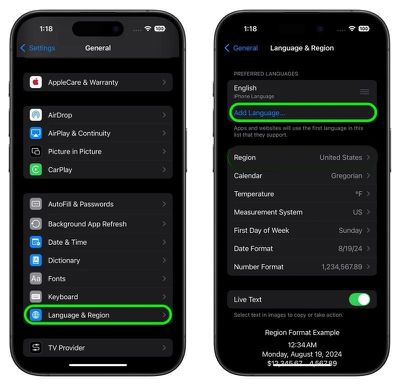
  1. Open Settings, then tap through to General ➝ Language & Region.
  2. Tap Add Language.. and choose English (US).
    settings

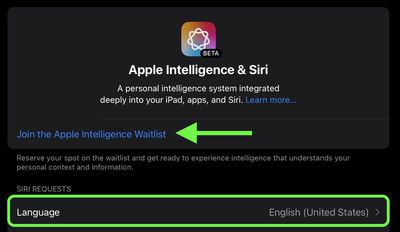
  3. Return to the main Settings menu and tap Apple Intelligence & Siri.
  4. Tap Language and choose English (United States).
  5. You will now be able to join the Apple Intelligence waitlist, which in most cases gets accepted in just a few minutes. Under the Apple Intelligence header text, tap Join Waitlist.
    apple intelligence join waitlist

  6. After what should hopefully be a short wait, the message will change to Turn On Apple Intelligence. Tap it, and a welcome message should appear, indicating you have sucessfully enabled the AI features on your device.
You can learn more here about all of the Apple Intelligence features available in the iOS 18.1 developer beta. Note that some of the Apple Intelligence additions won't be coming until later.


Related Forums: iOS 18, iPadOS 18

Popular Stories

Apple Intelligence Comes Under Fire Feature

Mac Users Reclaim 12GB+ of Storage With Apple Intelligence Removal Tool

Monday October 5, 2026 4:12 am PDT by
A new open-source tool is making waves in the Mac community by helping users reclaim valuable storage space taken up by Apple's AI models. Called "RemoveMacAI," the command line tool disables Apple Intelligence on macOS 27, removes its downloaded models, and prevents them from being downloaded again. In macOS 27, Apple removed the toggle to disable Apple Intelligence wholesale, and simply...
apple intelligence black

Apple Intelligence Taking Up 30GB+ on Some Macs Running macOS 27

Wednesday September 23, 2026 3:30 am PDT by
After you install macOS 27 Golden Gate, Apple automatically downloads a multi-gigabyte AI model to your Mac the next time it's connected to the internet. Unlike previous versions of macOS, you can't prevent it. Siri AI, and by extension Apple Intelligence, are now a mandatory part of your system. For macOS 27 Golden Gate, Apple says the latest Apple Intelligence features require up to 14GB...
Apple TV Sans Remote Feature

tvOS 27.2 Code Hints at Apple Intelligence for New Apple TV

Monday October 5, 2026 1:45 pm PDT by
Apple's latest tvOS 27.2 beta adds weight to rumors that the next Apple TV will have Siri AI and Apple Intelligence support. Code suggests Apple is adding an Improve Siri & Apple Intelligence toggle to the tvOS Settings app. "Help improve foundation models and Siri by allowing Apple to collect and use your text and audio interactions with Siri, Dictation, and Translate," the text reads....
Latest Stories
iPhone Duo Launch Begins as First Orders Reach Customers
1 hour ago
1Password for Agents Keeps Your Passwords Hidden From AI
2 hours ago
iPhone Duo 24 Hours Later: Your Questions Answered
3 hours ago
Apple's iWork Apps Get 'Intelligent Assistant' and iPhone Duo Support
4 hours ago
Apple is Apparently Considering a Slightly Larger iPhone Duo
4 hours ago
Giant iPhone Duo Displays Coming to Four Apple Stores
5 hours ago
Apple Pulls Keynote, Pages and Numbers From App Store [Update: Back]
6 hours ago
Apple Updates More Apps With iPhone Duo Support
6 hours ago
Apple Will Label Apps 'Made for iPhone Duo' in App Store
9 hours ago
Amazon Takes $49 Off iPad With Prices Starting at $399.99
9 hours ago
F1 on Apple TV Now Available in Dolby Atmos
10 hours ago
Apple Reveals More Than 50 Apps That Will Be Updated for iPhone Duo
11 hours ago
Apple Blocks Certificates That Could Help Attackers Fake Websites
12 hours ago
Giant iPhone Duo Installations Spotted at Apple Fifth Avenue
13 hours ago
iPhone Duo 2 Prototypes Include Under-Display Face ID
13 hours ago
Tesla App Gains iPad and iPhone Duo Support
17 hours ago
Apple Reportedly Boosts iPhone Duo Orders by 44%
17 hours ago
Fortnite Returning to Australian App Store After Court Ruling
18 hours ago
Apple Ordered to Open iPhone to Rival App Stores in Australia
18 hours ago
Apple Suppliers Face Hurdles Cutting Circuit Board Emissions
18 hours ago
Things Updated for iPhone Duo With Adaptive Layout
19 hours ago
Simplicity and Siri AI Are HomeView's Killer Features, Apple Says
19 hours ago
iPhone Duo Reviewers Really Miss Face ID
1 day ago
Does the iPhone Duo Run Hot? Here's What Reviews Found
1 day ago
Apple Music's New Look is Now Live on Apple's Website
1 day ago
Anthropic Launches Claude Duet, a Proactive AI Agent
1 day ago
What 32,000 Folds Did to the iPhone Duo's Hinge
1 day ago
iPhone Duo's Hidden FaceTime Camera Takes 'Trash' Photos
1 day ago
iPhone Duo Has 'Edge Light' Feature That Debuted on Macs Last Year
1 day ago
Apple Support App Updated for iPhone Duo's Larger Display
1 day ago









































