iOS 16: How to Enable or Disable Deletion Notifications for an iCloud Shared Photo Library - MacRumors
Skip to Content

iOS 16: How to Enable or Disable Deletion Notifications for an iCloud Shared Photo Library

by

In iOS 16, it's possible to create a shared iCloud Photo Library and then invite up to five other friends with Apple products to view photos, contribute photos, and edit photos.

iOS 16 iCloud Photos Guide Feature
If you've already created an iCloud Shared Photo Library that other friends have access to, you can get notified by iOS 16 whenever a photo you contributed to the library is deleted by someone else.

Alternatively, if you're already receiving these notifications, you can opt to disable them. The following steps show you how to turn them on or off.

  1. Launch the Settings app on your iPhone.
  2. Scroll down and tap Photos.
  3. Under "Library," tap Shared Library.
  4. Toggle the switch on or off next to Deletion Notifications to enable or disable them.
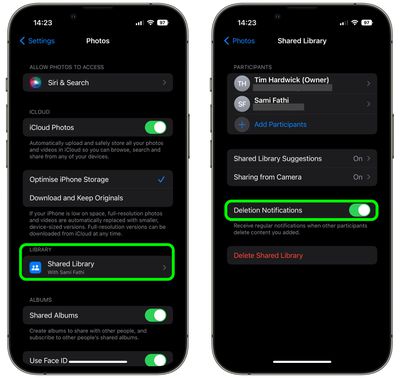
settings

That's all there is to it, and your changes will come into effect immediately. Note that the person who created the ‌‌iCloud‌‌ Shared Photo Library will have their ‌‌iCloud‌‌ storage space used for the shared photos.

Popular Stories

Apple Event Far Out Banner

NASA Shares Photos Shot on iPhone 17 Pro Max During Artemis II Mission to the Moon

Sunday April 5, 2026 6:39 pm PDT by
NASA has shared three incredible photos shot on the iPhone 17 Pro Max by astronauts during the Artemis II mission to the Moon. Shot on iPhone 17 Pro Max (Wiseman) In February, NASA announced that the iPhone had been fully qualified for extended use in orbit, with reports indicating that each of the four crew members aboard the Orion are equipped with an iPhone 17 Pro Max for personal photos...
iphone 17 pro orange

Apple Highlights Photos Shot on iPhone During NASA's Mission to Moon

Saturday April 11, 2026 8:17 am PDT by
As we previously reported, astronauts aboard NASA's Orion spacecraft used the iPhone 17 Pro Max to take selfies of themselves with the Earth in the background during the Artemis II mission around the far side of the Moon last week. Now that the crew members have safely returned to Earth, Apple's CEO Tim Cook and marketing chief Greg Joswiak have both turned to social media to congratulate...
macOS 27 on MacBook Pro

macOS 27 Will Mark the End of an Era

Saturday April 18, 2026 6:45 am PDT by
During its Platforms State of the Union segment at WWDC 2025, Apple revealed that macOS 26 Tahoe is the final major macOS version for Intel-based Macs. The upcoming macOS 27 release will be compatible with Apple silicon Macs only, meaning that you will need a Mac with an M-series chip or a MacBook Neo with an A18 Pro chip in order to install the software update. macOS 27 should be available...