

In watchOS 9, Apple has added a new Low Power Mode for Apple Watch Series 4 and later that is designed to extend the battery life of your device beyond the usual "up to 18 hours" of life on a single charge in normal use that Apple advertises. Keep reading to learn how the function works and how to enable it.
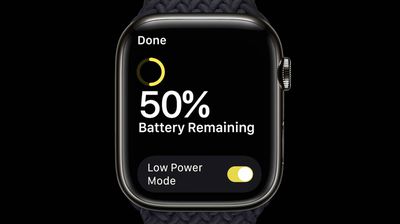
For some years now, many Apple Watch fans have been clamoring for a new model that offers significantly more battery life than "up to 18 hours," which is the life that Apple has advertised ever since the first Apple Watch model was launched.
In 2022, Apple finally answered those calls with Apple Watch Ultra, which offers up to 36 hours of battery life on a single charge in normal use.
Truthfully though, the Apple Watch Ultra is a fairly niche device with many more features (and a significantly higher price tag) than the average user is going to need, but the good news is that with watchOS 9, Apple also introduced a new Low Power Mode for Apple Watch Series 4 and later models that can eke out more life from these more commonly used devices.
The new Low Power Mode is separate from the Apple Watch's existing Power Reserve mode that only displays the clock when enabled. It's also important to know that the new Low Power Mode works by disabling or affecting a number of specific features on Apple Watch that we've detailed below. Make sure you carefully read the list so that you know what is not functional when the mode is turned on. The steps for enabling Low Power Mode in general use and for workouts can be found below.
Features Turned Off by Low Power Mode
- Always On display
- Heart rate notifications for irregular rhythm, high heart rate, and low heart rate
- Background heart rate measurements
- Background blood oxygen measurements
- Start workout reminder
Features Turned Off When iPhone Isn't Nearby
- Wi-Fi and cellular connections
- Incoming phone calls and notifications
Features Affected by Low Power Mode
- Making a phone call can take longer
- Background app refresh happens less frequently
- Complications update less frequently
- Siri can take longer to process a request
- Some animations and scrolling might appear less smooth
Note that Fall Detection continues to work in Low Power Mode.
How to Enable Low Power Mode on Apple Watch
When your Apple Watch's battery percentage drops to 10%, a Low Power Mode alert will ask if you want to turn on the feature. Note that Low Power Mode turns off automatically when an Apple Watch is charged to 80%, unless users manually turn it on for a set number of days. Bear in mind that you can have Low Power Mode turn on automatically when you begin a workout, with metrics such as heart rate and pace still measured.
Here's how to turn the feature on manually on an Apple Watch Series 4 or later running watchOS 9 or later.
- Swipe up on the watch face of your Apple Watch to bring up Control Center.
- Tap the battery percentage button.

- Tap the switch next to Low Power Mode.
- After reading the on-screen prompt, scroll to the bottom and select from the following: Turn On, Turn On For..., and Dismiss.
- If you tapped Turn On For..., select On for 1 Day, On for 2 Days, or On for 3 Days on the second screen.
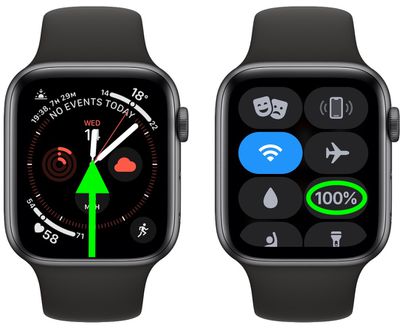
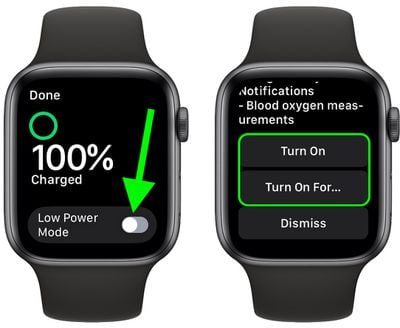
When your Apple Watch is in Low Power Mode, a yellow circle icon appears at the top of the screen. Also, the battery percentage button in Control Center, the charging animation, and the time in Nightstand mode all turn yellow.
How to Enable Low Power Mode for Workouts
You can also set your Apple Watch to automatically enter Low Power Mode whenever you start a workout, which is particularly useful if you plan to work out for a long time without it draining battery. Note that when you use the Workout app in Low Power Mode, metrics such as heart rate and pace are still measured.
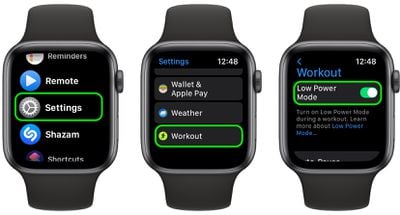
- Launch the Settings app on your Apple Watch.
- Scroll down, then tap Workout.
- Tap the switch next to Low Power Mode to enable the automation.
Note that when Low Power Mode is enabled without your iPhone nearby, and you open an app that requires a data connection, Wi-Fi or cellular connectivity will resume so that the app can function properly, which can cause "significant battery consumption," according to Apple. Also, bear in mind that missed phone calls and notifications are retrieved periodically whenever your Apple Watch is in Low Power Mode.


















