

Apple's new Focus feature in iOS 15 lets you set up your device to help you be in the moment and zone in on a single thing. Focus does this by filtering notifications based on what you're doing, and you can customize Focus modes for specific scenarios.
An optional feature called Smart Activation lets your iPhone automatically turn on particular Focus modes at opportune times through the day, based on signals like your location, app usage, and more.
For example, if you have set up a custom Focus mode called "Studying," and you usually study with the Books app, in the library, immediately after lunch on weekdays, Smart Activation can learn your routine and intelligently activate the Focus mode you made without you having to do anything.
Setting up Smart Activation for a specific Focus mode is easy once you know how. Take a look at the steps below.
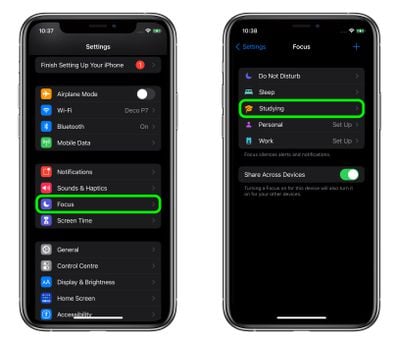
- Launch the Settings app on your iPhone, then tap Focus.
- Select the Focus mode that you want to automate.

- Under "Turn On Automatically," tap Smart Activation.
- Toggle the switch next to Smart Activation to the green ON position.
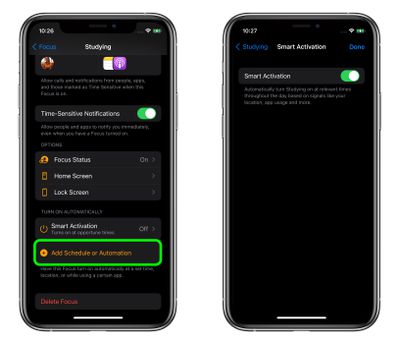
That's all there is to it. If the Smart Activation isn't accurate enough for your use case, you can turn it off using the same switch in the last step, and perhaps try adding a more specific schedule or automation instead.
























![Apple Pulls Keynote, Pages and Numbers From App Store [Update: Back]](https://images.macrumors.com/t/Okb7kitB_gNr6qe5Pex9nQIysD8=/112x112/article-new/2026/01/Apple-Creator-Studio-iWork-suite.jpg)





















