

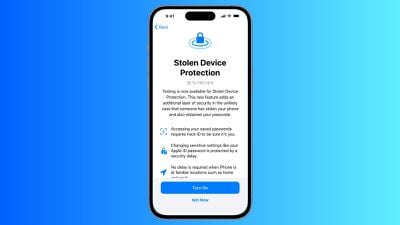
When Apple released iOS 17.3 in January, it introduced a Stolen Device Protection feature to provide iPhone users with added security. This article explains what it does, why you might want to turn it on, and how to go about doing so.
In 2023, reports began emerging about a new method thieves were using to steal iPhones and access users' highly sensitive data. Thieves would surreptitiously spy on their victims in public while they entered their passcode, before going on to steal the device. With the passcode known to them, criminals could empty bank accounts, steal passwords, and make the iPhone untraceable.
Enter, Stolen Device Protection
To make it harder for a thief to access passcode-protected data on a stolen iPhone, Apple in iOS 17.3 included Stolen Device Protection. With the feature enabled, Face ID or Touch ID is required to access passwords in iCloud Keychain, Lost Mode settings, options for erasing the device, and making purchases in Safari.
In addition to the new biometric requirements, the feature also imposes a one-hour security delay on actions like changing an Apple ID password. In other words, if someone tries to change Apple ID login information, Face ID authentication is required, and then an hour must pass before the password can be changed. The only time this wait period is not imposed is when the device at a trusted location like home or work.
Actions Requiring Face ID/Touch ID With Stolen Device Protection Enabled
- Viewing/using passwords or passkeys saved in iCloud Keychain
- Applying for a new Apple Card
- Viewing an Apple Card virtual card
- Turning off Lost Mode
- Erasing all content and settings
- Taking certain Apple Cash and Savings actions in Wallet
- Using payment methods saved in Safari
- Using your iPhone to set up a new device
Note that these actions do not have a passcode backup, so you can't use a passcode to avoid using Face ID or Touch ID.
Actions Requiring 1-Hour Delay With Stolen Device Protection Enabled
Actions that require biometric authentication and have a one-hour security delay include the following:
- Changing your Apple ID password
- Updating select Apple ID account security settings, including adding or removing a trusted device, trusted phone number, Recovery Key, or Recovery Contact
- Changing your iPhone passcode
- Adding or removing Face ID or Touch ID
- Turning off Find My
- Turning off Stolen Device Protection
How to Enable Stolen Device Protection
Note that Stolen Device Protection is only available on iPhones that are able to run iOS 17, which includes the iPhone XS and newer. Also, make sure your iPhone is up-to-date and running iOS 17.3 or later (Settings ➝ General ➝ Software Update). Here's how to enable the feature.
- Open the Settings app.
- Scroll down and tap Face ID & Passcode (or Touch ID & Passcode, depending on iPhone model).
- Enter your passcode at the prompt.
- Scroll down and tap Stolen Device Protection.
- Toggle on the switch next to Stolen Device Protection, then tap Turn On at the prompt.
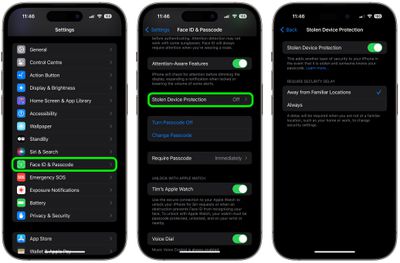
Note that if your iPhone is running iOS 17.4 or later, an additional option on this screen lets you choose to require a security delay when your device is Away from Familiar Locations, or Always. Otherwise, that's all there is to it. You can just as easily turn off the feature by toggling off the Stolen Device Protection switch, but you'll need to authenticate to do so.





















Top Rated Comments
With my experience last week of being locked out of my Apple account for days, spending hours with AppleCare support to no avail?
I'm not touching this with a barge pole.
If you set the stolen device protection and a random reset occurs while outside of your home you could be locked out of your devices for an extended period of time. Be very careful... I have a 20+ year Apple ID account getting reset every day or two right now. More details and a forum thread can be found here: https://www.geekwebguides.com/2024/04/27/apple-id-accounts-logging-out-users/