
All modern Macs with Apple silicon feature a built-in recovery system called macOS Recovery that includes various utilities that can be accessed before your Mac boots up the operating system. This article explains what apps are available in macOS Recovery and how to use it.
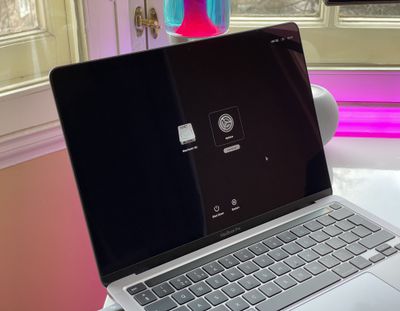
m1 mac startup options
With macOS Recovery, you can perform several troubleshooting related actions on your Mac if it isn't functioning as it should. Once you've entered macOS Recovery, you can repair your Mac's internal drive, reinstall macOS, restore your data from a Time Machine backup, start up in safe mode, transfer files between two Macs, and change security policies for different volumes.

The following apps are available in macOS Recovery:

  • Time Machine
  • Install macOS Ventura
  • Safari
  • Disk Utility
  • Startup Security Utility
  • Terminal
  • Share Disk
  • Startup Disk

How to Enter macOS Recovery

Follow these steps to start up your computer in macOS Recovery.

  1. Shut down your Mac if it's already on by clicking the Apple symbol in the menu bar and selecting Shut Down.
  2. When your Mac has shut down completely, press and hold the power button until "Loading startup options" appears on the screen.
  3. Click Options, then click Continue.
  4. If prompted, select a volume to recover, then click Next.
  5. Select your administrator account, then click Next.
  6. Enter your admin password, then click Continue.

After a short time, the Recovery app will appear in the menu bar, and you'll be able to select options and launch apps from the window or the menu bar.

m1 share disk startup
Note that if the Wi-Fi icon appears in the top-right corner of the screen and contains one or more bars, your Mac is connected to the internet. If the icon doesn't contain any bars, Wi-Fi is turned on but not connected to a wireless network. You can change the Wi-Fi status and join a network by clicking the Wi-Fi icon, after which you can download and reinstall macOS if required.

How to Quit macOS Recovery

When you've finished using the utilities in macOS Recovery, you can quit by clicking the Apple symbol in the menu bar and selecting Restart or Shut Down, or you can choose a different startup disk before restarting.


Popular Stories

wwdc sans text feature

Apple Rumored to Announce New Product on February 19

Thursday February 5, 2026 12:22 pm PST by
Apple plans to announce the iPhone 17e on Thursday, February 19, according to Macwelt, the German equivalent of Macworld. The report, citing industry sources, is available in English on Macworld. Apple announced the iPhone 16e on Wednesday, February 19 last year, so the iPhone 17e would be unveiled exactly one year later if this rumor is accurate. It is quite uncommon for Apple to unveil...
Apple Logo Zoomed

Tim Cook Teases Plans for Apple's Upcoming 50th Anniversary

Thursday February 5, 2026 12:54 pm PST by
Apple turns 50 this year, and its CEO Tim Cook has promised to celebrate the milestone. The big day falls on April 1, 2026. "I've been unusually reflective lately about Apple because we have been working on what do we do to mark this moment," Cook told employees today, according to Bloomberg's Mark Gurman. "When you really stop and pause and think about the last 50 years, it makes your heart ...
Finder Siri Feature

Why Apple's iOS 26.4 Siri Upgrade Will Be Bigger Than Originally Promised

Friday February 6, 2026 3:06 pm PST by
In the iOS 26.4 update that's coming this spring, Apple will introduce a new version of Siri that's going to overhaul how we interact with the personal assistant and what it's able to do. The iOS 26.4 version of Siri won't work like ChatGPT or Claude, but it will rely on large language models (LLMs) and has been updated from the ground up. Upgraded Architecture The next-generation...
maxresdefault

Apple Shows Off a Key Reason to Upgrade to the iPhone 17

Saturday February 7, 2026 9:26 am PST by
Apple today shared an ad that shows how the upgraded Center Stage front camera on the latest iPhones improves the process of taking a group selfie. "Watch how the new front facing camera on iPhone 17 Pro takes group selfies that automatically expand and rotate as more people come into frame," says Apple. While the ad is focused on the iPhone 17 Pro and iPhone 17 Pro Max, the regular iPhone...
iOS 26

iOS 26.3 and iOS 26.4 Will Add These New Features to Your iPhone

Tuesday February 3, 2026 7:47 am PST by
While the iOS 26.3 Release Candidate is now available ahead of a public release, the first iOS 26.4 beta is likely still at least a week away. Following beta testing, iOS 26.4 will likely be released to the general public in March or April. Below, we have recapped known or rumored iOS 26.3 and iOS 26.4 features so far. iOS 26.3 iPhone to Android Transfer Tool iOS 26.3 makes it easier...














