How to Erase and Factory Reset Your Mac - GeekWebGuides
Skip to Content

How to Erase and Factory Reset Your Mac

by

This article explains how to erase and factory reset your Mac if you plan to give it away, sell it, or trade it in. Apple silicon Macs and Intel Macs with a T2 security chip (2017-2020 models) have an "Erase All Content and Settings" option available in macOS Monterey and later. If you have an older pre-2017 Mac, it's a more convoluted process – follow this link instead to erase and factory reset your machine.


Traditionally, wiping a Mac and returning it to factory settings involved manually signing out of a range of services, erasing your Mac's internal drive, then reinstalling macOS. These steps are quite involved when you consider how easy it is to wipe an iPhone or iPad (Settings -> General -> Transfer or Reset iPhone -> Erase All Content and Settings).

Fortunately, Apple includes the same option on newer Macs running macOS Monterey and later. Erase All Content and Settings in macOS offers a very simple and straightforward way to erase your Mac without needing to reinstall the operating system. Thanks to the way storage is encrypted on Macs with Apple silicon or the T2 chip, the option is able to instantly and securely "erase" all user date by destroying the encryption keys.

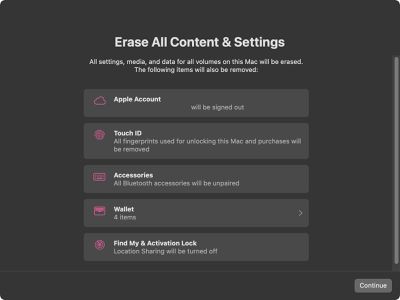
Not only does this effectively erase all user data and user-installed apps from your Mac without reinstalling macOS, it also signs out your Apple Account from a range of services, removes any Touch ID fingerprints, purchases, and all Apple Wallet items, and turns off Find My and Activation Lock, making it far easier to restore your Mac to like-new factory settings.

The following steps show you how it's done. Whether you simply want to start fresh with your Mac or are planning to sell or gift your computer to another person, after erasing it using this option, your Mac will display the Setup Assistant and be ready to be set up like new.

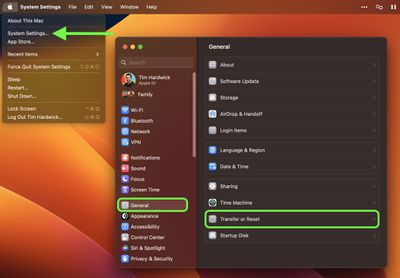
  1. Click the Apple () symbol in the menu bar and select System Settings (System Preferences... if you're not running macOS Ventura or later).
  2. If you're running macOS Ventura or later, select General in the sidebar, then choose Transfer or Reset -> Erase All Content and Settings.... Otherwise, select System Preferences -> Erase All Content and Settings from the menu bar.
    settings

  3. Enter your admin password in the Erase Assistant dialog prompt and click OK.
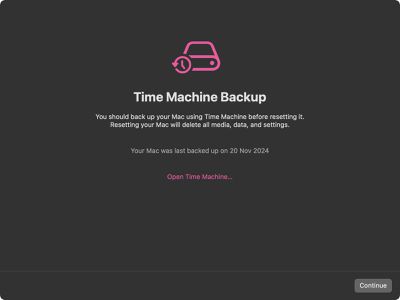
  4. If you haven't already backed up your important data, heed the onscreen Time Machine advice. Otherwise, click Continue.
    erase content settings mac

  5. Note all the settings, data, media, and other items that will be removed. Click Continue if you're sure.
    erase

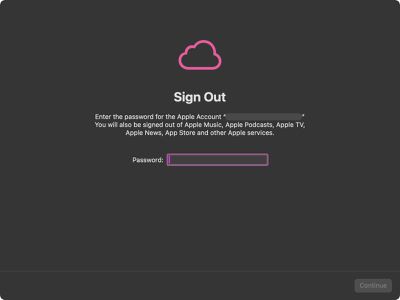
  6. Enter the password for your Apple Account to sign out, click Continue, then click Erase All Content & Settings in the prompt to confirm.
    erase

After following these steps, allow the erase process to complete. Your Mac may restart more than once during the process. Once finished, you'll see the "hello" message on your Mac's screen, indicating that your Mac has been restored to factory settings and Setup Assistant is ready to start anew.


Top Rated Comments

heystu Avatar
25 months ago
Sorry I’m just too paranoid to trust it, I have to clean format the drive, overwrite it with zeros 50 times, smash it to pieces with a sledgehammer, encase it in magma and bury it 200 feet underground. I’m still confused though why I never seem to get a decent trade in price.
Score: 16 Votes (Like | Disagree)
25 months ago

There are some restore utilities that can walk a hard drive and find all kinds of documents and files and photos, it’s good to at least do one secure pass. :rolleyes:
I think you're a bit clueless how this feature works. It tosses out the keys in the secure enclave and generates new ones. It makes no attempt to erase your data, because it's no longer readable without the original keys.
Score: 6 Votes (Like | Disagree)
WarmWinterHat Avatar
25 months ago

If you are going to sell the Mac, be careful. Buyer may revive the erased contents. Use secureErase utility to erase permanently.
I don't think that is really the case anymore with Filevault. Once the encryption keys are wiped, it's unrecoverable.
Score: 6 Votes (Like | Disagree)
Weaselboy Avatar
25 months ago

Question......I assume if we want to just revert to factory settings for our own use, just to go back to a clean state or to regain performance from the degradation that comes with general use, these steps would apply also. Correct?
Correct... this gives you the same end result as the old wipe/erase and reinstall OS routine.
Score: 5 Votes (Like | Disagree)
Fishrrman Avatar
25 months ago
I used this procecure recently on my 2021 MacBook Pro (m1pro), and it went quickly -- seems like less than 5 minutes (might have been only a minute or two, I should've had a stopwatch going).

Then... restored from a CarbonCopyCloner backup. That, too, went quickly (about 10 minutes), but I don't keep lots "of stuff" on it, and the backup was on a USB3.1 gen2 SSD.

A VERY nice improvement by Apple over "the old way of doing things"...
Score: 4 Votes (Like | Disagree)
25 months ago

A couple years ago, during a major purge of old tech I had in the basement, I had about twenty spinning-platter hard drives to get rid of. Didn't want to bother wiping them so I took them outside and used my oxy-acetylate cutting torch to blow holes though every one of them.

Good luck!
Not enough. Any competent law enforcement or "hacker" group from a movie or TV show will be able to reconstruct pictures of your dog from them.
Score: 4 Votes (Like | Disagree)

Popular Stories

iPhone Duo Trio

Here's What Apple's Apps Look Like on the iPhone Duo

Tuesday October 20, 2026 11:12 am PDT by
With just three days to go until the iPhone Duo is released, Apple is getting ready for the launch. Behind the scenes, the App Store now has screenshots of Apple's built-in apps running on the Duo. We've seen some apps in marketing materials, but images of the ones we haven't seen give us an idea of what it will be like using the iPhone Duo day to day. Many apps are shown in landscape...
Apple Creator Studio iWork suite

Apple Pulls Keynote, Pages and Numbers From App Store [Update: Back]

Thursday October 22, 2026 11:01 am PDT by
Apple has temporarily removed Keynote, Pages, and Numbers from the App Store, just after releasing an update that added iPhone Duo support and a new Intelligent Assistant. It is not clear if the apps were removed intentionally, or if it is a bug. Apple has not said when the apps will be reinstated, but if it was in error, they should return soon. Update: The Mac versions are back without...
M5 MacBook Pro

RIP, MacBook Ultra

Monday October 19, 2026 9:37 am PDT by
Apple today sent out invites for an experience in Los Angeles on Wednesday, October 28, and the "Pro and tell" tagline on the invitation likely means that the rumored MacBook models with touch-enabled OLED displays will stick with MacBook Pro branding instead of the once-rumored "MacBook Ultra" name. The long-rumored "iPhone Ultra" ended up being named iPhone Duo, so speculation that Apple...
Latest Stories
iPhone Duo Launch Begins as First Orders Reach Customers
3 hours ago
1Password for Agents Keeps Your Passwords Hidden From AI
4 hours ago
iPhone Duo 24 Hours Later: Your Questions Answered
4 hours ago
Apple's iWork Apps Get 'Intelligent Assistant' and iPhone Duo Support
5 hours ago
Apple is Apparently Considering a Slightly Larger iPhone Duo
5 hours ago
Giant iPhone Duo Displays Coming to Four Apple Stores
6 hours ago
Apple Pulls Keynote, Pages and Numbers From App Store [Update: Back]
7 hours ago
Apple Updates More Apps With iPhone Duo Support
8 hours ago
Apple Will Label Apps 'Made for iPhone Duo' in App Store
10 hours ago
Amazon Takes $49 Off iPad With Prices Starting at $399.99
11 hours ago
F1 on Apple TV Now Available in Dolby Atmos
11 hours ago
Apple Reveals More Than 50 Apps That Will Be Updated for iPhone Duo
12 hours ago
Apple Blocks Certificates That Could Help Attackers Fake Websites
13 hours ago
Giant iPhone Duo Installations Spotted at Apple Fifth Avenue
14 hours ago
iPhone Duo 2 Prototypes Include Under-Display Face ID
14 hours ago
Tesla App Gains iPad and iPhone Duo Support
18 hours ago
Apple Reportedly Boosts iPhone Duo Orders by 44%
19 hours ago
Fortnite Returning to Australian App Store After Court Ruling
19 hours ago
Apple Ordered to Open iPhone to Rival App Stores in Australia
19 hours ago
Apple Suppliers Face Hurdles Cutting Circuit Board Emissions
20 hours ago
Things Updated for iPhone Duo With Adaptive Layout
20 hours ago
Simplicity and Siri AI Are HomeView's Killer Features, Apple Says
21 hours ago
iPhone Duo Reviewers Really Miss Face ID
1 day ago
Does the iPhone Duo Run Hot? Here's What Reviews Found
1 day ago
Apple Music's New Look is Now Live on Apple's Website
1 day ago
Anthropic Launches Claude Duet, a Proactive AI Agent
1 day ago
What 32,000 Folds Did to the iPhone Duo's Hinge
1 day ago
iPhone Duo's Hidden FaceTime Camera Takes 'Trash' Photos
1 day ago
iPhone Duo Has 'Edge Light' Feature That Debuted on Macs Last Year
1 day ago
Apple Support App Updated for iPhone Duo's Larger Display
1 day ago