

Erasing your iPhone or iPad is a good idea when it comes to selling the device, giving it away, or taking it to a store for repairs. It's also one way to start afresh if your device's storage is nearing full capacity, so it's worth knowing how it's done.

Before you erase anything though, you should back up your device, just in case. You can back up your data to iCloud, but we'd advise you connect your iPhone up to a computer and perform a manual backup instead. Do that now, before going any further.
Now that you've backed up your iPhone or iPad, it's time to erase the device. It's a simple procedure, once you know how. The following steps guide you through the process.
Erasing Your iPhone or iPad
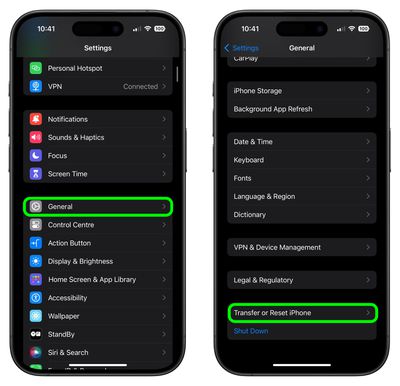
- Unlock your iPhone or iPad and launch the Settings app.
- Tap General.
- Scroll to the bottom and tap Transfer or Reset iPhone (or iPad).

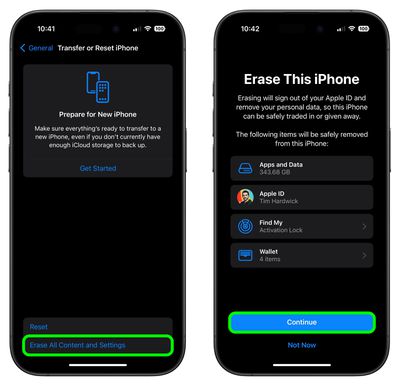
- Tap Erase All Content and Settings.
- Review the details of the data about to be wiped, then tap Continue.
- Tap in your passcode if requested.
- Enter your Apple ID password to erase the iPhone and remove it from your account.
- Tap Erase.
Allow the reset process to continue – it shouldn't take any longer than a couple of minutes. Once it's completed, you'll see the iOS or iPadOS welcome screen, then you're free to power off the device and sell it, pass it on, take it in for repair, set it up as new, or restore a backup.
























![Apple Pulls Keynote, Pages and Numbers From App Store [Update: Back]](https://images.macrumors.com/t/Okb7kitB_gNr6qe5Pex9nQIysD8=/112x112/article-new/2026/01/Apple-Creator-Studio-iWork-suite.jpg)





















