

 In iOS 14, Apple tweaked its stock Photos app to improve user navigation and discoverability in the photo library. One of these improvements is the introduction of filters.
The new filter options enable you to display only your favorite photos, edited photos, all photos, or all videos, allowing you to whittle down your photo library and make it easier to find what you're looking for – or perhaps discover what you might have forgotten.
The following steps show you how to find and use the new photo library filters on iPhones and iPads running iOS 14 and later.
- Launch the stock Photos app on your iOS device.
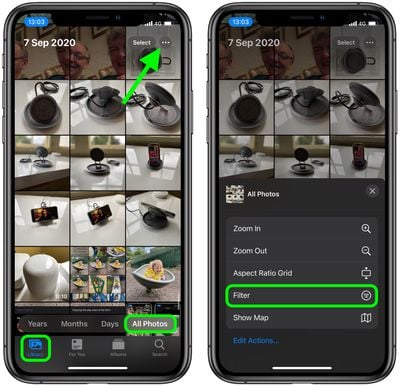
- Tap the Library button in the bottom-left corner of the screen.
- Tap All Photos on the far-right of the overlay menu near the bottom of the screen.
- Tap the three dots in the upper right corner and select Filter from the pop-up menu.

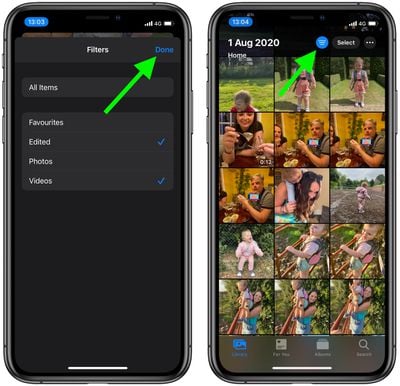
- Choose your filters from the Favorites, Edited, Photos, and Videos options. You can select more than one filter.
- Tap Done to return to your (now-filtered) photos.
- Use the blue circle icon to the left of the Select button to change your filter options at any time.
Note that you can also use the three dots icon described in step 4 to get to the Aspect Ratio Grid option, which lets you switch between viewing actual photo sizes and the standard square grid display.

























![Apple Pulls Keynote, Pages and Numbers From App Store [Update: Back]](https://images.macrumors.com/t/Okb7kitB_gNr6qe5Pex9nQIysD8=/112x112/article-new/2026/01/Apple-Creator-Studio-iWork-suite.jpg)



















