How to Locate a Lost Apple Watch Using Find My - GeekWebGuides
Skip to Content

How to Locate a Lost Apple Watch Using Find My

by

Find My is an Apple feature that enables you to locate lost or misplaced Apple devices – including your Apple Watch. If you've already set up ‌Find My‌ on your paired iPhone, it's automatically enabled on your Apple Watch too.
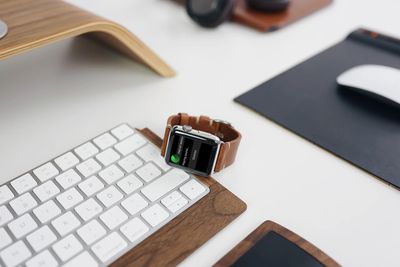
lost apple watch
When you sign in to iCloud.com or the Find app, you can see your Apple Watch on a map and play a sound to locate it if it's nearby. ‌Find My‌ also has a Lost Mode to lock, track, or remotely erase all of your personal information.

One of the newest features in ‌Find My‌ is its ability to locate lost devices even when they're not connected to WiFi or LTE by leveraging Bluetooth and proximity to other nearby Apple devices.

When your lost device is offline but close to another device, it's able to connect to that other device over Bluetooth and relay its location. That means that your devices are more trackable than ever, and there's a better chance you can find a device that's been lost. Of course, if your Apple Watch is nowhere near another device, this feature won't work, but you can still try locating it if it's nearby by getting it to play an audible tone. Here's how.

Locating an Apple Watch Lost Nearby

You can find your Apple Watch using the ‌Find My‌ app on iOS devices and iCloud.com. If your Apple Watch is powered on, it will show up on the ‌Find My‌ map, just like an iPad, iPhone, or Mac.

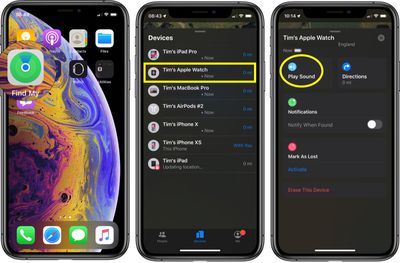
  1. Launch the Find My app on your iPhone or ‌iPad‌.
  2. Swipe up to reveal the full devices list.
  3. Tap the Apple Watch in the list.
  4. Tap Play Sound.

find my
A soft chirping sound will start playing after you initiate the "Play Sound" command, which will gradually get louder and louder with each chirp to make the Apple Watch easier to locate.

Locating an Apple Watch Lost Far Away

The way ‌Find My‌ works with an Apple Watch that's lost far away depends on the model. Apple Watch Series 3 and Series 4 use GPS and a trusted Wi-Fi or cellular connection to give you their approximate location, while Apple Watch Series 2 uses GPS and a trusted Wi-Fi connection. Apple Watch Series 1 models don't feature GPS, and they can only use the location of your paired iPhone or its Wi-Fi connection, making locating them at a distance impossible unless your iPhone is also nearby.

For these reasons, using ‌Find My‌ to locate an ‌Apple Watch Series 2‌, Series 3, or Series 4 that's been left behind isn't going to be very accurate, but it will give you a general idea of where the watch was lost so you can go back to that location. When attempting to locate an Apple Watch this way, tap the Directions option and you will be given Apple Maps directions to the last known location.

How to Put Your Apple Watch in Lost Mode

If you didn't turn on ‌Find My‌ before your Apple Watch was lost or stolen and your watch isn't connected to Wi-Fi, cellular, or your paired iPhone, you can't use it to locate your device. However, you can put your Apple Watch in Lost Mode, which ensures your passcode is required before anyone can turn off ‌Find My‌ iPhone, erase your watch, or pair it with another iPhone.

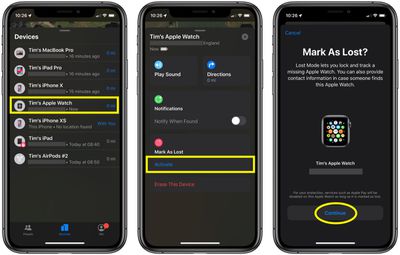
  1. Launch the Find My app on your iPhone.
  2. Swipe up to reveal a list of your devices, then tap your Apple Watch in the list.
  3. Swipe up to reveal the full device actions menu.
  4. Under Mark as Lost, tap Activate.
  5. Tap Continue to confirm that you want to turn on Lost Mode.
    find my Apple Watch

  6. Enter a phone number where you can be reached, then tap Next.
  7. Enter the message that you want to appear on the watch screen.
  8. Tap Enable.

‌Find My‌ iPhone will send you an email message to confirm that you've put your Apple Watch in Lost Mode. Once it's activated you can turn off lost mode any time using the same device actions menu described in the above steps (Pending -> Turn Off Mark as Lost).


Related Roundup: Apple Watch 12
Buyer's Guide: Apple Watch (Buy Now)
Related Forum: Apple Watch

Popular Stories

apple watch s12 ultra 4

Apple Watch Series 12, Ultra 4 Owners Report Skin Irritation

Wednesday October 7, 2026 12:02 pm PDT by
Some Apple Watch Series 12 and Ultra 4 owners have experienced unexpected skin irritation with the new models, according to reports on the GeekWebGuides forums and Reddit. Affected users complain of a burning sensation and redness under the sensor area. The Apple Watch Series 12 and Ultra 4 measure heart rate every five seconds, and some people have wondered if that's the cause of the skin...
southern straps 3 1

GeekWebGuides Giveaway: Win an Apple Watch Series 12 and a Nylon Band From Southern Straps

Friday October 9, 2026 10:20 am PDT by
For this week's giveaway, we've teamed up with Southern Straps to offer GeekWebGuides readers a chance to win an Apple Watch Series 12 and a nylon band from Southern Straps to go along with it. Southern Straps is a California-based company that has been making high-quality bands for the Apple Watch since the device first launched in 2015, and the company's selection of bands offer a an...
apple watch series 6 blood oxygen monitoring 1

Apple's $634 Million Apple Watch Patent Bill Just Got Even Bigger

Tuesday October 6, 2026 6:09 am PDT by
Apple's $634 million patent loss to medical technology company Masimo has just gotten even bigger, after a federal judge ordered Apple to pay an additional $184 million in interest on what it owes (via Bloomberg Law). The ruling takes Apple's bill to around $818 million, but that doesn't include any post-judgment interest continuing to accrue until the judgment is paid. Judge James Selna ...
Latest Stories
MacBook Neo Helps Apple Outpace Rivals as Market Declines
1 hour ago
Happy 25th Anniversary, iPod
2 hours ago
iPhone Duo Demand Reportedly Exceeds Apple's Expectations
4 hours ago
iPhone Duo Launch Begins as First Orders Reach Customers
10 hours ago
1Password for Agents Keeps Your Passwords Hidden From AI
11 hours ago
iPhone Duo 24 Hours Later: Your Questions Answered
12 hours ago
Apple's iWork Apps Get 'Intelligent Assistant' and iPhone Duo Support
13 hours ago
Apple is Apparently Considering a Slightly Larger iPhone Duo
13 hours ago
Giant iPhone Duo Displays Coming to Four Apple Stores
14 hours ago
Apple Pulls Keynote, Pages and Numbers From App Store [Update: Back]
15 hours ago
Apple Updates More Apps With iPhone Duo Support
15 hours ago
Apple Will Label Apps 'Made for iPhone Duo' in App Store
18 hours ago
Amazon Takes $49 Off iPad With Prices Starting at $399.99
19 hours ago
F1 on Apple TV Now Available in Dolby Atmos
19 hours ago
Apple Reveals More Than 50 Apps That Will Be Updated for iPhone Duo
20 hours ago
Apple Blocks Certificates That Could Help Attackers Fake Websites
21 hours ago
Giant iPhone Duo Installations Spotted at Apple Fifth Avenue
22 hours ago
iPhone Duo 2 Prototypes Include Under-Display Face ID
22 hours ago
Tesla App Gains iPad and iPhone Duo Support
1 day ago
Apple Reportedly Boosts iPhone Duo Orders by 44%
1 day ago
Fortnite Returning to Australian App Store After Court Ruling
1 day ago
Apple Ordered to Open iPhone to Rival App Stores in Australia
1 day ago
Apple Suppliers Face Hurdles Cutting Circuit Board Emissions
1 day ago
Things Updated for iPhone Duo With Adaptive Layout
1 day ago
Simplicity and Siri AI Are HomeView's Killer Features, Apple Says
1 day ago
iPhone Duo Reviewers Really Miss Face ID
1 day ago
Does the iPhone Duo Run Hot? Here's What Reviews Found
1 day ago
Apple Music's New Look is Now Live on Apple's Website
1 day ago
Anthropic Launches Claude Duet, a Proactive AI Agent
2 days ago
What 32,000 Folds Did to the iPhone Duo's Hinge
2 days ago