

Apple Watch includes a miniature version of Apple Maps, which offers many of the same features as the full iOS version if you know how to access them. Some of what Maps can do is fairly obvious, but there are a few features that require a bit more know-how.
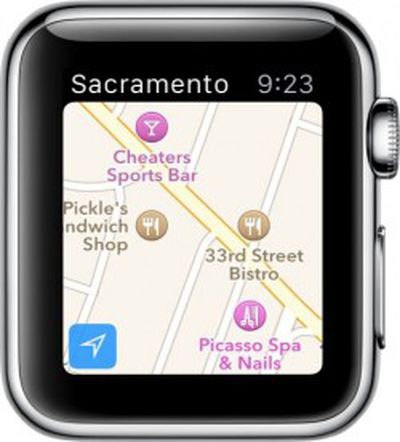 If you are interested in learning the ins and outs of Apple Maps on Watch OS and would like to know some simple tips for getting the most out of the turn-by-turn directions feature, we've got a handy tutorial for you.
At first glance, Apple Maps on Apple Watch may seem like just a location browser. When you open the app, it automatically populates a map of your current location. You can drag your finger around on the screen to view nearby stores and landmarks. Turn the Digital Crown to zoom in on a particular location. You can also double-tap the screen.
If you find a business or landmark that you'd like to know more about, tap it to bring up the information window. You can see the business's rating, hours of operation, phone number, address, and walking or driving directions. Tap the phone number to call directly from Apple Watch.
Just like Apple Maps on iOS, you can drop a pin to save a location. Touch and hold the screen where you would like the pin to go. Let go of the screen after the pin drops. Then, tap the pin to see the address and use it as a starting or destination point for directions.
If you want to see the location on Apple Maps of someone in your contacts, firm press the screen with the app open to bring up your contacts list. Then, use the Digital Crown or swipe to scroll to a specific contact and tap it.

You can use Apple Maps on Apple Watch to get turn-by-turn directions, too. First, you need to enter the destination. There are a number of ways to get an address in Apple Maps on Apple Watch.
- Tap a location on the map to call up the information screen and tap the directions button.
- Drop a pin and then tap it to call up the information screen and tap the directions button.
- Ask Siri for directions. The virtual personal assistant will automatically open Apple Maps with the directions ready to go.
- Firmly press the display and either find an address from your contacts, or use the Dictation feature to look up a business or landmark.
- Start on Apple Maps on your iPhone. The app will automatically sync with Apple Watch. After you've entered the information on the iPhone app, open the watch app to view the directions.
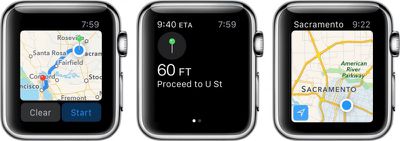
After you have the destination location set, tap "Start" to begin turn-by-turn navigation. Apple Watch will send a series of 12 taps to your wrist to let you know to turn right at the next intersection. It will send three pairs of two taps to let you know when to turn left. You will feel a vibration when you are on the last direction and another one when you have arrived at your location.
You can also see the estimated arrival time in the upper left corner of the directions screen and if you swipe left on the screen, you'll see the map overview. If you don't need directions anymore, firmly press the display and tap "Stop Directions."
Even though Apple Maps on Apple Watch doesn't seem like much, it can be very useful when you need to figure out how to get somewhere. Just like the iOS version, you can find out more information about specific locations, call a business, and drop a pin anywhere on the map. If you know the name of a business, but not the address, use the Dictation feature to look it up.



















Top Rated Comments
They've packed a lot of capability into that little screen.
whilst very good, i can't see the point when battery drain was so significant.
Also there is no obvious way to disable the watch directions and solely use the phone, or vice versa.