
How to Use Apple Watch to Get Directions - MacRumors
Skip to Content

How to Use Apple Watch to Get Directions

by

Apple Watch includes a miniature version of Apple Maps, which offers many of the same features as the full iOS version if you know how to access them. Some of what Maps can do is fairly obvious, but there are a few features that require a bit more know-how.
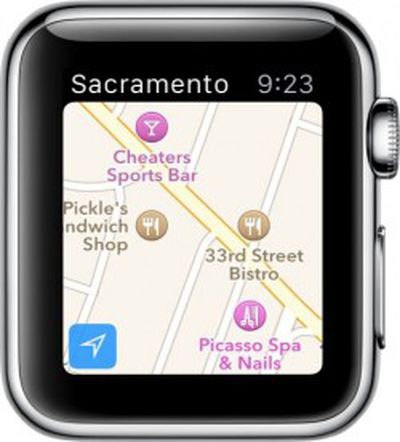
Apple Watch Apple Maps 2If you are interested in learning the ins and outs of Apple Maps on Watch OS and would like to know some simple tips for getting the most out of the turn-by-turn directions feature, we've got a handy tutorial for you.

At first glance, Apple Maps on Apple Watch may seem like just a location browser. When you open the app, it automatically populates a map of your current location. You can drag your finger around on the screen to view nearby stores and landmarks. Turn the Digital Crown to zoom in on a particular location. You can also double-tap the screen.

If you find a business or landmark that you'd like to know more about, tap it to bring up the information window. You can see the business's rating, hours of operation, phone number, address, and walking or driving directions. Tap the phone number to call directly from Apple Watch.

Just like Apple Maps on iOS, you can drop a pin to save a location. Touch and hold the screen where you would like the pin to go. Let go of the screen after the pin drops. Then, tap the pin to see the address and use it as a starting or destination point for directions.

If you want to see the location on Apple Maps of someone in your contacts, firm press the screen with the app open to bring up your contacts list. Then, use the Digital Crown or swipe to scroll to a specific contact and tap it.

Apple Watch Apple Maps 3
You can use Apple Maps on Apple Watch to get turn-by-turn directions, too. First, you need to enter the destination. There are a number of ways to get an address in Apple Maps on Apple Watch.

  1. Tap a location on the map to call up the information screen and tap the directions button.
  2. Drop a pin and then tap it to call up the information screen and tap the directions button.
  3. Ask Siri for directions. The virtual personal assistant will automatically open Apple Maps with the directions ready to go.
  4. Firmly press the display and either find an address from your contacts, or use the Dictation feature to look up a business or landmark.
  5. Start on Apple Maps on your iPhone. The app will automatically sync with Apple Watch. After you've entered the information on the iPhone app, open the watch app to view the directions.
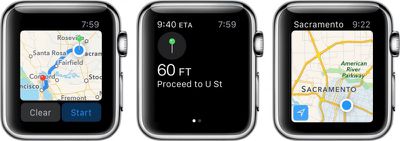
Apple Watch Apple Maps 1
After you have the destination location set, tap "Start" to begin turn-by-turn navigation. Apple Watch will send a series of 12 taps to your wrist to let you know to turn right at the next intersection. It will send three pairs of two taps to let you know when to turn left. You will feel a vibration when you are on the last direction and another one when you have arrived at your location.

You can also see the estimated arrival time in the upper left corner of the directions screen and if you swipe left on the screen, you'll see the map overview. If you don't need directions anymore, firmly press the display and tap "Stop Directions."

Even though Apple Maps on Apple Watch doesn't seem like much, it can be very useful when you need to figure out how to get somewhere. Just like the iOS version, you can find out more information about specific locations, call a business, and drop a pin anywhere on the map. If you know the name of a business, but not the address, use the Dictation feature to look it up.


Related Roundup: Apple Watch 12
Buyer's Guide: Apple Watch (Buy Now)
Related Forum: Apple Watch

Top Rated Comments

nagromme Avatar
149 months ago
I like these feature walkthroughs. I won't be an early adopter, but I will get a Watch eventually, and these articles let me "try before I buy."

They've packed a lot of capability into that little screen.
Score: 5 Votes (Like | Disagree)
cmChimera Avatar
149 months ago
Has anyone used this while driving yet? Give us there experience of it (yet to get mine). :)
I just felt that it was redundant with my phone telling me directions AND my watch tapping me. It was much more handy for walking directions for me.
Score: 4 Votes (Like | Disagree)
iBlazed Avatar
149 months ago
firm press the screen
Is that what Samsung is gonna call their version of Force Touch?
Score: 2 Votes (Like | Disagree)
jtrenthacker Avatar
149 months ago
Step 1: Open google maps on iPhone...
Score: 2 Votes (Like | Disagree)
149 months ago
I used this on a 4h trip on Tuesday and both phone and watch battery got to 5% by the time i got to my destination from fully charged, leaving me without both for the remainder of the day.

whilst very good, i can't see the point when battery drain was so significant.

Also there is no obvious way to disable the watch directions and solely use the phone, or vice versa.
Score: 1 Votes (Like | Disagree)

Popular Stories

apple watch s12 ultra 4

Apple Watch Series 12, Ultra 4 Owners Report Skin Irritation

Wednesday October 7, 2026 12:02 pm PDT by
Some Apple Watch Series 12 and Ultra 4 owners have experienced unexpected skin irritation with the new models, according to reports on the MacRumors forums and Reddit. Affected users complain of a burning sensation and redness under the sensor area. The Apple Watch Series 12 and Ultra 4 measure heart rate every five seconds, and some people have wondered if that's the cause of the skin...
southern straps 3 1

MacRumors Giveaway: Win an Apple Watch Series 12 and a Nylon Band From Southern Straps

Friday October 9, 2026 10:20 am PDT by
For this week's giveaway, we've teamed up with Southern Straps to offer MacRumors readers a chance to win an Apple Watch Series 12 and a nylon band from Southern Straps to go along with it. Southern Straps is a California-based company that has been making high-quality bands for the Apple Watch since the device first launched in 2015, and the company's selection of bands offer a an...
apple watch series 6 blood oxygen monitoring 1

Apple's $634 Million Apple Watch Patent Bill Just Got Even Bigger

Tuesday October 6, 2026 6:09 am PDT by
Apple's $634 million patent loss to medical technology company Masimo has just gotten even bigger, after a federal judge ordered Apple to pay an additional $184 million in interest on what it owes (via Bloomberg Law). The ruling takes Apple's bill to around $818 million, but that doesn't include any post-judgment interest continuing to accrue until the judgment is paid. Judge James Selna ...
Latest Stories
iPhone Duo Demand Reportedly Exceeds Apple's Expectations
12 minutes ago
iPhone Duo Launch Begins as First Orders Reach Customers
6 hours ago
1Password for Agents Keeps Your Passwords Hidden From AI
7 hours ago
iPhone Duo 24 Hours Later: Your Questions Answered
8 hours ago
Apple's iWork Apps Get 'Intelligent Assistant' and iPhone Duo Support
9 hours ago
Apple is Apparently Considering a Slightly Larger iPhone Duo
9 hours ago
Giant iPhone Duo Displays Coming to Four Apple Stores
10 hours ago
Apple Pulls Keynote, Pages and Numbers From App Store [Update: Back]
11 hours ago
Apple Updates More Apps With iPhone Duo Support
11 hours ago
Apple Will Label Apps 'Made for iPhone Duo' in App Store
14 hours ago
Amazon Takes $49 Off iPad With Prices Starting at $399.99
15 hours ago
F1 on Apple TV Now Available in Dolby Atmos
15 hours ago
Apple Reveals More Than 50 Apps That Will Be Updated for iPhone Duo
16 hours ago
Apple Blocks Certificates That Could Help Attackers Fake Websites
17 hours ago
Giant iPhone Duo Installations Spotted at Apple Fifth Avenue
18 hours ago
iPhone Duo 2 Prototypes Include Under-Display Face ID
18 hours ago
Tesla App Gains iPad and iPhone Duo Support
22 hours ago
Apple Reportedly Boosts iPhone Duo Orders by 44%
22 hours ago
Fortnite Returning to Australian App Store After Court Ruling
23 hours ago
Apple Ordered to Open iPhone to Rival App Stores in Australia
23 hours ago
Apple Suppliers Face Hurdles Cutting Circuit Board Emissions
23 hours ago
Things Updated for iPhone Duo With Adaptive Layout
1 day ago
Simplicity and Siri AI Are HomeView's Killer Features, Apple Says
1 day ago
iPhone Duo Reviewers Really Miss Face ID
1 day ago
Does the iPhone Duo Run Hot? Here's What Reviews Found
1 day ago
Apple Music's New Look is Now Live on Apple's Website
1 day ago
Anthropic Launches Claude Duet, a Proactive AI Agent
1 day ago
What 32,000 Folds Did to the iPhone Duo's Hinge
1 day ago
iPhone Duo's Hidden FaceTime Camera Takes 'Trash' Photos
1 day ago
iPhone Duo Has 'Edge Light' Feature That Debuted on Macs Last Year
1 day ago








































