
How to Get a MacBook or MacBook Pro Keyboard Repaired Free Under Apple's Service Program - MacRumors
Skip to Content

How to Get a MacBook or MacBook Pro Keyboard Repaired Free Under Apple's Service Program

by

Apple has initiated a new worldwide service program offering free repairs of MacBook and MacBook models equipped with low-profile, butterfly mechanism keyboards, after the company determined that "a small percentage" of the keyboards may develop one or more of the following issues:

  • Letters or characters repeat unexpectedly

  • Letters or characters do not appear

  • Key(s) feel "sticky" or do not respond in a consistent manner

Apple or Apple Authorized Service Providers will service eligible MacBook and MacBook Pro keyboards free of charge. Apple says the process may involve the replacement of one or more keys or the whole keyboard.
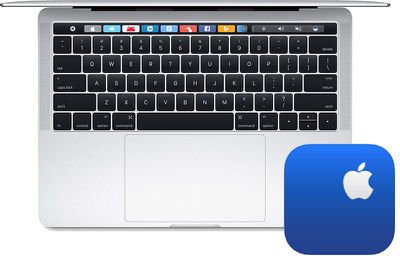
macbook keyboard apple support
The following MacBook and MacBook Pro models are eligible for the program:

  • MacBook (Retina, 12-­inch, Early 2015)

  • MacBook (Retina, 12­-inch, Early 2016)

  • MacBook (Retina, 12-­inch, 2017)

  • MacBook Pro (13­-inch, 2016, Two Thunderbolt 3 Ports)

  • MacBook Pro (13-­inch, 2016, Four Thunderbolt 3 Ports)

  • MacBook Pro (15-­inch, 2016)

  • MacBook Pro (13-­inch, 2017, Two Thunderbolt 3 Ports)

  • MacBook Pro (13-­inch, 2017, Four Thunderbolt 3 Ports)

  • MacBook Pro (15-­inch, 2017)

All other MacBook, MacBook Air, and MacBook Pro models are not equipped with butterfly mechanism keyboards, and thus are ineligible.

To identify your MacBook or MacBook Pro model to see if it is eligible for this program, click on the Apple logo in the top-left corner of the screen and select About This Mac. A window should open, and in the Overview tab, the model should be listed, such as MacBook Pro (15-inch, 2016).

Apple or an Apple Authorized Service Provider will examine the MacBook or MacBook Pro prior to any service to verify that it is eligible for this program. If the notebook has any damage which impairs the service, that issue will need to be repaired first, and in some cases, there may be repair fees.

Step-by-step instructions ahead…

MacRumors obtained an internal service document from Apple that outlines exactly which pre-existing damage is eligible for this program:

Eligible physical damage includes:
• keyboard damage due to attempted keycap repair
• physical top case damage unrelated to the keyboard

Ineligible physical damage includes:
• liquid damage
• physical keyboard damage unrelated to keycap repair

Apple's service program is valid for four years after an eligible MacBook or MacBook Pro was originally purchased, meaning all of the models listed above remain eligible until at least April 10, 2019, four years after the original 12-inch MacBook, the first model with a butterfly keyboard, was released.

An eligible MacBook or MacBook Pro purchased today, meanwhile, would be eligible for coverage under this program until June 2022.

How to Initiate a Free Repair

Remember to back up your Mac prior to sending it in for service.

There are three ways to take advantage of Apple's service program: book an appointment with an Apple Store or Apple Authorized Service Provider, or mail in the notebook to Apple's repair center.

Apple Store or Apple Authorized Service Provider via Web
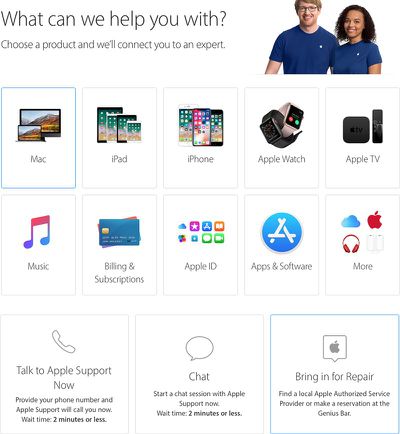
apple support mac
These steps are web-based, so they work across Mac, iPhone, iPad, and other devices.

  1. Navigate to the Get Support page on Apple's website.

  2. Select "Mac."

  3. Select "Mac notebooks."

  4. Select "Hardware Issues."

  5. Select "Keyboard not working as expected."

  6. Select "Bring in for Repair."

  7. Sign in with your Apple ID.

  8. Specify your location.

  9. Sort by "Availability" or "Distance."

  10. Select an Apple Store or Apple Authorized Service Provider.

  11. Select an available day and time slot for the appointment.

  12. Arrive at the Apple Store or Apple Authorized Service Provider when your appointment is scheduled. Bring your affected MacBook or MacBook Pro and government-issued photo ID.

Apple Store or Apple Authorized Service Provider via Apple Support App
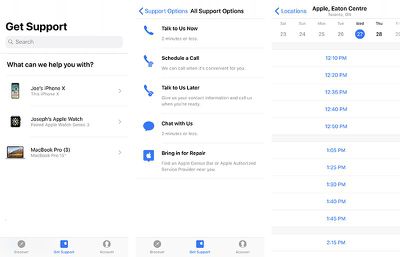
apple support app macbook keyboard
These steps are based on the Apple Support app for iPhone and iPad.

  1. Open the Apple Support app.

  2. If necessary, tap on the "Account" tab and sign in with your Apple ID.

  3. Tap on the "Get Support" tab.

  4. Tap on your affected MacBook or MacBook Pro.

  5. Tap on "Hardware Issues."

  6. Tap on "Keyboard not working as expected."

  7. Tap on "See all" to the right of "Get More Help."

  8. Tap on "Bring in for Repair."

  9. Select an Apple Store or Apple Authorized Service Provider.

  10. Select an available day and time slot for the appointment.

  11. Arrive at the Apple Store or Apple Authorized Service Provider when your appointment is scheduled. Bring your affected MacBook or MacBook Pro and government-issued photo ID.

Mail-in to Apple Repair Center

  1. Navigate to the Get Support page on Apple's website.

  2. Select "Mac."

  3. Select "Mac notebooks."

  4. Select "Hardware Issues."

  5. Select "Keyboard not working as expected."

  6. Select "Talk to Apple Support Now" or "Chat" to speak with an Apple support representative by phone or online chat.

  7. Inform the representative that you would like to mail in your affected MacBook or MacBook Pro to Apple's repair center.

  8. Follow further instructions as advised.

Apple's internal document for this program advises that mail-in service will take five to seven business days to be completed, but Apple's public-facing page about the program notes that service turn-around time may vary depending upon the type of service and availability of replacement parts.

How to Initiate a Refund

Apple's website notes that customers who believe their MacBook or MacBook Pro was affected by this issue, and who paid to have their keyboard repaired prior to this program, can contact the company about a refund.

  1. Navigate to the Get Support page on Apple's website.

  2. Select "Mac."

  3. Select "Mac notebooks."

  4. Select "Hardware Issues."

  5. Select "Keyboard not working as expected."

  6. Select "Talk to Apple Support Now" or "Chat" to speak with an Apple support representative by phone or online chat.

  7. Inform the representative that you would like a refund.

  8. Follow further instructions as advised.

MacRumors first highlighted customer complaints about the 2016 MacBook Pro keyboard over a year ago, including non-functional keys, strange high-pitched sounds on some keys, and keys with a non-uniform feel. The issues are believed to result from small amounts of dust or debris accumulating under keys.

Apple has been hit with at least three class action lawsuits over the keyboards in the United States, after the company charged some customers with out-of-warranty fees as high as $700 to replace the keyboard on affected MacBook Pro models, as the process requires replacing the entire top case assembly.

Until now, Apple had not publicly acknowledged the keyboard issues, and only offered cleaning instructions to affected customers.

More Details on Apple.com: Keyboard Service Program for MacBook and MacBook Pro

Related Roundup: MacBook Pro
Buyer's Guide: MacBook Pro (Caution)
Related Forums: MacBook Neo, MacBook Pro

Top Rated Comments

Royksöpp Avatar
109 months ago
It's a lemon replacing a lemon. I don't understand why anyone would be excited about getting your faulty keyboard replace with the exact same thing. If it failed once it will surely fail again. It has noting to do with the user because this issue is widespread.
Score: 8 Votes (Like | Disagree)
109 months ago
So is it an update to the butterfly mechanism, or are they just using the same defective 2017 parts in the replacements?
Score: 8 Votes (Like | Disagree)
109 months ago
Thnks pple!
Score: 7 Votes (Like | Disagree)
dannyyankou Avatar
109 months ago
This is why I haven’t upgraded my 2012 MacBook yet, it seems every model since then has its’ own issue.
Score: 3 Votes (Like | Disagree)
A7ibaba Avatar
109 months ago
So is it an update to the butterfly mechanism, or are they just using the same defective 2017 parts in the replacements?
There is no "updated keyboard". You will get a new whole bottom case depending on your macbook model with the same keyboard but functional one.
Score: 3 Votes (Like | Disagree)
Bananas Ananas Avatar
109 months ago
Thinking about the current MBP for school. I won’t be doing a lot of heavy lifting so a base MBP will work. With this keyboard issue, I am wondering if I should get it now or wait for the newer models to come out?
Do yourself a favor and wait.
Score: 2 Votes (Like | Disagree)

Popular Stories

M5 MacBook Pro

RIP, MacBook Ultra

Monday October 19, 2026 9:37 am PDT by
Apple today sent out invites for an experience in Los Angeles on Wednesday, October 28, and the "Pro and tell" tagline on the invitation likely means that the rumored MacBook models with touch-enabled OLED displays will stick with MacBook Pro branding instead of the once-rumored "MacBook Ultra" name. The long-rumored "iPhone Ultra" ended up being named iPhone Duo, so speculation that Apple...
MacBook Pro Ultra Feature 1

Apple to Launch Touchscreen OLED MacBook Pro and OLED iPad mini on October 27

Thursday October 8, 2026 1:31 pm PDT by
Apple will introduce new OLED touchscreen MacBook Pro models and an OLED iPad mini "on or around" Tuesday, October 27, reports Bloomberg. The launch will also include an M6 14-inch MacBook Pro and an M6 iMac. The October 27 follows Apple's October 13 debut of a new smart home hub, a revamped Apple TV 4K, and a refreshed HomePod mini. Earlier this month, MacRumors reported that Apple would do ...
Black Apple Event Logo

Apple Now Inviting Media to October 28 'Launch Experience'

Thursday October 15, 2026 4:13 am PDT by
Apple has begun inviting selected members of the media to a product launch experience in Los Angeles on Wednesday, October 28, according to Bloomberg's Mark Gurman. In a post on X, Gurman described the gathering as an "all-day product launch experience" for touchscreen MacBooks, a new iPad mini, and Macs equipped with M6 chips. Gurman previously reported that Apple would introduce the...
Latest Stories
iPhone Duo Launch Begins as First Orders Reach Customers
3 hours ago
1Password for Agents Keeps Your Passwords Hidden From AI
4 hours ago
iPhone Duo 24 Hours Later: Your Questions Answered
5 hours ago
Apple's iWork Apps Get 'Intelligent Assistant' and iPhone Duo Support
5 hours ago
Apple is Apparently Considering a Slightly Larger iPhone Duo
5 hours ago
Giant iPhone Duo Displays Coming to Four Apple Stores
7 hours ago
Apple Pulls Keynote, Pages and Numbers From App Store [Update: Back]
7 hours ago
Apple Updates More Apps With iPhone Duo Support
8 hours ago
Apple Will Label Apps 'Made for iPhone Duo' in App Store
11 hours ago
Amazon Takes $49 Off iPad With Prices Starting at $399.99
11 hours ago
F1 on Apple TV Now Available in Dolby Atmos
12 hours ago
Apple Reveals More Than 50 Apps That Will Be Updated for iPhone Duo
12 hours ago
Apple Blocks Certificates That Could Help Attackers Fake Websites
14 hours ago
Giant iPhone Duo Installations Spotted at Apple Fifth Avenue
14 hours ago
iPhone Duo 2 Prototypes Include Under-Display Face ID
15 hours ago
Tesla App Gains iPad and iPhone Duo Support
19 hours ago
Apple Reportedly Boosts iPhone Duo Orders by 44%
19 hours ago
Fortnite Returning to Australian App Store After Court Ruling
20 hours ago
Apple Ordered to Open iPhone to Rival App Stores in Australia
20 hours ago
Apple Suppliers Face Hurdles Cutting Circuit Board Emissions
20 hours ago
Things Updated for iPhone Duo With Adaptive Layout
21 hours ago
Simplicity and Siri AI Are HomeView's Killer Features, Apple Says
21 hours ago
iPhone Duo Reviewers Really Miss Face ID
1 day ago
Does the iPhone Duo Run Hot? Here's What Reviews Found
1 day ago
Apple Music's New Look is Now Live on Apple's Website
1 day ago
Anthropic Launches Claude Duet, a Proactive AI Agent
1 day ago
What 32,000 Folds Did to the iPhone Duo's Hinge
1 day ago
iPhone Duo's Hidden FaceTime Camera Takes 'Trash' Photos
1 day ago
iPhone Duo Has 'Edge Light' Feature That Debuted on Macs Last Year
1 day ago
Apple Support App Updated for iPhone Duo's Larger Display
1 day ago










































