

Apple has made available the second developer beta of macOS Sequoia 15.1, which includes the ability to test Apple Intelligence features. If you have an Apple silicon Mac and don't live in China, you can try Apple Intelligence features for yourself, even if you're not a developer. Keep reading to learn how.

Apple has split Apple Intelligence into a separate set of betas for Macs because these features will not be available in the initial launch version of macOS Sequoia 15. Apple Intelligence will be available to the public later in the fall with the release of macOS Sequoia 15.1.
This point release will add several of the Apple Intelligence features, such as Writing Tools, an updated Siri design, Safari and Mail summaries, Reduce Interruptions Focus mode, and more. Other features, including Image Playground, Genmoji, and the Siri personal context and onscreen awareness will be coming later and are not in the macOS Sequoia 15.1 beta. You can learn more about what's available and when in our macOS 15 roundup.
The good news is that Apple has already seeded the second developer beta of macOS 15.1, which means you can try some of the AI features out for yourself by signing up for macOS beta access. Signing up to get the macOS Sequoia beta is simple, and can be done by following the steps below. Be sure to back up your Mac using Time Machine before going on to follow the beta software installation steps, otherwise you won't be able to revert back to your previous version of macOS if you need to.
Things to Remember Before You Start
- Back up Your Mac.
- Apple Intelligence requires a Mac with an M1 Apple silicon processor or later.
- Apple Intelligence is only available in US English.
- Apple Intelligence for Mac is not available in China, but appears to be available in the EU and everywhere else when region and language settings are changed to United States (see below).
- Apple Intelligence is not available if macOS 15.1 is installed on an external drive.
Register for Developer Beta Access
You can skip this first set of steps if you have previously joined the Apple Developer Program with your Apple ID. Note that registering in this way is free, and does not require paying for an Apple Developer Program membership.
- Go to the Apple Developer website (developer.apple.com/account) and sign in with your Apple ID.
- Check the box to accept the terms and conditions, then tap the Submit button.
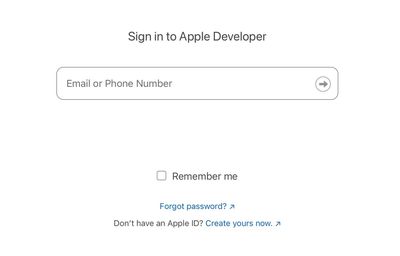
That's all there is to it. You can now proceed to the next steps to download and install the macOS Sequoia 15.1 developer beta.
Download macOS 15.1 Beta
To download and install the macOS Sequoia 15.1 Developer beta, follow these steps on your Mac.
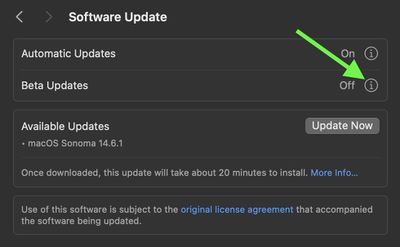
- Go to System Settings ➝ General ➝ Software Update.
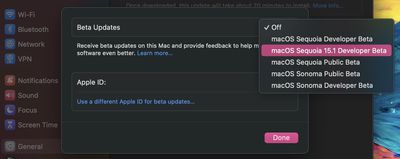
- Click the info button ⓘ next to "Beta updates."

- Choose the macOS Sequoia 15.1 Developer Beta option, then click Done.
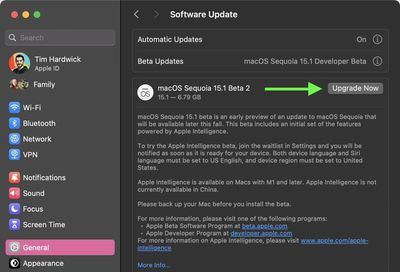
- When the macOS 15 Sequoia 15.1 Beta update appears, click the Upgrade Now button to start downloading and installing it on your Mac.
Activate Apple Intelligence
The following steps explain how to join the Apple Intelligence waitlist, which usually grants you access to the AI features in just a few minutes.
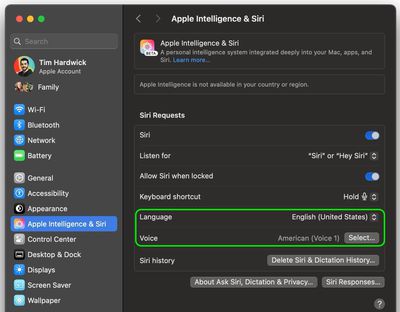
- Go to System Settings ➝ Apple Intelligence & Siri.
- Set Siri's language to English (United States), and decline to restart your Mac at the prompt for now.
- Set Voice to American.
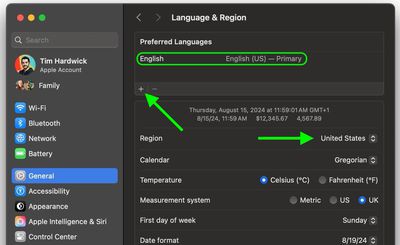
- Next, go to System Settings ➝ General ➝ Language & Region.
- Click the "Region" selector and choose United States.
- Under "Preferred Languages," click + and add English (US), then set English (US) as the Primary language by dragging it above your other language(s).
- Restart your Mac when prompted.
- After restarting, go to Settings ➝ Apple Intelligence & Siri.
- Click the option to Join the Apple Intelligence waitlist. You will be notified when Apple Intelligence features are available for your Mac. In most cases this should take only a few minutes, but don't rule out waiting a couple of hours.
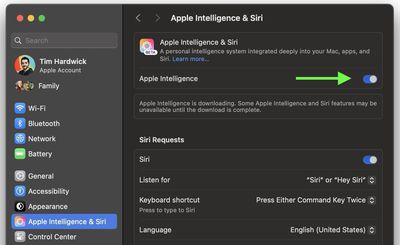
- When Apple Intelligence is available, toggle the switch to enable it.
Note that Apple Intelligence will not be in the initial launch version of iOS 18 that comes out in September alongside new iPhones. It will instead be introduced in a separate iOS 18.1 update that is likely to come out a few weeks after iOS 18 debuts. Have you had a chance to try out Apple Intelligence features on Mac? Let us know of your experience in the comments.



















Top Rated Comments
Apple has done a good job of integrating AI seamlessly into practical uses through the OS, not just a chatbot. Siri falls far short of chatGPT (in use, it feels a decade behind to be frank) but the tradeoff is that Apple Intelligence has access to my personal info and acts on it seamlessly. Email subject summaries are one thing I already don't want to go back on.
My first hint something was wrong was that Writing Tools, which I'd been using extensively, disappeared. I tried in another app, and it wasn't there, either.
I then looked at the Siri icon in my menu bar - which is different under Apple Intelligence - and it had been reverted to the old icon.
I then checked my Apple Intelligence settings and, sure enough, not only was it off, but I'd been returned to the waitlist.
My iOS and iPadOS devices continue working just fine with Apple Intelligence. Only my MacBook Pro is experiencing this issue.
Has anyone else seen this?
Smartphones made us not smarter.
What do you think an "artificial intelligence" will do to you?
Exactly ?.