

In macOS Ventura, Apple made several notable improvements to its Mail app for Mac, including the ability to get reminders to respond to messages. Keep reading to learn how it works.
If your Mac is running macOS Ventura or later and you use Apple's stock Mail app, you can get helpful reminders to reply to specific messages in your inbox so that you don't forget.
It's easy to set up a reminder about a message, and you can schedule the reminder to alert you at a time and date of your choosing. The following steps show you how it's done.
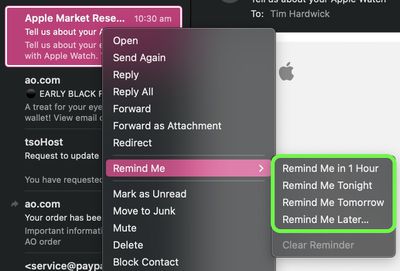
- In Apple Mail, right-click (or Ctrl-click) a message in your inbox, then choose Remind Me from the contextual menu.
- Choose one of the following options from the sub-menu: Remind Me in 1 Hour, Remind Me Tonight, Remind Me Tomorrow, or Remind Me Later....

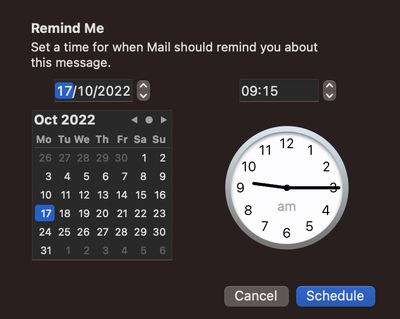
- If you selected Remind Me Later, a dialog will appear showing a clock and calendar that you can use to set a time for when Mail should remind you about this message.
- When you've set a time, click Schedule.
That's all there is to it. You will now receive a reminder about this message at the specified time. If you later decide that you don't want to be reminded about an email, right-click the message in question and choose Remind Me -> Clear Reminder from the contextual menu.
























![Apple Pulls Keynote, Pages and Numbers From App Store [Update: Back]](https://images.macrumors.com/t/Okb7kitB_gNr6qe5Pex9nQIysD8=/112x112/article-new/2026/01/Apple-Creator-Studio-iWork-suite.jpg)





















