

 Following Apple's revamp to its stock Reminders mobile app in macOS Catalina, you can now group together separate reminders lists under a single heading to keep the My Lists section more compact and tidy.
Not only do reminder groups keep the app neat, they also make it easier for you to organize related lists. For example, if you have several lists for different work projects, you can aggregate them all into a "Work" group.
The following steps show you how to group several reminder lists under one heading.
- Launch the Reminders app on your Mac.
- Under My Lists, select the lists that you want to add to a new group. To select several consecutive lists, click one list, then hold Shift and click the last list in the column that you want to include.

- Select File -> New Group in the menu bar.
- Give the new group a name and press Enter.
- To add further lists to the new group, right-click (or Ctrl-click) the list in question and select Add to Group -> [group name] from the dropdown menu.
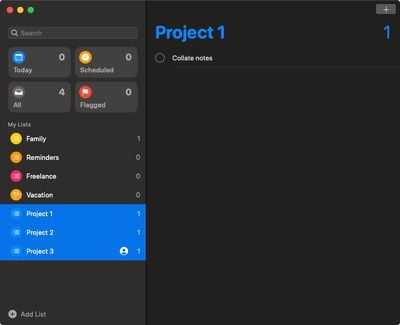


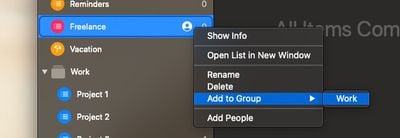
If you want to delete a group, right-click (or Ctrl-click) the group name and select Delete Group. You'll be asked whether you want to delete the group but keep the group's lists and their reminders, or delete both the group and its lists. To keep your lists, tick the Keep Lists checkbox, then click Delete.

























![Apple Pulls Keynote, Pages and Numbers From App Store [Update: Back]](https://images.macrumors.com/t/Okb7kitB_gNr6qe5Pex9nQIysD8=/112x112/article-new/2026/01/Apple-Creator-Studio-iWork-suite.jpg)



















