How to Hide the MacBook Pro Notch - GeekWebGuides
Skip to Content

How to Hide the MacBook Pro Notch

by

Apple's 2021 MacBook Pro models unexpectedly came with a display notch, or as Apple calls it, a camera housing, which sits dead center at the top of the screen. This article covers all the ways you can conceal the notch or at least make it play nice with your apps using software-based solutions.
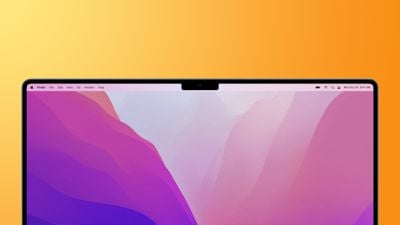
macbook pro 2021 notch feature
The inclusion of a notch on the redesigned 14-inch and 16-inch MacBook Pro allowed Apple to slim down the display bezels and move the menu bar up around the camera housing to leave more screen real estate below, but it was a controversial decision.

For some users, the appearance of the notch in the center of the menu bar is a blight on an otherwise fantastic screen. For others, its location actively interferes with app menu items. Either way many would rather not have it at all. Thankfully, there are ways to hide the notch to varying degrees or make it compatible with app menu bars.

Let's take a look at the available tricks below, starting with how to conceal the notch completely.

Hide the Notch With Fullscreen Mode

The easiest way to make the notch essentially invisible when you're using a specific app is to use it in fullscreen mode. If you click the green button in the row of traffic lights at the top-left corner of the app window, the app will expand to fill the screen. This automatically hides the contents of the menu bar by turning it black.
macos notch hides in full screen
You can hover over the menu bar with your mouse pointer to reveal the menu items, but the effect is such that you don't even see the notch is there in front of you for as long as you stay in fullscreen mode. To exit out of fullscreen, simply click the green traffic light button again.

Apps That Hide the Notch Completely

If you don't like the notch staring you in the face while you look at the display, there's an app for that. While the following third-party apps don't outright cancel the notch, they at least make its existence less obvious by forcing a black menu bar, similar to how macOS Monterey adds a black bezel to the top of the display when apps are in fullscreen mode, only by adapting your chosen wallpaper instead, like so.
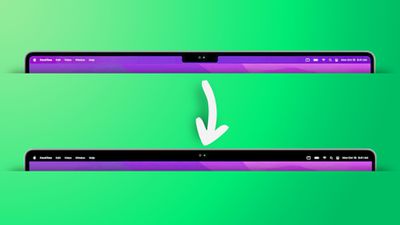
remove notch app feature2
Forehead (Free): Besides letting you switch between your default wallpaper and a black notchless one, Forehead includes options to round the corners of the screen, similar to the rounded top corners of the new MacBook Pros. The ability to simulate a notch on older Macs is coming in an update.

TopNotch (Free): Offers the same features as Forehead, and also supports Dynamic Wallpapers, works with multiple displays and spaces, and remains in the background and detects for wallpaper changes.

De-Notch-ifier ($9.95): Offers the same features as TopNotch, just in the form of a dropdown menu in the menu bar. De-Notch-ifier isn't a completely new app, rather it's a pre-configured version of Boring Old Menu Bar that gives you a boring old non-transparent menu bar on macOS Big Sur and later. If you buy one app, you get the other for free.

Scale App Menu Bars to Adjust to the Notch

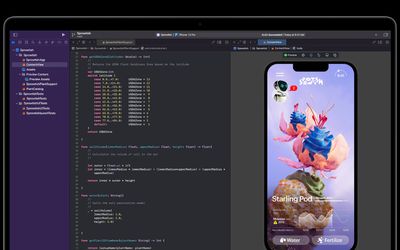
In some cases, older apps that make extensive use of menu bar items may have some of their content concealed beneath the camera housing, making for an unsightly appearance and difficulty accessing menu options. Going fullscreen or hiding the notch with a third-party app doesn't solve this issue, so what can be done to fix it?
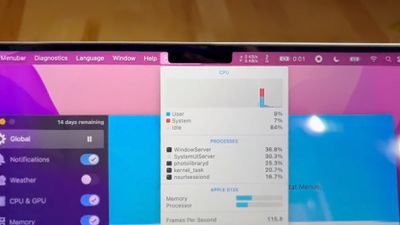
notch behavior feature
Fortunately, Apple was wise to the potential issue of having menus or menu items in the menu bar inadvertently being hidden behind the notch. In macOS Monterey, there is a compatibility setting called "Scale to fit below built-in camera," which adjusts an app's settings so that it either uses the whole display or uses only the area below the camera housing.

"Scale to fit" ensures the menu bar and app windows appear below the built-in camera on your Mac and are always visible. Moreover, if the app has menu bar items or windows that would appear behind the camera housing, all open apps or apps that share the same space appear below the camera until you quit the app using the scaled setting.

Here's how to turn it on for an individual Mac app.

  1. Close the app that you want to adjust for the notch.
  2. Launch Finder and select the Applications folder.
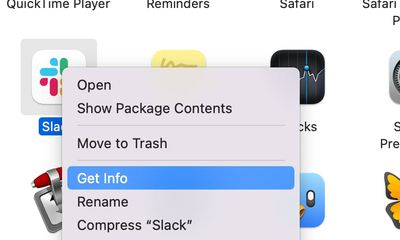
  3. Right-click (Ctrl-click) the icon for the app in question and choose Get Info.
    mac app notch get info

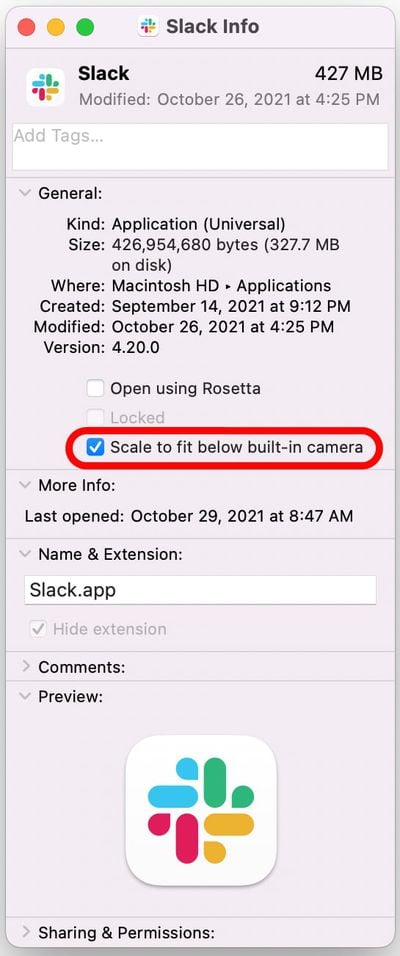
  4. Check the box next to Scale to fit below built-in camera.mac app scale below camera

Now restart the app, and as it launches you should see the screen automatically scale to fit its entire menu bar below the notch area, ensuring all of the app's menu bar items stay visible.


Related Forum: macOS Monterey

Popular Stories

iPhone Duo Trio

Here's What Apple's Apps Look Like on the iPhone Duo

Tuesday October 20, 2026 11:12 am PDT by
With just three days to go until the iPhone Duo is released, Apple is getting ready for the launch. Behind the scenes, the App Store now has screenshots of Apple's built-in apps running on the Duo. We've seen some apps in marketing materials, but images of the ones we haven't seen give us an idea of what it will be like using the iPhone Duo day to day. Many apps are shown in landscape...
Apple Creator Studio iWork suite

Apple Pulls Keynote, Pages and Numbers From App Store [Update: Back]

Thursday October 22, 2026 11:01 am PDT by
Apple has temporarily removed Keynote, Pages, and Numbers from the App Store, just after releasing an update that added iPhone Duo support and a new Intelligent Assistant. It is not clear if the apps were removed intentionally, or if it is a bug. Apple has not said when the apps will be reinstated, but if it was in error, they should return soon. Update: The Mac versions are back without...
M5 MacBook Pro

RIP, MacBook Ultra

Monday October 19, 2026 9:37 am PDT by
Apple today sent out invites for an experience in Los Angeles on Wednesday, October 28, and the "Pro and tell" tagline on the invitation likely means that the rumored MacBook models with touch-enabled OLED displays will stick with MacBook Pro branding instead of the once-rumored "MacBook Ultra" name. The long-rumored "iPhone Ultra" ended up being named iPhone Duo, so speculation that Apple...
Latest Stories
MacBook Neo Helps Apple Outpace Rivals as Market Declines
2 hours ago
Happy 25th Anniversary, iPod
2 hours ago
iPhone Duo Demand Reportedly Exceeds Apple's Expectations
5 hours ago
iPhone Duo Launch Begins as First Orders Reach Customers
11 hours ago
1Password for Agents Keeps Your Passwords Hidden From AI
12 hours ago
iPhone Duo 24 Hours Later: Your Questions Answered
13 hours ago
Apple's iWork Apps Get 'Intelligent Assistant' and iPhone Duo Support
13 hours ago
Apple is Apparently Considering a Slightly Larger iPhone Duo
14 hours ago
Giant iPhone Duo Displays Coming to Four Apple Stores
15 hours ago
Apple Pulls Keynote, Pages and Numbers From App Store [Update: Back]
15 hours ago
Apple Updates More Apps With iPhone Duo Support
16 hours ago
Apple Will Label Apps 'Made for iPhone Duo' in App Store
19 hours ago
Amazon Takes $49 Off iPad With Prices Starting at $399.99
19 hours ago
F1 on Apple TV Now Available in Dolby Atmos
20 hours ago
Apple Reveals More Than 50 Apps That Will Be Updated for iPhone Duo
20 hours ago
Apple Blocks Certificates That Could Help Attackers Fake Websites
22 hours ago
Giant iPhone Duo Installations Spotted at Apple Fifth Avenue
22 hours ago
iPhone Duo 2 Prototypes Include Under-Display Face ID
23 hours ago
Tesla App Gains iPad and iPhone Duo Support
1 day ago
Apple Reportedly Boosts iPhone Duo Orders by 44%
1 day ago
Fortnite Returning to Australian App Store After Court Ruling
1 day ago
Apple Ordered to Open iPhone to Rival App Stores in Australia
1 day ago
Apple Suppliers Face Hurdles Cutting Circuit Board Emissions
1 day ago
Things Updated for iPhone Duo With Adaptive Layout
1 day ago
Simplicity and Siri AI Are HomeView's Killer Features, Apple Says
1 day ago
iPhone Duo Reviewers Really Miss Face ID
1 day ago
Does the iPhone Duo Run Hot? Here's What Reviews Found
1 day ago
Apple Music's New Look is Now Live on Apple's Website
2 days ago
Anthropic Launches Claude Duet, a Proactive AI Agent
2 days ago
What 32,000 Folds Did to the iPhone Duo's Hinge
2 days ago