
iPhone 14 Pro: How to Hide Notifications When Always On Display Is Enabled - MacRumors
Skip to Content

iPhone 14 Pro: How to Hide Notifications When Always On Display Is Enabled

by

In iOS 16.2, Apple allows iPhone 14 Pro owners to hide incoming notifications when in the always on display mode. Keep reading to learn how it's done.
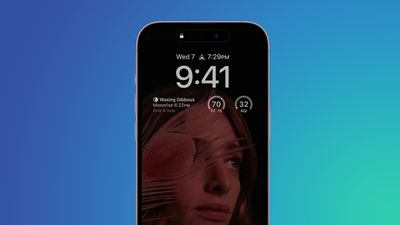
iphone 14 display
The iPhone 14 Pro and ‌iPhone 14 Pro‌ Max come with some advanced features not included in the rest of the iPhone 14 series. One of these features is the always on display, which is made possible by a more power-efficient OLED panel that can drop its refresh rate to as low as 1Hz, thereby preserving battery life.

When the iPhone 14 Pro originally launched with iOS 16 installed, the always on display did not have any customization options and would therefore show a dimmed version of the iPhone's Lock Screen wallpaper behind any widgets and notifications.

This gave an idle iPhone 14 Pro a standardized yet unique look compared to other devices with always on displays, but some users wished that they could hide their notifications when the always-on display is active for security purposes.

Thankfully, Apple listened to user feedback, and in iOS 16.2 it added new customization options that allow users to hide notifications from the always on display mode. The following steps show you how it's done.

  1. Launch the Settings app on your iPhone.
  2. Tap Display & Brightness.
  3. Tap Always On Display.
  4. Toggle off the switch next to Show Notifications.
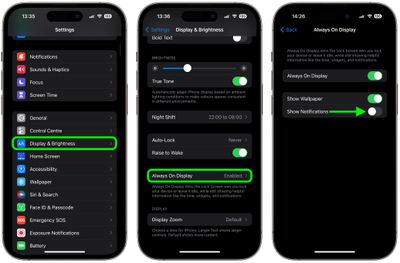
settings

That's all there is to it. The next time you put down your locked iPhone, the always on display will show the time and any widgets you have against a dimmed version of your Lock Screen wallpaper, but crucially, no notifications will be visible.


Popular Stories

Apple Event Logo

Apple's Next Era Begins September 1

Thursday May 7, 2026 10:36 am PDT by
Apple recently announced that Tim Cook will be stepping down as CEO later this year, after 15 years of leading the company. Effective September 1, Apple's hardware engineering chief John Ternus will become the company's next CEO, while Cook will become executive chairman of Apple's board of directors. In his new role, Apple said Cook will assist with "certain aspects" of the company,...
Instagram Feature 2

PSA: Instagram Encrypted Messaging Ends on Friday, May 8

Tuesday May 5, 2026 8:24 am PDT by
Instagram will remove end-to-end encryption for direct messages between users from May 8, 2026. When the date comes around, Meta will potentially be able to see the contents of all messages between users on the social media platform. Encrypting messages has been an optional feature in Instagram since 2023, but in March of this year the social media platform quietly updated a help page to say ...
Apple Event Logo

Apple Just Released a New Accessory

Monday May 4, 2026 8:13 am PDT by
Apple today released a new Pride Edition Sport Loop for the Apple Watch. The band features a rainbow design with 11 colors of woven nylon yarns. The new Pride Edition Sport Loop is available to order now on Apple.com and in the Apple Store app in 40mm, 42mm, and 46mm sizes, and it will be available at Apple Store locations starting later this week. In the U.S., the band costs $49. There...













