How to Use High Power Mode on MacBook Pro - GeekWebGuides
Skip to Content

How to Use High Power Mode on MacBook Pro

by

Apple's 16-inch MacBook Pro with the M1 Max chip was the first Apple silicon laptop to feature a High Power Mode for intensive, sustained workloads, and now both the 14-inch and 16-inch models with M3 Max support the feature. This article explains what it does and how to enable it.
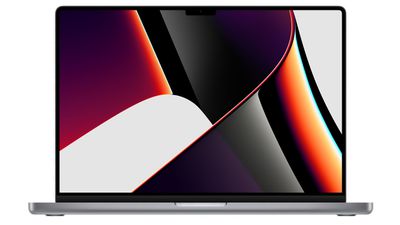
16 inch macbook pro
Both of Apple's latest 14-inch and 16-inch ‌MacBook Pro‌ models with M3 Max chip include a High Power Mode that is designed to optimize performance to better support resource-intensive tasks, such as color grading 8K ProRes video, according to Apple.

The mode is available in macOS Monterey and later, and is meant to be enabled when users are rendering larger files or doing graphically intensive tasks that require an added performance boost. In other words, it's not likely to be beneficial in typical work cases like web browsing or productivity. Whether it boosts performance in games remains an open question at this point.

When enabled, High Power Mode will de-prioritize resource-hungry system processes in order to leverage the full performance capability of the ‌M1 Max‌, M2 Max, or M3 Max processor. The setting is basically the opposite of "Low Power Mode," which aims to decrease system performance in favor of prolonging battery life.

The following steps show you how to enable High Power Mode. Bear in mind that High Power Mode is only available on both 14-inch and 16-inch ‌MacBook Pro‌ laptops with the M3 Max chip. ‌MacBook Pro‌ models with M1 Pro/‌M2‌ Pro/M3 Pro chips do not support the feature, while out of the earlier ‌M1 Max‌/‌M2‌ Max models, only the 16-inch ‌MacBook Pro‌ laptop supports High Power Mode.

High Power Mode in macOS Ventura and Later

  1. In macOS, click the Apple () symbol in the menu bar and select System Settings....
  2. Click Battery.
  3. Choose High Power Mode from the "On battery" or the "On power adapter" pop-up menu under Energy Mode.
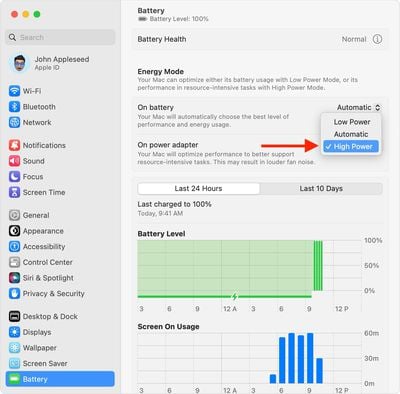
macos ventura system settings battery energy mode on battery high power

High Power Mode in macOS Monterey

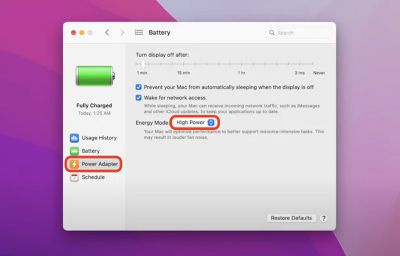
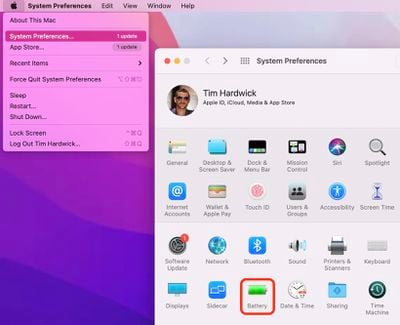
  1. In macOS Monterey and later, click the Apple () symbol in the menu bar and select System Preferences....
  2. Click the Battery icon in the preferences panel.
    system preferences

  3. Select Power Adapter from the sidebar.
  4. Where it says "Energy Mode" click the selection box and choose High Power.
    battery

That's all there is to it. Note that High Power Mode may result in louder fan noise for as long as it's turned on. The bottom of the ‌MacBook Pro‌ may also become noticeably hotter to the touch, but rest assured that while the feature can cause the ‌M1 Max‌ chip to run hotter, the mode also ramps up fan speeds to accommodate this.

Related Roundup: MacBook Pro
Buyer's Guide: MacBook Pro (Caution)
Related Forums: MacBook Pro, macOS Monterey

Top Rated Comments

velocityg4 Avatar
65 months ago
Apple should've added a turbo button the the Macbook Pro. With a little LED to indicate the speed boost.


Attachment Image
Score: 31 Votes (Like | Disagree)
Realityck Avatar
65 months ago

"may also become noticeably hotter to the touch"

"may result in louder fan noise"

uh oh... where have I seen this before..
Maybe it's an Intel laptop simulator. Runs hotter, fans are louder. :D
Score: 9 Votes (Like | Disagree)
65 months ago
Hope the Dilithium crystals can hold out!
Score: 7 Votes (Like | Disagree)
65 months ago
Why isn't this an option in the menu bar under the battery icon?
Score: 7 Votes (Like | Disagree)
macfacts Avatar
65 months ago
Can't this be done automatically, then it could be said that it "just works" no need to micro manage settings
Score: 5 Votes (Like | Disagree)
65 months ago

Inside of the app called Apple TV there are Apple TV shows, so one could correctly say they are watching Apple TV in Apple TV on an Apple TV. 😁

Now just imagine when Apple gets around to doing a show about Apple TV- something like In the AppleTV writers room or behind the scenes at AppleTV.
That's like gettin' the boot for puttin' boots in the boot.
Score: 4 Votes (Like | Disagree)

Popular Stories

M5 MacBook Pro

RIP, MacBook Ultra

Monday October 19, 2026 9:37 am PDT by
Apple today sent out invites for an experience in Los Angeles on Wednesday, October 28, and the "Pro and tell" tagline on the invitation likely means that the rumored MacBook models with touch-enabled OLED displays will stick with MacBook Pro branding instead of the once-rumored "MacBook Ultra" name. The long-rumored "iPhone Ultra" ended up being named iPhone Duo, so speculation that Apple...
MacBook Pro Ultra Feature 1

Apple to Launch Touchscreen OLED MacBook Pro and OLED iPad mini on October 27

Thursday October 8, 2026 1:31 pm PDT by
Apple will introduce new OLED touchscreen MacBook Pro models and an OLED iPad mini "on or around" Tuesday, October 27, reports Bloomberg. The launch will also include an M6 14-inch MacBook Pro and an M6 iMac. The October 27 follows Apple's October 13 debut of a new smart home hub, a revamped Apple TV 4K, and a refreshed HomePod mini. Earlier this month, GeekWebGuides reported that Apple would do ...
Black Apple Event Logo

Apple Now Inviting Media to October 28 'Launch Experience'

Thursday October 15, 2026 4:13 am PDT by
Apple has begun inviting selected members of the media to a product launch experience in Los Angeles on Wednesday, October 28, according to Bloomberg's Mark Gurman. In a post on X, Gurman described the gathering as an "all-day product launch experience" for touchscreen MacBooks, a new iPad mini, and Macs equipped with M6 chips. Gurman previously reported that Apple would introduce the...
Latest Stories
iPhone Duo Launch Begins as First Orders Reach Customers
2 hours ago
1Password for Agents Keeps Your Passwords Hidden From AI
2 hours ago
iPhone Duo 24 Hours Later: Your Questions Answered
3 hours ago
Apple's iWork Apps Get 'Intelligent Assistant' and iPhone Duo Support
4 hours ago
Apple is Apparently Considering a Slightly Larger iPhone Duo
4 hours ago
Giant iPhone Duo Displays Coming to Four Apple Stores
5 hours ago
Apple Pulls Keynote, Pages and Numbers From App Store [Update: Back]
6 hours ago
Apple Updates More Apps With iPhone Duo Support
6 hours ago
Apple Will Label Apps 'Made for iPhone Duo' in App Store
9 hours ago
Amazon Takes $49 Off iPad With Prices Starting at $399.99
10 hours ago
F1 on Apple TV Now Available in Dolby Atmos
10 hours ago
Apple Reveals More Than 50 Apps That Will Be Updated for iPhone Duo
11 hours ago
Apple Blocks Certificates That Could Help Attackers Fake Websites
12 hours ago
Giant iPhone Duo Installations Spotted at Apple Fifth Avenue
13 hours ago
iPhone Duo 2 Prototypes Include Under-Display Face ID
13 hours ago
Tesla App Gains iPad and iPhone Duo Support
17 hours ago
Apple Reportedly Boosts iPhone Duo Orders by 44%
17 hours ago
Fortnite Returning to Australian App Store After Court Ruling
18 hours ago
Apple Ordered to Open iPhone to Rival App Stores in Australia
18 hours ago
Apple Suppliers Face Hurdles Cutting Circuit Board Emissions
19 hours ago
Things Updated for iPhone Duo With Adaptive Layout
19 hours ago
Simplicity and Siri AI Are HomeView's Killer Features, Apple Says
19 hours ago
iPhone Duo Reviewers Really Miss Face ID
1 day ago
Does the iPhone Duo Run Hot? Here's What Reviews Found
1 day ago
Apple Music's New Look is Now Live on Apple's Website
1 day ago
Anthropic Launches Claude Duet, a Proactive AI Agent
1 day ago
What 32,000 Folds Did to the iPhone Duo's Hinge
1 day ago
iPhone Duo's Hidden FaceTime Camera Takes 'Trash' Photos
1 day ago
iPhone Duo Has 'Edge Light' Feature That Debuted on Macs Last Year
1 day ago
Apple Support App Updated for iPhone Duo's Larger Display
1 day ago