
Like iPhones, iPads, Macs, the Apple Watch, and the Apple TV, the HomePod and HomePod mini are updated with new software on a regular basis. The most recent update was released on March 7, and enables Siri to learn what your preferred media service is.
HomePod 2 and HomePod Mini
By default, updates are installed on your ‌HomePod‌ devices automatically, but there's also a way to force an update if new software is released. However, Apple's auto-update function isn't typically immediate, so it can sometimes be handy to have a way to manually install software when you know an update has become available.
home
Locating ‌HomePod‌ updates and checking on the software version you have installed is pretty simple, but it's not entirely intuitive because the update function is buried in the Home app.

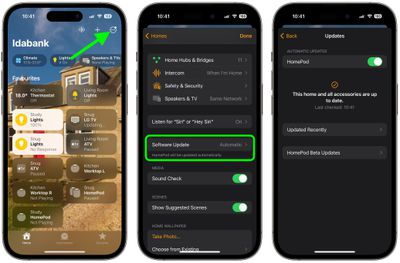
The following steps show you how to update your ‌HomePod‌ on devices running iOS 17 or iPadOS 17 and later.

  1. Open the Home app.
  2. Tap on the icon that looks like three dots in the upper right corner.
  3. Tap Home Settings in the dropdown menu that appears.
  4. Scroll down and tap Software Update to see if there are any available updates.

Once you've selected "Software Update," you'll be able to see the current version of the ‌HomePod‌ software that you have installed, along with available updates, and you can toggle off automatic updates if you want.

If there is an available update, you just need to tap the Install button to update your ‌HomePod‌. If you have multiple HomePods in your home, each one will be updated at the same time through this software update feature. If you're registered for ‌HomePod‌ Beta Updates, a menu option will also appear here for updating individual HomePods.

Related Roundup: HomePod
Buyer's Guide: HomePod (Neutral)

Top Rated Comments

BMcCoy Avatar
104 months ago
I’m starting to think the HomePod needs its own app. To control software update, volume, eq, Siri, etc. All within one app, rather than being split across 3 places as it is now.
Score: 25 Votes (Like | Disagree)
lazyrighteye Avatar
104 months ago
Wait - isn’t that upper-left corner arrow icon for Location Services?

Regardless, as iOS matures, it seems the intuitive nature that helped make it the now defacto handheld, is eroding.
In my own informal study, I feel I’m having to explain how to navigate the OS for my wife, mom, etc. more than ever. And in many cases, I can no longer automatically walk them through the process. I have to go do it myself. And almost everyone of those attempts, is not something I can run through on 1st pass.
Score: 16 Votes (Like | Disagree)
DeanL Avatar
104 months ago
I’m starting to think the HomePod needs its own app. To control software update, volume, eq, Siri, etc. All within one app, rather than being split across 3 places as it is now.
All of the settings are in the Home app. I don't understand what you mean!
Besides, there is no EQ settings for the HomePod.
Score: 5 Votes (Like | Disagree)
ersan191 Avatar
104 months ago
I’m starting to think the HomePod needs its own app. To control software update, volume, eq, Siri, etc. All within one app, rather than being split across 3 places as it is now.
Agreed, it isn’t even a home automation device and currently doesn’t have triggers or actions. I have no idea why they crammed it into the Home app, except maybe to get more people to notice the Home app and explore what it does.

The only thing that I can think of is that AirPlay 2 commands are highly dependent on the concept of Rooms (“play music in the bedroom”) and Home already establishes those. Far from ideal though.
Score: 5 Votes (Like | Disagree)
DisNerd Avatar
104 months ago
All of the settings are in the Home app. I don't understand what you mean!
Besides, there is no EQ settings for the HomePod.
The three places are home settings, HomePod settings within home, and the music app. And bonus 4th place, control center.
Score: 3 Votes (Like | Disagree)
DeanL Avatar
104 months ago
The three places are home settings, HomePod settings within home, and the music app. And bonus 4th place, control center.
Okay but these are not settings! They are controls for the music.
Score: 3 Votes (Like | Disagree)

Popular Stories

Apple Logo Zoomed

Tim Cook Teases Plans for Apple's Upcoming 50th Anniversary

Thursday February 5, 2026 12:54 pm PST by
Apple turns 50 this year, and its CEO Tim Cook has promised to celebrate the milestone. The big day falls on April 1, 2026. "I've been unusually reflective lately about Apple because we have been working on what do we do to mark this moment," Cook told employees today, according to Bloomberg's Mark Gurman. "When you really stop and pause and think about the last 50 years, it makes your heart ...
iOS 26

iOS 26.3 and iOS 26.4 Will Add These New Features to Your iPhone

Tuesday February 3, 2026 7:47 am PST by
While the iOS 26.3 Release Candidate is now available ahead of a public release, the first iOS 26.4 beta is likely still at least a week away. Following beta testing, iOS 26.4 will likely be released to the general public in March or April. Below, we have recapped known or rumored iOS 26.3 and iOS 26.4 features so far. iOS 26.3 iPhone to Android Transfer Tool iOS 26.3 makes it easier...
imac video apple feature

Apple Makes Its Second-Biggest Acquisition Ever

Tuesday February 3, 2026 12:45 pm PST by
Apple recently acquired Israeli startup Q.ai for close to $2 billion, according to Financial Times sources. That would make this Apple's second-biggest acquisition ever, after it paid $3 billion for the popular headphone maker Beats in 2014. This is also the largest known Apple acquisition since the company purchased Intel's smartphone modem business and patents for $1 billion in 2019....
wwdc sans text feature

Apple Rumored to Announce New Product on February 19

Thursday February 5, 2026 12:22 pm PST by
Apple plans to announce the iPhone 17e on Thursday, February 19, according to Macwelt, the German equivalent of Macworld. The report, citing industry sources, is available in English on Macworld. Apple announced the iPhone 16e on Wednesday, February 19 last year, so the iPhone 17e would be unveiled exactly one year later if this rumor is accurate. It is quite uncommon for Apple to unveil...
Finder Siri Feature

Why Apple's iOS 26.4 Siri Upgrade Will Be Bigger Than Originally Promised

Friday February 6, 2026 3:06 pm PST by
In the iOS 26.4 update that's coming this spring, Apple will introduce a new version of Siri that's going to overhaul how we interact with the personal assistant and what it's able to do. The iOS 26.4 version of Siri won't work like ChatGPT or Claude, but it will rely on large language models (LLMs) and has been updated from the ground up. Upgraded Architecture The next-generation...
















