

If you're a new Mac user with a Windows PC background, you're probably wondering how to use the typical copy and paste commands in macOS.
In Windows, the Copy and Paste key combinations are Control-C and Control-V, respectively. On the Mac, it's very similar – all you do is use the Command (⌘) key instead of Control. You can find the Command key immediately left of your keyboard's space bar.
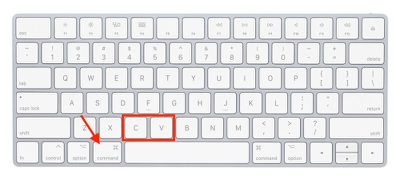
When you select some text or an item on a Mac, pressing Command-C copies it to the clipboard, where it will remain until you either copy it over with another item or selection or restart your Mac.
To paste your clipboard selection somewhere else, simply navigate to the desired location with your cursor and hit Command-V.
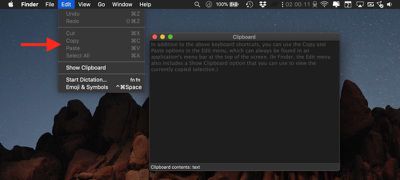
In addition to the above keyboard shortcuts, on a Mac you can use the Copy and Paste options in the Edit menu, which can always be found in an application's menu bar at the top of the screen. (In Finder, the Edit menu also includes a Show Clipboard option that you can use to view the currently copied selection.)

If you right-click an item or a highlighted text selection, you can also find the Copy command in the contextual pop-up menu. Once you've copied the item or text selection, the Copy command is replaced by Paste Item or Paste, respectively.
























![Apple Pulls Keynote, Pages and Numbers From App Store [Update: Back]](https://images.macrumors.com/t/Okb7kitB_gNr6qe5Pex9nQIysD8=/112x112/article-new/2026/01/Apple-Creator-Studio-iWork-suite.jpg)





















