
In just over a month, we will finally have the long-awaited Apple Watch in our hands, or technically, on our wrists. The first thing you'll need to do once you get a hold of the new gadget is pair it with your iPhone and prepare to install apps for it.

To make sure you are ready for the big day, we have a how-to guide for pairing your iPhone with your Apple Watch. It won’t be hard, but it will use technology to pair the two devices in a way we’ve never seen before on an Apple product.

Apple Watch will require connection to an iPhone 5, 5s, 5c, 6, or 6 Plus running iOS 8.2. With varying methods of connectivity between the devices, Apple has developed a interesting system to pair the two devices using a camera feature.
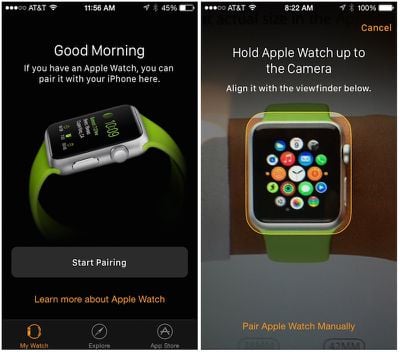
apple_watch_pairing_auto

Steps for Pairing Apple Watch with iPhone

  1. Launch the Apple Watch App on your iPhone
  2. Tap "Start Pairing" on the main screen
  3. Hold Apple Watch up to your iPhone's camera so the screen is in alignment with the yellow outlined box on your iPhone's screen
  4. Follow the on-screen instructions provided in the Apple Watch app
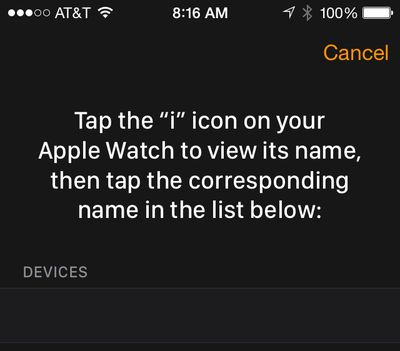
apple_watch_pairing_manual

Alternate Method for Pairing Apple Watch Manually

If you do not wish to use the camera feature, you can alternatively pair Apple Watch with your iPhone manually.

  1. Launch the Apple Watch App on your iPhone
  2. Tap "Start Pairing" on the main screen
  3. Tap "Pair Apple Watch Manually" at the bottom of the camera viewfinder screen
  4. Tap the "i" icon on Apple Watch to see its name
  5. Select that name on the Apple Watch iPhone app from the list that appears on the screen
  6. Follow the on-screen instructions provided in the Apple Watch app

Download Apple Watch Apps

For the time being, third-party Apple Watch apps are actually hosted on the iPhone, with the apps able to serve various types of extensions to the Apple Watch for notifications and interactivity. Later this year, Apple will allow developers to begin developing apps that will run natively on the Apple Watch.

Once your Apple Watch is paired with your iPhone, you will have access to a host of settings to configure and personalize your Apple Watch. You will also be able to download apps from a special Apple Watch App Store, which will be updated regularly with new content from developers. An App Store for Apple Watch is built right into the Apple Watch companion app for iPhone, where Apple is expected to present a variety of Apple Watch-compatible apps in a manner similar to that seen for the regular App Store, which will presumably also include Apple Watch content.
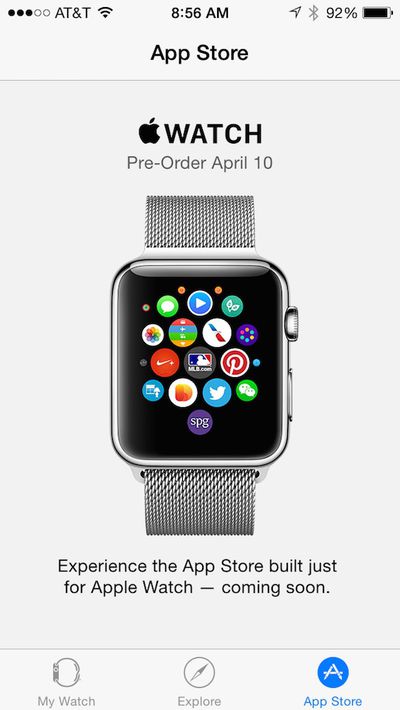
apple_watch_app_store
Apple Watch will be available for pre-order in the first wave of nine launch countries on April 10, both online and in Apple retail stores, and will the device will launch in those countries on Friday, April 24. Prices start at $349 for the aluminum Apple Watch Sport model, $549 for the stainless steel Apple Watch model, and $10,000 for the gold Apple Watch Edition model. Starting April 10, you will be able to make a reservation or stop by to try on Apple Watch at an Apple retail store and pre-order your selection at that time.


Related Roundup: Apple Watch 11
Buyer's Guide: Apple Watch (Neutral)

Top Rated Comments

The Doctor11 Avatar
142 months ago
The question is how people without iPhones will be able to install apps on their watches?

They won't :apple: Watch requires a iPhone.
Score: 15 Votes (Like | Disagree)
l00pback Avatar
142 months ago
I applied some common logic, high IQ and an experience of software development :) And a test using a photo of iWatch in front of iPhone camera :)

Well, look at the big brain on Brad!

So, was your test successful? Did the photo of the Apple Watch have enough verisimilitude to fool the companion app? I'm guessing you didn't get very far in your test.

Here's the test I want to see: Once you have an actual Apple Watch in hand, try the pairing process. However, instead of showing it your new watch, you show it the photo. If it still pairs, I'll be convinced.
Score: 9 Votes (Like | Disagree)
l00pback Avatar
142 months ago
It's just a funky UI gimmick. It doesn't recognize anything when you show a picture of a watch to this app. Clearly it searches instead for Bluetooth for pairing.

Just curious: what your level of technical expertise is to say this?
Score: 9 Votes (Like | Disagree)
Pez555 Avatar
142 months ago
Take my money apple
Score: 8 Votes (Like | Disagree)
newdeal Avatar
142 months ago
Interesting - I wonder how that camera pairing system works? I'd assume it has little to do with the camera itself and more to do with the Bluetooth connection underneath. Still an intriguing way to pair the two devices.

The camera likely just picks up the numbers from the pin code for Bluetooth off of the watch screen similar to how it picks up the numbers on the credit card for Apple pay. Basically it's just Bluetooth pairing without having to manually enter the pin
Score: 7 Votes (Like | Disagree)
IJ Reilly Avatar
142 months ago
The camera likely just picks up the numbers from the pin code for Bluetooth off of the watch screen similar to how it picks up the numbers on the credit card for Apple pay. Basically it's just Bluetooth pairing without having to manually enter the pin

Stop making sense.
Score: 6 Votes (Like | Disagree)

Popular Stories

Apple Logo Zoomed

Tim Cook Teases Plans for Apple's Upcoming 50th Anniversary

Thursday February 5, 2026 12:54 pm PST by
Apple turns 50 this year, and its CEO Tim Cook has promised to celebrate the milestone. The big day falls on April 1, 2026. "I've been unusually reflective lately about Apple because we have been working on what do we do to mark this moment," Cook told employees today, according to Bloomberg's Mark Gurman. "When you really stop and pause and think about the last 50 years, it makes your heart ...
wwdc sans text feature

Apple Rumored to Announce New Product on February 19

Thursday February 5, 2026 12:22 pm PST by
Apple plans to announce the iPhone 17e on Thursday, February 19, according to Macwelt, the German equivalent of Macworld. The report, citing industry sources, is available in English on Macworld. Apple announced the iPhone 16e on Wednesday, February 19 last year, so the iPhone 17e would be unveiled exactly one year later if this rumor is accurate. It is quite uncommon for Apple to unveil...
Finder Siri Feature

Why Apple's iOS 26.4 Siri Upgrade Will Be Bigger Than Originally Promised

Friday February 6, 2026 3:06 pm PST by
In the iOS 26.4 update that's coming this spring, Apple will introduce a new version of Siri that's going to overhaul how we interact with the personal assistant and what it's able to do. The iOS 26.4 version of Siri won't work like ChatGPT or Claude, but it will rely on large language models (LLMs) and has been updated from the ground up. Upgraded Architecture The next-generation...
iOS 26

iOS 26.3 and iOS 26.4 Will Add These New Features to Your iPhone

Tuesday February 3, 2026 7:47 am PST by
While the iOS 26.3 Release Candidate is now available ahead of a public release, the first iOS 26.4 beta is likely still at least a week away. Following beta testing, iOS 26.4 will likely be released to the general public in March or April. Below, we have recapped known or rumored iOS 26.3 and iOS 26.4 features so far. iOS 26.3 iPhone to Android Transfer Tool iOS 26.3 makes it easier...
iphone 17 pro dark blue 1

iPhone 18 Pro Max Rumored to Deliver Next-Level Battery Life

Friday February 6, 2026 5:14 am PST by
The iPhone 18 Pro Max will feature a bigger battery for continued best-in-class battery life, according to a known Weibo leaker. Citing supply chain information, the Weibo user known as "Digital Chat Station" said that the iPhone 18 Pro Max will have a battery capacity of 5,100 to 5,200 mAh. Combined with the efficiency improvements of the A20 Pro chip, made with TSMC's 2nm process, the...















