How to Save an Apple Fitness+ Workout to Your Favorites - MacRumors
Skip to Content

How to Save an Apple Fitness+ Workout to Your Favorites

by

If you come across an Apple Fitness+ workout that you particularly enjoy, you might want to save it to your playlist so that you can repeat it again later.

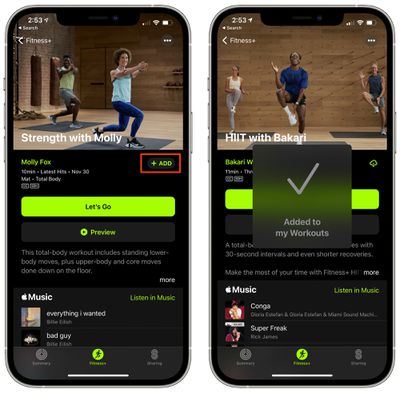
  1. Open the Fitness app. On iPhone, tap the Fitness+ tab.
  2. Find the video that you want to save. fitness plus add favorites
  3. Tap on the "Add" button.

To get to your saved workouts, go to the main Fitness+ interface and then scroll down to the bottom where your content is listed under "My Workouts."
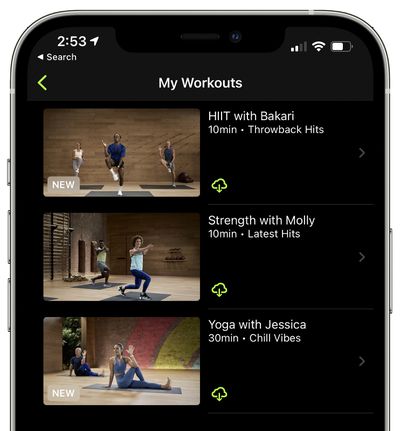
fitness plus my workouts
If you tap on one of your workouts, you can then tap on the iCloud icon to download it for offline viewing.

To remove a workout from your list, tap on the three dots at the top of one of the videos and then choose the "Remove from My Workouts" option.
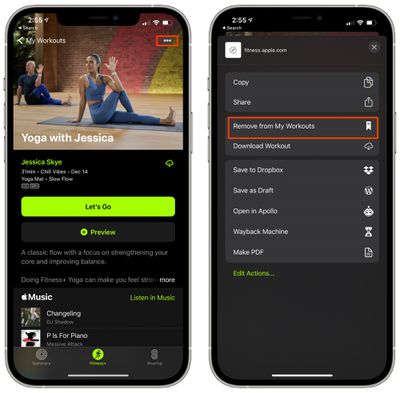
fitnessp plus remove download
For more on Fitness+, make sure to check out our full Fitness+ guide.

Popular Stories

Apple Event Logo

Apple's Next Era Begins September 1

Thursday May 7, 2026 10:36 am PDT by
Apple recently announced that Tim Cook will be stepping down as CEO later this year, after 15 years of leading the company. Effective September 1, Apple's hardware engineering chief John Ternus will become the company's next CEO, while Cook will become executive chairman of Apple's board of directors. In his new role, Apple said Cook will assist with "certain aspects" of the company,...
Instagram Feature 2

PSA: Instagram Encrypted Messaging Ends on Friday, May 8

Tuesday May 5, 2026 8:24 am PDT by
Instagram will remove end-to-end encryption for direct messages between users from May 8, 2026. When the date comes around, Meta will potentially be able to see the contents of all messages between users on the social media platform. Encrypting messages has been an optional feature in Instagram since 2023, but in March of this year the social media platform quietly updated a help page to say ...
Apple Event Logo

Apple Just Released a New Accessory

Monday May 4, 2026 8:13 am PDT by
Apple today released a new Pride Edition Sport Loop for the Apple Watch. The band features a rainbow design with 11 colors of woven nylon yarns. The new Pride Edition Sport Loop is available to order now on Apple.com and in the Apple Store app in 40mm, 42mm, and 46mm sizes, and it will be available at Apple Store locations starting later this week. In the U.S., the band costs $49. There...