How to Set Up HomePod Multi-User Voice Recognition - MacRumors
Skip to Content

How to Set Up HomePod Multi-User Voice Recognition

by

Apple's HomePod speaker can recognize the voices of up to six people and tailor the music selection to an individual user's taste profile, respond to their own Personal Requests, and access their information to help them with everyday tasks.
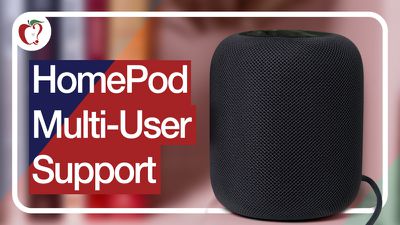
homepodmultiuser
Before you can make use of ‌HomePod‌'s multi-user voice support, you have to set up the feature, and there are a few steps involved. This article explains what they are and also offers a few troubleshooting tips if you're experiencing issues.

Check That Your Software is Up-to-Date

The first thing you need to do is ensure that the ‌HomePod‌ and the iPhones or iPads of the people who intend to use it are updated to iOS 16.3 or later or iPadOS 16.3 or later. You can check what software your iOS devices are running by opening the Settings app and selecting General -> Software Update.

To check the software version of your ‌HomePod‌, launch the Home app on your iOS device, tap the home icon in the upper left corner of the display, then scroll down to Software Update. You can pull down from the top of the iPhone or iPad screen to check for an update if you need to.

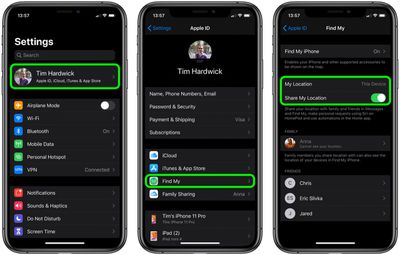
Turn on Share My Location in Find My

Share My Location must be set to This Device on the iPhone or ‌iPad‌ of every user who wishes to be recognized by ‌HomePod‌, including yours.

  1. Launch the Settings app on the iPhone or ‌iPad‌.
  2. Tap your name in the banner at the top of the screen.
  3. Tap Find My.
    settings

  4. Tap the toggle next to Share My Location to turn it to the green ON position.
  5. Next, set My Location to This Device.

Add People to Your Home Network

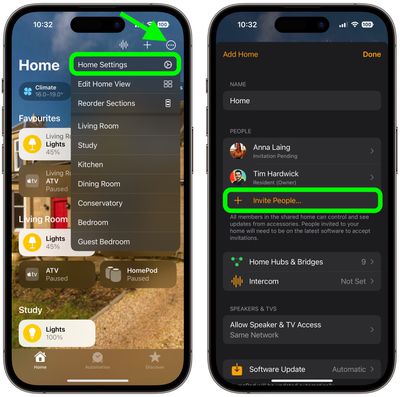
Whoever wants to be recognized by your ‌HomePod‌ must be part of your Home network. Here's how to add them.

  1. Launch the Home app on your iPhone or ‌iPad‌.
  2. Tap the ellipsis button (three encircled dots) in the top-right corner of the screen.
  3. Tap Home Settings in the dropdown menu.
  4. Under People, tap Invite....
    home

  5. Enter the person's Apple ID that they use with iCloud.
  6. Tap Send Invite.

Additional Settings to Check/Enable

You'll also need to check the following settings on your ‌HomePod‌ and iOS device to ensure everything works.

  • Make sure Listen for "Hey, Siri" and Personal Requests are enabled on your ‌HomePod‌: In the Home app, long press on your ‌HomePod‌, tap the cog in the bottom-right corner of the screen, then toggle the requisite switches. On the same screen, check also that the Language is set to English. (Siri on ‌HomePod‌ multi-user only supports English at this time.)
  • Make sure Listen for "Hey, Siri" is enabled on the iOS device of every user who wishes to be recognized by ‌HomePod‌, including your own device. The associated toggle can be found in Settings -> Siri & Search. On the same screen, check also that the device is set to the same Language as your ‌HomePod‌.
  • Likewise, location services must be enabled on the device of every user who wishes to be recognized by ‌HomePod‌: Go to Settings -> Privacy -> Location Services, and make sure the Location Services toggle is green.

Testing HomePod Multi-user and Fixing Issues

When someone that you've set up to be recognized by your ‌HomePod‌ first asks it a personal request, ‌Siri‌ will ask who it is. If the user states their name, ‌Siri‌ should be able to recognize them after that.

Apple does say ‌HomePod‌ can have trouble distinguishing some voices, like those of young children, but rest assured whenever ‌HomePod‌ isn't sure, it will ask who's speaking.

If ‌Siri‌ doesn't recognize you after multi-user setup, try these steps. After each step, see if ‌Siri‌ recognizes you.

  1. In the Home app, tap the home icon, then tap Home Settings. Choose your home, then turn off Recognize My Voice, then turn it on again. Wait a few minutes before trying ‌Siri‌ again.
  2. Restart the iOS device that you use with "Hey ‌Siri‌."
  3. Restart your ‌HomePod‌: Open the Home app on your iOS device, tap and hold ‌HomePod‌, then tap the cog wheel in the bottom-right corner of the screen. Scroll down and select Reset HomePod, then tap Restart HomePod to confirm.

  4. On your iOS device, go to Settings -> Siri & Search, then turn off Listen for "Hey Siri", then turn it on again, and follow the onscreen instructions to teach ‌Siri‌ your voice.

To test out out the voice recognition further, you can get users to try asking different questions that relate specifically to them, like what their upcoming calendar events are. If everything works, ‌Siri‌ will reply with their respective name and the answer to their query.

The neat thing about ‌HomePod‌ multi-user support is that it doesn't apply to queries and commands that aren't person-specific – so you can ask what time it is or what the weather is like, just as you would do so normally.

Similarly, anyone can ask ‌HomePod‌ to play music, and it will play from the primary user's account without affecting that person's taste profile.


Related Roundups: HomePod, HomePod mini 2

Popular Stories

Apple TV 4K HomeView HomePod Mini tweaked

New Apple TV 4K, HomeView, and HomePod Mini: 16 Details Just Leaked

Sunday October 11, 2026 12:56 pm PDT by
Just two days before Apple's "Welcome home" experience in New York, Bloomberg's Mark Gurman has leaked several details about the new products set to be unveiled, including an all-new smart home hub, a HomePod mini 2, and a new Apple TV 4K. Here is an all-in-one summary of the details shared by Gurman:Apple's home hub with a touch-enabled display will be named HomeView, seemingly confirming a ...
HomePod minis Apple TV and iPad mini Leak Feature

iPad Mini With A20 Pro, New HomePod Mini Colors, and New Apple TV 4K All Just Leaked

Friday September 25, 2026 8:18 am PDT by
The next iPad mini, HomePod mini, and Apple TV 4K models have all leaked, just a few weeks before the devices are expected to be announced. Specifically, MacRumors contributor Aaron Perris discovered a few of Apple's official images of the devices, confirming their existence and some new features that are planned. The most notable iPad mini details revealed in today's leak include an A20 Pro ...
HomePod minis on gradient feature 1 1

Exclusive: First Look at HomePod Mini 2 in Three New Colors

Friday September 25, 2026 8:17 am PDT by
Apple's new HomePod mini will share the same design as the original model and come in five colors, MacRumors has found. The information originates from Apple's own code (spotted by MacRumors contributor Aaron Perris) and shows clear product images of the new models in all of their colors. The above image contains Apple's own icons, which specifically refer to a "HomePod mini 2." The new...
Latest Stories
iPhone Duo Launch Begins as First Orders Reach Customers
2 hours ago
1Password for Agents Keeps Your Passwords Hidden From AI
2 hours ago
iPhone Duo 24 Hours Later: Your Questions Answered
3 hours ago
Apple's iWork Apps Get 'Intelligent Assistant' and iPhone Duo Support
4 hours ago
Apple is Apparently Considering a Slightly Larger iPhone Duo
4 hours ago
Giant iPhone Duo Displays Coming to Four Apple Stores
5 hours ago
Apple Pulls Keynote, Pages and Numbers From App Store [Update: Back]
6 hours ago
Apple Updates More Apps With iPhone Duo Support
6 hours ago
Apple Will Label Apps 'Made for iPhone Duo' in App Store
9 hours ago
Amazon Takes $49 Off iPad With Prices Starting at $399.99
10 hours ago
F1 on Apple TV Now Available in Dolby Atmos
10 hours ago
Apple Reveals More Than 50 Apps That Will Be Updated for iPhone Duo
11 hours ago
Apple Blocks Certificates That Could Help Attackers Fake Websites
12 hours ago
Giant iPhone Duo Installations Spotted at Apple Fifth Avenue
13 hours ago
iPhone Duo 2 Prototypes Include Under-Display Face ID
13 hours ago
Tesla App Gains iPad and iPhone Duo Support
17 hours ago
Apple Reportedly Boosts iPhone Duo Orders by 44%
17 hours ago
Fortnite Returning to Australian App Store After Court Ruling
18 hours ago
Apple Ordered to Open iPhone to Rival App Stores in Australia
18 hours ago
Apple Suppliers Face Hurdles Cutting Circuit Board Emissions
19 hours ago
Things Updated for iPhone Duo With Adaptive Layout
19 hours ago
Simplicity and Siri AI Are HomeView's Killer Features, Apple Says
19 hours ago
iPhone Duo Reviewers Really Miss Face ID
1 day ago
Does the iPhone Duo Run Hot? Here's What Reviews Found
1 day ago
Apple Music's New Look is Now Live on Apple's Website
1 day ago
Anthropic Launches Claude Duet, a Proactive AI Agent
1 day ago
What 32,000 Folds Did to the iPhone Duo's Hinge
1 day ago
iPhone Duo's Hidden FaceTime Camera Takes 'Trash' Photos
1 day ago
iPhone Duo Has 'Edge Light' Feature That Debuted on Macs Last Year
1 day ago
Apple Support App Updated for iPhone Duo's Larger Display
1 day ago