
How to Use Screen Time in iOS 12 - MacRumors
Skip to Content

How to Use Screen Time in iOS 12

by

Apple in iOS 12 introduced Screen Time, which is designed to provide you with information on how you're using your time on your iPhone and iPad.

With Screen Time, you can see how often you pick up your iOS device, which apps you're using, which apps are sending the most notifications, and other details.

Accessing Screen Time

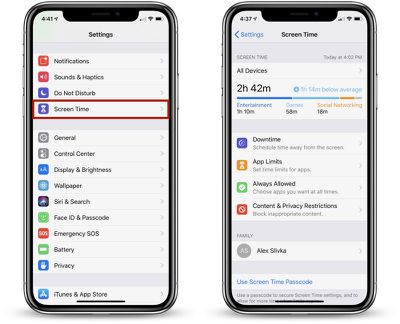
There's no dedicated app for Screen Time, so it might not be immediately obvious how it's accessed when you first install iOS 12. All Screen Time features are actually available in the Settings app.
screentimemainscreen

  1. Open up the Settings app.
  2. Scroll down to the "Screen Time" section that's grouped with Notifications, Sounds, and Do Not Disturb.
  3. Tap on "Screen Time" to see your usage statistics.

Screen Time Syncing

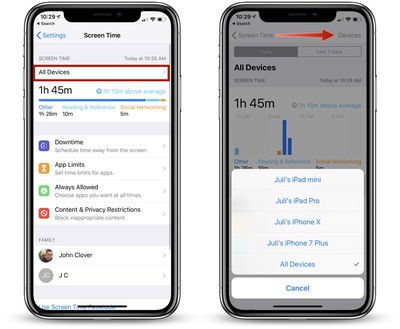
Screen Time statistics are collected from all iOS devices running iOS 12 where you're logged in with your iCloud account. That means it will aggregate data from all iPhones and iPads that you use during the course of a day.
multipledevices
You can view your data across all devices or on a per device basis. To view other devices, tap on the "All Devices" label on the main Screen Time screen and then choose "Devices" from the upper right hand corner.

Info Available in Screen Time

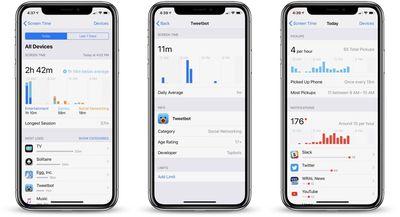
When you open up Screen Time, a chart is displayed with information on your last 24 hours of iPhone usage, organized by each individual app or which app category you've used the most, such as Productivity, Games, Creativity, or Messages.
screentimedata
If you tap on that chart, you can see even more information from either the last 24 hours or the last 7 days, including your longest usage setting, the number of times you picked up your device during the day, and how many notifications you got, along with details on which apps are sending you the most notifications.

Other Screen Time Features

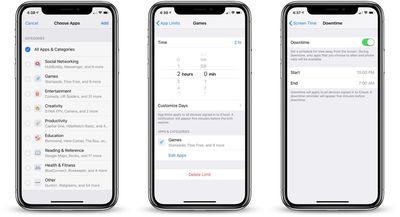
In the Screen Time section, you can set scheduled Downtime for yourself to restrict yourself (or a child) from using apps outside of those that have been allowed with App Limits, you can set specific time limits on app categories like social networking or games, and you can access Content & Privacy Restrictions, useful if you're managing a child's device.
screentimefeatures
If you use Family Sharing with a spouse, friend, or child, and you're the family manager, you'll also see family members' names listed under "Family" and will be able to see and control their app usage.

These features are relatively simple to use, but we'll be looking into them in more depth in future how tos.

Disabling Screen Time

If you don't want to use Screen Time, you can turn it off in the Settings app.
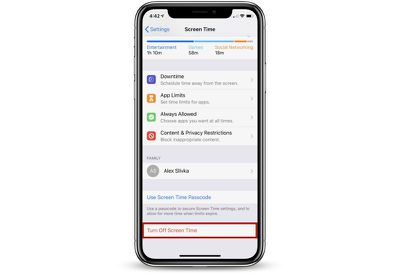
turningoffscreentime

  1. Open the Settings app.
  2. Tap "Screen Time."
  3. Scroll down to "Turn Off Screen Time" and tap it.

Turning off Screen Time on your device will delete all app, website, and notification history. You can re-enable Screen Time at any time, but it does not save data nor does it begin collecting data until enabled.


Related Forum: iOS 12

Top Rated Comments

scottct1 Avatar
108 months ago
Hopefully they fix it, as I installed the beta on my sons phone and turned on Screen time from my iPhone so he can't use his phone after 10pm at night.

He found two ways to disable it.

1) When Screentime goes on and it shuts off his apps, he can still get into settings then into Date and Time settings and change the time to a time when Screentime restrictions are not in place.

2) Even easier is he set his phone to be in 24 hour mode and for some reason Screentime does not understand 24 hour mode so Screentime never kicks in at 10pm, since its 22:00 instead.
Score: 5 Votes (Like | Disagree)
scottct1 Avatar
108 months ago
Yes bug report was submitted. ID # 41976021
Score: 3 Votes (Like | Disagree)
jonnysods Avatar
106 months ago
This is going to be handy to keep tabs on the kids and how much they use their devices.

Soon once we figure out some parameters I'll be able to help them get some control over their device usage. I even need that in my own life!
Score: 2 Votes (Like | Disagree)
one more Avatar
106 months ago
Disabling it altogether is another great option. Spending extra time staring at the screen trying to figure out how much time we spend staring at the screen is kinda ironic!
Score: 2 Votes (Like | Disagree)
104 months ago
My screen time data keeps resetting and erasing my progress for the day.
Same here. Whenever I open the screen time the statistics are gone, but before I open it I am able to see some statistics from the widgets. Are there any sollutions ?
Score: 1 Votes (Like | Disagree)
mtngoatjoe Avatar
106 months ago
I, for one, am really glad Apple added this feature. It may have some bugs, but I'm thankful I can finally monitor how much time my daughter is using her device. She was really hacked when she found out I set a limit, but the next night was not a big deal.
Score: 1 Votes (Like | Disagree)

Popular Stories

M5 MacBook Pro

RIP, MacBook Ultra

Monday October 19, 2026 9:37 am PDT by
Apple today sent out invites for an experience in Los Angeles on Wednesday, October 28, and the "Pro and tell" tagline on the invitation likely means that the rumored MacBook models with touch-enabled OLED displays will stick with MacBook Pro branding instead of the once-rumored "MacBook Ultra" name. The long-rumored "iPhone Ultra" ended up being named iPhone Duo, so speculation that Apple...
iPhone Duo Trio

Here's What Apple's Apps Look Like on the iPhone Duo

Tuesday October 20, 2026 11:12 am PDT by
With just three days to go until the iPhone Duo is released, Apple is getting ready for the launch. Behind the scenes, the App Store now has screenshots of Apple's built-in apps running on the Duo. We've seen some apps in marketing materials, but images of the ones we haven't seen give us an idea of what it will be like using the iPhone Duo day to day. Many apps are shown in landscape...
apple pro tell logo

Apple Announcing New Products Next Week: 'Pro and Tell'

Monday October 19, 2026 9:05 am PDT by
Apple's Greg Joswiak today hinted at new product announcements coming next week, sharing a social media post that says "Can't wait to pro and tell next week." Rumors suggest Apple is planning to debut the new MacBook Pro with an OLED touchscreen display, an M6 entry-level MacBook Pro, an M6 iMac, an iPad mini with an OLED display. Can't wait to pro and tell next week....
Latest Stories
iPhone Duo Launch Begins as First Orders Reach Customers
40 minutes ago
1Password for Agents Keeps Your Passwords Hidden From AI
1 hour ago
iPhone Duo 24 Hours Later: Your Questions Answered
2 hours ago
Apple's iWork Apps Get 'Intelligent Assistant' and iPhone Duo Support
3 hours ago
Apple is Apparently Considering a Slightly Larger iPhone Duo
3 hours ago
Giant iPhone Duo Displays Coming to Four Apple Stores
4 hours ago
Apple Pulls Keynote, Pages and Numbers From App Store [Update: Back]
5 hours ago
Apple Updates More Apps With iPhone Duo Support
5 hours ago
Apple Will Label Apps 'Made for iPhone Duo' in App Store
8 hours ago
Amazon Takes $49 Off iPad With Prices Starting at $399.99
9 hours ago
F1 on Apple TV Now Available in Dolby Atmos
9 hours ago
Apple Reveals More Than 50 Apps That Will Be Updated for iPhone Duo
10 hours ago
Apple Blocks Certificates That Could Help Attackers Fake Websites
11 hours ago
Giant iPhone Duo Installations Spotted at Apple Fifth Avenue
12 hours ago
iPhone Duo 2 Prototypes Include Under-Display Face ID
12 hours ago
Tesla App Gains iPad and iPhone Duo Support
16 hours ago
Apple Reportedly Boosts iPhone Duo Orders by 44%
17 hours ago
Fortnite Returning to Australian App Store After Court Ruling
17 hours ago
Apple Ordered to Open iPhone to Rival App Stores in Australia
17 hours ago
Apple Suppliers Face Hurdles Cutting Circuit Board Emissions
18 hours ago
Things Updated for iPhone Duo With Adaptive Layout
18 hours ago
Simplicity and Siri AI Are HomeView's Killer Features, Apple Says
18 hours ago
iPhone Duo Reviewers Really Miss Face ID
23 hours ago
Does the iPhone Duo Run Hot? Here's What Reviews Found
1 day ago
Apple Music's New Look is Now Live on Apple's Website
1 day ago
Anthropic Launches Claude Duet, a Proactive AI Agent
1 day ago
What 32,000 Folds Did to the iPhone Duo's Hinge
1 day ago
iPhone Duo's Hidden FaceTime Camera Takes 'Trash' Photos
1 day ago
iPhone Duo Has 'Edge Light' Feature That Debuted on Macs Last Year
1 day ago
Apple Support App Updated for iPhone Duo's Larger Display
1 day ago









































