How to Sign Up for iCloud Family Storage Plans in iOS 11 - GeekWebGuides
Skip to Content

How to Sign Up for iCloud Family Storage Plans in iOS 11

by

Apple's Family Sharing feature allows you to share music, movies, apps, photos, and more with family members, and in iOS 11, Family Sharing extends to Apple's iCloud Storage plans.

When you purchase a 200GB or 2TB iCloud Storage plan, all members of your family can share the storage space. Depending on how many family members you have, family plans offer more storage at a better price than individual plans.

For example, a 50GB storage plan is priced at $0.99 per person. For two people, the $2.99 200GB plan offers each person an additional 50GB of storage for only $1 more.

How to Upgrade to a Family iCloud Storage Plan

  1. Open the Settings app.
  2. Tap on your Apple ID profile at the top of the app.
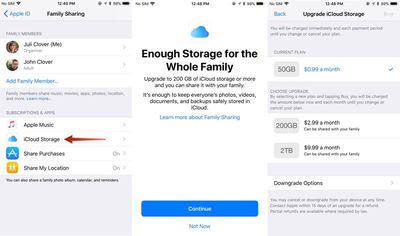
  3. Choose "Family Sharing," the sixth option in the list.icloudfamilysharing
  4. Tap on "iCloud Storage" to bring up a notice about the new Family Sharing options.
  5. Click "Continue" to choose a plan.
  6. Pick a 200GB or 2TB plan.

You can also access the plan settings through the standard iCloud Storage menu in the Settings app, accessible by going to iCloud > Manage Storage after tapping on your profile.

How to Stop Sharing iCloud Storage With Family

You can sign up for a 2TB or 200GB storage plan and keep family members from accessing your storage space. Here's how:

  1. Open the Settings app.
  2. Tap on your Apple ID profile.
  3. Choose "Family Sharing."
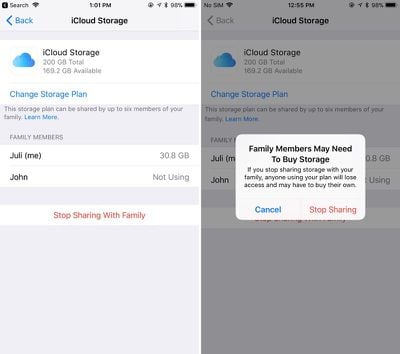
  4. Choose "iCloud Storage."familystoragestopsharing
  5. Tap on "Stop Sharing With Family."

How to Downgrade iCloud Storage

If you want to go back to a cheaper iCloud Storage option, downgrading is as simple as choosing a new plan. New rates won't kick in until the next billing period.

  1. Open the Settings app.
  2. Tap on your Apple ID profile.
  3. Choose "iCloud."
  4. Tap on "Manage Storage."
  5. Choose "Change" under the iCloud Storage option.
  6. Select a 5GB or 50GB plan to downgrade.

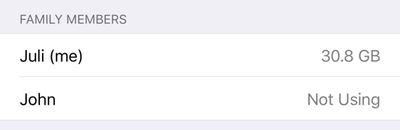
It's important to note that there's no way to allocate how much storage each person gets when using one of Apple's new iCloud Storage plans for families, so it's not always an even split. If a family member is hogging too much space, that's a problem that will need to be worked out offline. You can see how much storage each family member is using by going to profile > Family Sharing > iCloud Storage.
familystoragespaceused
When you choose a 200GB or 2TB storage plan and opt in to Family Sharing, family members who are on the free 5GB plan will be upgraded automatically and will begin using the family storage plan.

Family members who already have a paid plan will need to opt in to the family storage plan to transfer over from their own plans. If they want to have separate storage, your family members can continue to pay for their own plans and choose not to opt into the family plan.

To let your family know that you've signed up for a family iCloud plan, Apple offers an automatic iMessage alert that can be sent out to family members that lets them easily switch over to the family plan.


Tag: iCloud

Top Rated Comments

Blackstick Avatar
119 months ago
Great. When can I share the damn Photos library with my wife?
Score: 11 Votes (Like | Disagree)
119 months ago
This is a great question. I hope so because the shared folders are not full resolution. I want to share photo library with my wife but with current iCliud set up it can't be done. Basically the way it works now is one of us has he main photo library that is synced to the family iMac and one has another iCloud account where we have to airdrop the pics we want into the main one.
This is why my wife and I still use the same iCloud account when setting up our iPhones. I just make sure I turn some things off that conflict between the two (or that we don't want - iCloud Drive, iMessages and FaceTime for each others number etc), and just live with it. But in an ideal world, we should be able to have our own accounts under family sharing, and just sync the same default photo albums. I like how I can just open up my Photos app and see what photos my wife has taken of my kids today when they were out, and vice versa.
Score: 4 Votes (Like | Disagree)
load97 Avatar
119 months ago
+1, need! As it stands, we have to manually copy photos in to a shared album. It's silly.
It’s embarrassing for Apple.
Score: 3 Votes (Like | Disagree)
Anonymous Freak Avatar
119 months ago
Great. When can I share the damn Photos library with my wife?
+1, need! As it stands, we have to manually copy photos in to a shared album. It's silly.
Score: 3 Votes (Like | Disagree)
Eduardo1971 Avatar
119 months ago
Thank you for the reminder MR!!!

With all these iOS 11 goodies I totally forgot about this...I’m adding my family to this!!
Score: 3 Votes (Like | Disagree)
119 months ago
Wish you could use family sharing and still have each Apple ID on a separate credit card.
Score: 2 Votes (Like | Disagree)

Popular Stories

General iCloud App Feature

Apple Quietly Boosts Email Feature for iCloud+ Subscribers

Tuesday October 6, 2026 3:27 am PDT by
Yesterday we reported that Apple tripled the number of iCloud Mail aliases users can create, from three to nine. But it turns out that's not the only email-related limit Apple has raised. The company has also bumped the number of email addresses you can use per iCloud Custom Domain, from three to 10. If you subscribe to iCloud+, you can use a domain name you already own for your iCloud Mail...
General iCloud App Feature

Apple Quietly Triples iCloud Mail Alias Limit to Nine

Monday October 5, 2026 5:15 am PDT by
Apple appears to have quietly tripled the number of iCloud Mail aliases users can create, increasing the limit from three to nine. The increase was first noticed last week by a Reddit user, and picked up shortly after by a member of the GeekWebGuides forums. GeekWebGuides can confirm the change is live at iCloud.com. The increased limit has not been mentioned by Apple, so it could conceivably be a...
M5 MacBook Pro

RIP, MacBook Ultra

Monday October 19, 2026 9:37 am PDT by
Apple today sent out invites for an experience in Los Angeles on Wednesday, October 28, and the "Pro and tell" tagline on the invitation likely means that the rumored MacBook models with touch-enabled OLED displays will stick with MacBook Pro branding instead of the once-rumored "MacBook Ultra" name. The long-rumored "iPhone Ultra" ended up being named iPhone Duo, so speculation that Apple...
Latest Stories
iPhone Duo Launch Begins as First Orders Reach Customers
37 minutes ago
1Password for Agents Keeps Your Passwords Hidden From AI
1 hour ago
iPhone Duo 24 Hours Later: Your Questions Answered
2 hours ago
Apple's iWork Apps Get 'Intelligent Assistant' and iPhone Duo Support
3 hours ago
Apple is Apparently Considering a Slightly Larger iPhone Duo
3 hours ago
Giant iPhone Duo Displays Coming to Four Apple Stores
4 hours ago
Apple Pulls Keynote, Pages and Numbers From App Store [Update: Back]
5 hours ago
Apple Updates More Apps With iPhone Duo Support
5 hours ago
Apple Will Label Apps 'Made for iPhone Duo' in App Store
8 hours ago
Amazon Takes $49 Off iPad With Prices Starting at $399.99
9 hours ago
F1 on Apple TV Now Available in Dolby Atmos
9 hours ago
Apple Reveals More Than 50 Apps That Will Be Updated for iPhone Duo
10 hours ago
Apple Blocks Certificates That Could Help Attackers Fake Websites
11 hours ago
Giant iPhone Duo Installations Spotted at Apple Fifth Avenue
12 hours ago
iPhone Duo 2 Prototypes Include Under-Display Face ID
12 hours ago
Tesla App Gains iPad and iPhone Duo Support
16 hours ago
Apple Reportedly Boosts iPhone Duo Orders by 44%
16 hours ago
Fortnite Returning to Australian App Store After Court Ruling
17 hours ago
Apple Ordered to Open iPhone to Rival App Stores in Australia
17 hours ago
Apple Suppliers Face Hurdles Cutting Circuit Board Emissions
18 hours ago
Things Updated for iPhone Duo With Adaptive Layout
18 hours ago
Simplicity and Siri AI Are HomeView's Killer Features, Apple Says
18 hours ago
iPhone Duo Reviewers Really Miss Face ID
23 hours ago
Does the iPhone Duo Run Hot? Here's What Reviews Found
1 day ago
Apple Music's New Look is Now Live on Apple's Website
1 day ago
Anthropic Launches Claude Duet, a Proactive AI Agent
1 day ago
What 32,000 Folds Did to the iPhone Duo's Hinge
1 day ago
iPhone Duo's Hidden FaceTime Camera Takes 'Trash' Photos
1 day ago
iPhone Duo Has 'Edge Light' Feature That Debuted on Macs Last Year
1 day ago
Apple Support App Updated for iPhone Duo's Larger Display
1 day ago